A CRO audit is detective work for your website. You look at the data, watch what visitors actually do, and find exactly where they leave without converting. Then you fix it.
That’s it. No 47-slide consulting deck. No three-month discovery phase. Just finding the holes in your conversion rate optimization process and plugging them in the right order. (Want a quick starting point? The free CRO audit checklist walks you through a guided audit in minutes.) (An audit is the first step in the CRO fundamentals loop.)
The problem? Most “CRO audits” floating around the internet are just generic checklists. Check if your button is green. Make sure your headline is big. Add trust badges. That kind of advice sounds helpful but changes nothing because it’s not based on YOUR data. A real audit starts with what’s actually happening on your site, not what some blog says should happen.
Here’s how to run one that finds real money. And once your audit is complete, our CRO strategy framework shows you how to turn those findings into a prioritized plan of action.
What a CRO audit actually is (and what it isn’t)
Think of it like a doctor’s checkup for your website. You wouldn’t want a doctor who walks in, doesn’t look at your chart, and prescribes the same vitamins to every patient. But that’s exactly what most conversion rate audits deliver.
There’s a real difference between a “fake audit” and a real one. A fake audit runs through a generic list of CRO best practices and tells you to make your buttons bigger. A real audit digs into YOUR analytics and finds that 73% of your mobile visitors abandon your shipping calculator page. That’s where your money is leaking.
Peep Laja, founder of CXL, puts it bluntly: testing random stuff is the number one reason for tests that produce no result. MeasuringU backs this up. Generic checklist reviews only catch about 36% of the issues real visitor testing uncovers.
A CRO audit is NOT a UX audit (that covers navigation and accessibility). It’s NOT a full website audit (that’s technical SEO and server stuff). And it’s NOT an A/B testing program (that’s ongoing; an audit is a snapshot). It’s narrower. Everything gets measured against one question: is this costing us conversions?
Our take: If someone hands you a 50-item CRO checklist and calls it an “audit,” they handed you a to-do list. A real audit tells you which 3 items on that list actually matter for YOUR site. Big difference.
Why you need a conversion rate audit (the revenue math)
According to Invesp, businesses spend $92 on customer acquisition for every $1 they spend converting those visitors. That’s like spending a fortune getting people into your store, then leaving the checkout counter unstaffed.
And it’s getting worse. Contentsquare’s 2025 benchmark (99 billion browsing sessions) found conversion rates dropped 6.1% year over year while ad spend rose 13.2%. You’re paying more for traffic that converts less. Their 2026 data shows another 5.1% drop.
The math that makes this worth your afternoon: Conversion.com modeled that a 2% conversion lift on a $1M site generates roughly $150,000 in extra annual revenue. Not from more traffic. From the same visitors you already have.
Baymard Institute estimates there’s $260 billion in recoverable lost orders just from better checkout design. And Contentsquare found that 40% of website visits are affected by visitor frustration. Problems hiding in plain sight.
A conversion rate optimization audit doesn’t require a big budget. It requires looking at the right things.
The 7-step CRO audit checklist
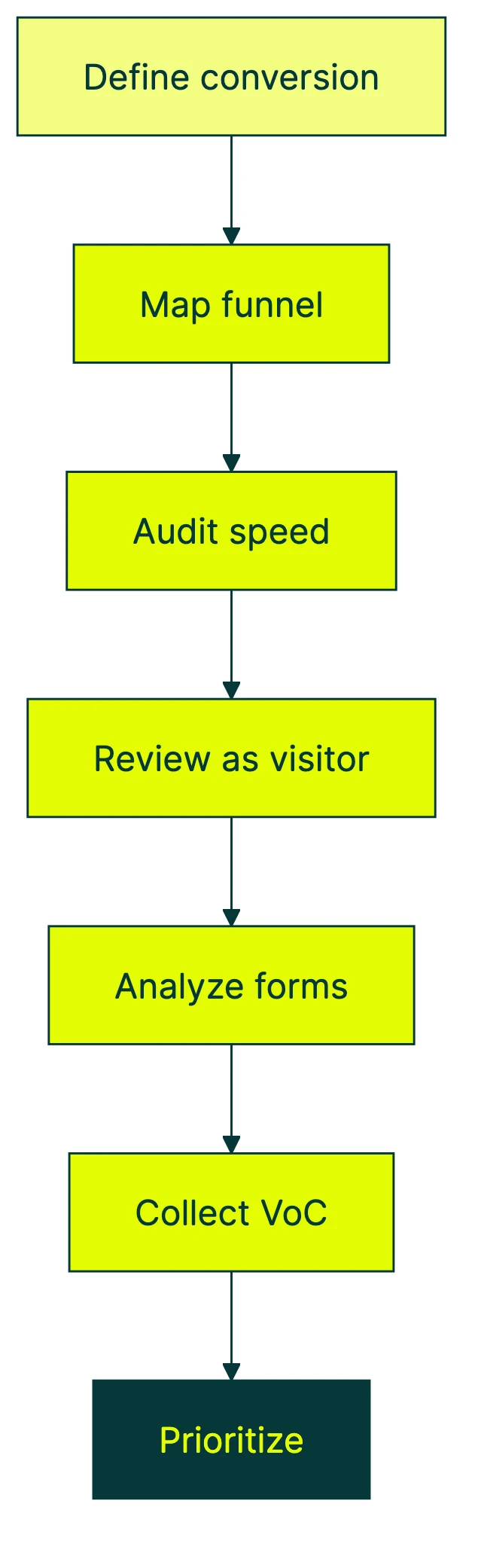
This isn’t a random grab bag of tips. It’s a sequence. Each step builds on the one before it. Skip ahead and you’ll waste time fixing things that don’t matter.
Step 1: define what “conversion” means for your site
Not every website has the same goal. An online store measures purchases. A SaaS product tracks signups or trial starts. A service business counts form submissions or phone calls.
Pick your primary conversion. Then set your baseline numbers BEFORE you start digging. Write down your current conversion rate, revenue per visitor, and top 10 pages by traffic. You need these numbers to measure whether your changes actually worked.
Google Analytics 4 gives you all of this for free. If you want to track the right CRO metrics, set up conversion events for each goal.
Step 2: map your conversion funnel and find the drop-offs
Think of your website like a physical store. People walk in the front door (homepage or landing page), browse the aisles (product or service pages), pick something up (add to cart, start a form), and either buy or walk out.
Your job is to find where they walk out.
Identify the 3 to 5 pages that matter most to your revenue. Use GA4’s funnel exploration to see where visitors drop off. A thorough conversion funnel analysis shows you exactly which stages leak the most visitors, and running a structured funnel analysis gives you a repeatable method for quantifying each drop-off. If you’re running an online store, start with your ecommerce conversion rate in GA4 to set a baseline. You’ll almost always find an 80/20 pattern: 80% of your conversion problems live on 20% of your pages.
That’s where your audit should focus. Not on page 47 of your blog. On the 3 pages between “interested visitor” and “paying customer.”
Step 3: audit page speed and technical performance
Slow pages kill conversions. Google and Deloitte found that a 0.1-second speed improvement led to 8.4% more conversions for retail sites. And 10.1% more for travel. A tenth of a second.
Google calls the targets Core Web Vitals. Fancy name for “how fast and stable your pages feel”:
- Page loads in under 2.5 seconds (technically called LCP, the time for main content to show up)
- Layout doesn’t jump around (called CLS. You know when you try to tap a button and it moves? That.)
- Buttons respond in under 200 milliseconds (called INP, how quickly the page reacts to clicks)
Don’t shrug this off. Rakuten ran a month-long test fixing these metrics. Result: 33% higher conversion rate, 53% more revenue per visitor. From speed fixes alone.
Free tools to check yours: Google PageSpeed Insights and GTmetrix. This is also where CRO and SEO overlap, since Google uses these same metrics for search rankings. Before making changes, understand how CRO changes affect SEO so you don’t fix conversions at the cost of organic traffic. While you’re at it, check for keyword cannibalization — it’s one of the most overlooked items in a CRO audit.
Step 4: review your pages like a first-time visitor
Open your website in an incognito browser. Pretend you’ve never seen it before. Can you answer these three questions within 5 seconds?
- What is this site?
- What can I do here?
- Why should I care?
If you can’t, neither can your visitors. And they’re less patient than you.
Nielsen Norman Group (the gold standard in usability research) found that one person reviewing a site only catches about 35% of usability problems. Get 2 or 3 people to review independently and you’ll catch way more.
Check these specifics: Is your value proposition clear in the first sentence? Can visitors find the main button without scrolling? Are trust signals (reviews, security badges, guarantees) visible on key pages? You can analyze landing pages with a dedicated tool to get a quick score before diving into a manual review. For a detailed landing page optimization checklist, our dedicated guide covers every element worth reviewing. If your landing pages also need organic traffic, our landing page SEO guide covers the on-page elements that matter.
And don’t forget mobile. Over 60% of traffic comes from phones. Tap your buttons on yours. If your thumbs can’t hit them easily, they’re too small. For a deeper dive into UX audit for conversions, that guide covers how to turn usability findings into testable improvements.
Step 5: analyze forms, checkout, and friction points
This is where your ecommerce CRO audit gets specific. Baymard Institute studied 50 cart abandonment studies and found a 70.22% average abandonment rate. Seven out of ten people who add something to their cart never buy it.
The top reasons people bail:
- Unexpected costs like shipping or taxes showing up late (39%)
- Required account creation before checkout (19%)
- Checkout was too complicated (18%)
For ecommerce conversion optimization, audit every step: product page, cart, each checkout screen, and confirmation. We have a dedicated ecommerce CRO audit guide that walks through this process with store-specific benchmarks and priorities. For SaaS or lead gen, look at signup forms, pricing page, and demo request flow.
Count your form fields. Asking for a fax number before someone can buy a $29 product? You know where to start cutting.
Our take: The fastest way to improve checkout conversions? Remove things. Every field you delete, every step you eliminate, every “are you sure?” dialog you kill makes it easier for someone to give you money. Stop adding. Start subtracting.
Step 6: collect voice-of-customer data
Analytics tells you WHAT is happening. Only humans tell you WHY.
Your analytics might show that 60% of visitors leave your pricing page. But it can’t tell you if they left because the price was too high, they couldn’t find the feature they needed, or their kid started crying.
Methods that work:
- Exit surveys on key pages: “What stopped you from buying today?” (one question, not ten)
- Post-purchase surveys: “What almost stopped you from buying?”
- Customer support tickets: your support inbox is a goldmine of conversion insights
- On-site polls: quick one-question surveys that pop up after 30 seconds
CXL’s research found that only 39.6% of companies have a documented CRO strategy. Most skip qualitative research because it feels slow. But Peep Laja says 80% of results come from research and deep thinking. The breakthroughs live in what your visitors tell you, not what your dashboard shows.
Ask your customers what’s wrong. They’ll tell you.
Step 7: prioritize findings by revenue impact
This is the step nobody else teaches well. Every CRO audit article says “prioritize your findings.” None tells you HOW.
CXL’s data shows that figuring out what to test (and in what order) is the top challenge for 1 in 4 optimizers. Faber Infinite found that up to 40% of audit recommendations never get acted on. Usually because the list is overwhelming and there’s no starting point.
Score each finding on two things: revenue impact (high, medium, low) and effort to fix (quick, medium, complex). Then sort into three tiers:
| Tier | Revenue impact | Effort | What to do | Examples |
|---|---|---|---|---|
| 1: Quick wins | High | Low | Fix immediately, no testing needed | Broken forms, missing CTAs, slow pages, unclear value props |
| 2: Test candidates | High | Medium/High | A/B test before full rollout | New layouts, pricing changes, checkout redesign |
| 3: Backlog | Low/Medium | Any | Document, revisit after Tier 1-2 | Minor copy tweaks, design preferences, nice-to-haves |
Tier 1 is the stuff you fix Monday morning. Broken form? Fix it. Page takes 8 seconds to load? Fix it. No testing needed.
Tier 2 is where you need proof the change actually helps. New layouts, different pricing displays, alternative checkout flows. Validate these with A/B testing before full deployment. Kirro lets you test these changes without writing code. Handy when you’ve got a list of 10 things to check.
Tier 3 gets written down and ignored until the first two tiers are done. These are the “nice to have” changes that shouldn’t distract from what actually moves revenue.
This framework alone will save you from audit-paralysis. You’ll know exactly what to do first. Once your audit is complete, turn audit findings into a CRO process that moves systematically from research through testing and analysis. Then turn audit findings into a conversion optimization plan that connects each fix to a business goal, and turn findings into prioritized recommendations using our impact/effort matrix. For the changes most worth validating, work through a CRO best practices checklist to make sure your test candidates are grounded in proven tactics.
CRO audit for low-traffic sites (under 10K monthly visitors)
Every competitor article about CRO audits assumes you have enough traffic for A/B tests. Most small businesses don’t. So the whole “audit, then test everything” pipeline falls apart for the majority of people reading this.
The numbers are honest about it. CXL’s data shows that only 1 in 8 A/B tests produces a clear winner even with decent traffic. With low traffic, that ratio gets much worse.
Under 1,000 monthly visitors: Skip A/B testing entirely. Seriously. You don’t have the numbers. Focus on heuristic reviews (that’s just “have smart people look at your site and tell you what’s confusing”), direct customer conversations, and fixing the obvious stuff from your audit.
1,000 to 10,000 monthly visitors: You can test, but only big changes. A subtle button color tweak won’t show results at this traffic level. Test headline rewrites, major layout shifts, or completely different page structures. Use math that works with less data (experts call this Bayesian A/B testing) for faster results.
Nielsen Norman Group found that 5 independent reviewers uncover about 75% of usability problems. Cheaper and faster than waiting months for statistical significance.
The point isn’t to wait until you have enough traffic. Fix the Tier 1 issues from your audit. Do customer research. Get people to review your site. When traffic grows, set up your first split test and let the data confirm what you suspected.
Watch out for common A/B testing mistakes when you do start testing. Low traffic amplifies every mistake.
How much does a CRO audit cost?
This is one of those questions nobody in the CRO industry wants to answer directly. So we will.
DIY audit: free. Your time plus free tools (GA4, Google PageSpeed Insights, Hotjar’s free tier for heatmaps, or a Hotjar alternative if the pricing doesn’t work for you). Follow the 7-step checklist above. For most small businesses, this is the right starting point.
Freelance CRO consultant: $10 to $400/hour. Invesp reports that top consultants charge $250 to $300/hour. A one-time audit from a good freelancer typically runs a few thousand dollars.
CRO agency (audit only): $1,000 to $50,000+. The range is huge because scope varies wildly. A quick audit with a report is on the low end. A full research engagement with user testing and a prioritized roadmap is on the high end. If you’re considering this route, our guide to specialized CRO agencies helps you compare options and avoid overpaying.
Ongoing CRO program: $3,000 to $30,000+/month. This is where a team continuously audits, tests, and improves. Forrester found structured CRO programs deliver 602% ROI over three years with a six-month payback period.
Supporting tools: $200 to $1,500/month for heatmaps, session recording software, and A/B testing. Though you can start with free tiers for most of these.
The ROI math makes even the expensive options look reasonable. A $5,000 audit that lifts conversions by 2% on a million-dollar business? That’s $150,000 per year in extra revenue. The $1-for-$92 spending ratio shifts fast once you start paying attention to conversions. For local businesses looking to improve conversions, a DIY audit is often the best first step before investing in outside help.
If you want to build a CRO program over time instead of one-off audits, start with a DIY audit, fix the quick wins, then decide whether you need outside help. Our CRO services guide breaks down the five types of CRO help and which one fits your budget.
CRO audit tools you actually need
There are hundreds of CRO tools on the market. You don’t need hundreds. Here’s what matters, organized by budget:
Free and essential:
- Google Analytics 4 (traffic data, funnel analysis, conversion tracking)
- Google PageSpeed Insights (speed and Core Web Vitals scores)
- Google Search Console (search performance, technical issues)
Behavioral data ($0 to $100/month):
- Microsoft Clarity or Hotjar free tier (heatmaps and session recordings, which show you WHERE people click and scroll). See what Hotjar costs in 2026 if you’re considering paid tiers.
- These answer “what are visitors doing on my page?” in a way raw analytics can’t
A/B testing ($0 to $200/month):
- Kirro for testing your audit findings without code. Simple setup, clear results, no per-visitor pricing (full disclosure: that’s us)
- Other CRO software options exist for larger teams, but for the businesses reading this, you don’t need enterprise tier
Enterprise ($1,000+/month):
- Contentsquare, Quantum Metric, Glassbox for large-scale behavioral analytics
- If you’re reading a blog post about CRO audits, you probably don’t need these yet
The honest take: GA4 plus Clarity (free) plus Kirro gives you analytics, behavioral data, and testing. Three tools. That covers everything in the 7-step checklist above. Don’t let tool shopping delay your audit. The audit itself is more valuable than any tool you buy.
For a full comparison, check our CRO tools guide. To measure your A/B testing conversion rate properly once you start testing, keep it simple: track one goal at a time.
FAQ
What is a CRO audit?
A CRO audit is a systematic look at your website to find why visitors aren’t converting. It combines analytics data, page-by-page review, and customer feedback to pinpoint specific conversion problems. Then it prioritizes fixes by revenue impact so you know what to tackle first. Think of it as a health checkup for your website’s ability to turn traffic into money. For the full picture of how CRO works, see our complete CRO guide.
How do you do a CRO audit?
Follow the 7-step checklist: define your conversion goals and baseline metrics, map your funnel to find drop-offs, audit page speed, review pages like a first-time visitor, analyze forms and friction points, collect voice-of-customer data, and prioritize findings using the three-tier framework (quick wins, test candidates, backlog).
How much does a CRO audit cost?
A DIY audit costs nothing but your time if you use free tools like GA4 and Google PageSpeed Insights. Freelance consultants charge $10 to $400/hour. Agencies charge $1,000 to $50,000+ for a one-time audit depending on scope. Ongoing CRO programs run $3,000 to $30,000+ per month. The ROI usually makes even the expensive options worthwhile.
How often should you run a CRO audit?
At minimum, every 6 to 12 months. More often if you’ve made major site changes, launched new products, or noticed a sudden drop in conversions. Treat it like a dental checkup. You know you should go regularly. You know you’ll find something. The longer you wait, the more expensive the fix.
What’s the difference between a CRO audit and a UX audit?
A UX audit looks at the overall experience across your entire site: navigation, accessibility, information architecture, content clarity. A CRO audit is narrower. It focuses on pages that affect conversions and measures everything against revenue impact. A CRO audit often includes UX elements but adds analytics data, funnel analysis, and testing recommendations. If a UX audit asks “is this easy to use?” a CRO audit asks “is this making us money?”
If you’re looking for a complete CRO guide that walks you through the full process from audit to optimization, start there.
Now go audit something. Your website has been guessing long enough.

Randy Wattilete
CRO expert and founder with nearly a decade running conversion experiments for companies from early-stage startups to global brands. Built programs for Nestlé, felyx, and Storytel. Founder of Kirro (A/B testing).
View all author posts