CRO and SEO aren’t rivals. But they’re not best friends either. Conversion rate optimization (the meaning of CRO: getting more visitors to buy, sign up, or click) and SEO (getting those visitors in the first place) share the same levers. Page speed. Mobile design. Content quality. Most of the time they pull in the same direction.
But sometimes they don’t. You redesign a page for conversions and your rankings drop. You add content for SEO and your conversion rate tanks.
According to SearchPilot’s data, around 80% of SEO-motivated website changes either have no impact or actually decrease traffic. Most were made without testing.
This guide covers where CRO and SEO conflict, which changes help both, and where your next hour should go. If you’re still getting up to speed on CRO fundamentals, start there. Otherwise: actual data, actual examples, and a framework you can use this week.
What CRO and SEO actually share (and where they clash)
Think of SEO and CRO as two people decorating the same room. SEO wants the room easy to find and clearly labeled. CRO wants the room comfortable enough that visitors stay and take action. Usually they agree (better lighting, cleaner layout). Sometimes they fight over the furniture placement.
What they agree on:
- Page speed. Faster pages rank better as a tiebreaker and convert better by a lot (more on this in a minute).
- Mobile design. Google indexes the mobile version first. And mobile visitors are less patient, so a clean mobile experience helps both.
- Content quality. Pages that answer the question well tend to rank well AND convert well.
- Site structure. Clean navigation helps search engines crawl your site and helps visitors find what they need.
Where they fight:
- Content gating. CRO loves putting your best content behind a form (more leads!). SEO hates it (Google can’t read anything behind a form).
- Tabs and accordions. CRO loves clean, collapsed layouts. SEO may penalize hidden content (despite what Google says publicly).
- Pop-ups. CRO loves them for email capture. Google has penalized intrusive mobile pop-ups since 2017.
- Copy length. SEO often wants more text on the page. CRO often wants less friction and shorter pages. (For landing pages specifically, the solution is structural: conversion elements above the fold, SEO content below. More on that in our landing page SEO guide.)
The uncomfortable truth: only 0.2% of websites use A/B testing tools. That means almost nobody is actually testing these trade-offs. They’re guessing. And guessing wrong means either losing traffic or losing conversions.
Our take: Most articles on CRO and SEO say “they should work together” and call it a day. That’s like saying “diet and exercise should work together.” Technically true. Completely useless. The real question is: what do you do when they disagree?
5 conversion optimization changes that can break your SEO
Every change on this list makes perfect sense from a conversion perspective. That’s what makes them dangerous. They feel right. They might even increase your conversion rate. But they can quietly erode your organic traffic at the same time.
1. Hiding content in tabs or accordions
This is the most documented conflict. Your design team says “let’s clean up this page with collapsible sections.” Looks great. Reads cleaner. But SearchPilot ran a controlled test and found that exposing hidden content increased organic traffic by 12%.
Google’s Gary Illyes said in 2016 that collapsed content carries the same weight as visible content. The empirical data disagrees. Treat Google’s public statements as incomplete, not false.
If you’re using accordions on pages that get organic traffic, consider showing the content by default and using a table of contents for navigation instead.
2. Gating content behind forms
You wrote a great guide. Your CRO instinct says “gate it, capture emails.” But Google’s crawler sees forms as a brick wall. Everything behind that form gets zero organic traffic, zero backlinks, and adds zero topical authority to your domain.
The trade-off is direct and zero-sum. The same piece of content can’t be ranked by Google AND gated for lead capture. You have to pick one or find a creative middle ground (like gating a PDF version while keeping the text version public).
3. Intrusive mobile pop-ups
Full-screen pop-ups that appear the moment someone lands on your page from Google. Great for email signups. Terrible for SEO. Google’s intrusive interstitial penalty has been live since January 2017.
Small banners at the top or bottom are fine. Exit-intent pop-ups are fine. But anything that covers most of the page on mobile, especially right after arrival? Google may demote that page.
4. Removing on-page copy for cleaner UX
This one’s interesting because it can go either way. Your CRO team says “nobody reads this wall of text at the bottom, remove it.” Sometimes that’s right. SearchPilot tested removing SEO boilerplate text from category pages in 2024. Result: organic traffic went up on mobile.
But other times, removing content removes the keyword signals Google uses to understand your page. The only way to know? Test it. Don’t just delete copy because it “looks better.” Measure whether traffic changes.
5. Adding heavy testing or personalization scripts
The irony: the tools you use to improve conversions can hurt your SEO. A/B testing scripts, personalization engines, and analytics tools all add weight to your page. Most A/B testing and conversion rates improve when your tool is lightweight.
Google measures three Core Web Vitals (speed metrics that affect how your site shows up in search). If a heavy script pushes your page across the “good” to “needs improvement” threshold, you might lose a ranking tiebreaker. Kirro’s script is 9KB. Most competitors load 100 to 200KB. That difference matters.
5 SEO changes that can tank your conversion rate
SEO conversion rate optimization is a two-way street. SEO teams can hurt conversions just as easily as CRO teams can hurt rankings.
1. Stuffing keyword-dense copy above the fold
Your SEO consultant says “we need the primary keyword in the first paragraph, the H1, and a subheading above the fold.” Fine. But if that keyword-stuffed section pushes your value proposition, pricing, or call-to-action button below the fold? Your visitors have to scroll before they can do anything.
Baymard Institute’s research shows 70.19% of shopping carts get abandoned. The last thing you need is making it harder to find the “add to cart” button because there’s a paragraph of keyword text in the way.
2. Prioritizing search intent over buyer intent
Ranking for informational queries on a page designed to sell something. It sounds smart (more traffic!) but the visitors you attract are looking for answers, not products. They’ll read your content, get what they need, and leave. Your traffic goes up. Your conversion rate goes down.
Match the page type to the intent. Informational content gets its own page. Sales pages focus on converting. When both pages target the same keyword, you end up with CRO keyword cannibalization — and the wrong page often wins.
3. Over-optimizing title tags for keywords
A title tag that reads “Best CRO SEO Services | CRO SEO Guide | CRO & SEO 2026” is technically stuffed with keywords. It’s also ugly. Nobody wants to click that in search results.
Your title tag is a tiny ad in Google. Write it like one. Include the keyword naturally, but make it something a person would want to click.
4. Ignoring page speed for content depth
Adding 4,000 words of SEO content to a page that used to be a clean, fast landing page. More content means more for Google to index. But it also means longer load times, more images, and more scroll depth before visitors reach your conversion goal. (The choice between a landing page or website matters here. Landing pages need to stay lean, while website pages can handle more depth.)
Portent’s research across 20 websites found that B2C e-commerce sites loading in 1 second convert at 3.05%. At 5 seconds? Just 0.67%. That’s a 78% drop. Content depth is only valuable if the page still loads fast.
5. Changing URLs without checking conversion tracking
Your SEO team restructures URLs for better site architecture. Makes sense for SEO. But if your analytics goals, ad campaigns, or email links point to the old URLs? You lose conversion tracking. Worse, you might break redirects and send paid traffic to 404 pages.
Always coordinate URL changes with whoever manages your conversion tracking. A redirect plan isn’t enough. You need an analytics audit too.
The page speed truth: why it matters for conversions but not rankings
Every article about CRO, SEO, and SEM says “page speed helps both.” Half true.
Speed absolutely helps conversions. Deloitte studied 37 brand websites across 30 million sessions. Making a page just 0.1 seconds faster increased retail conversions by 8.4%. Travel bookings went up 10.1%. Lead generation improved 21.6%.
And Google’s own data shows 53% of mobile visitors leave if a page takes longer than 3 seconds to load.
Now the part nobody mentions. Semrush’s 2024 ranking factors study analyzed over 300,000 search results. No meaningful correlation between page speed and rankings. None.
Portent’s multi-year CWV study confirmed it independently: “Core Web Vitals have no discernible impact on traffic.”
Google’s own Page Experience documentation says it plainly: good speed scores don’t guarantee top rankings. Core Web Vitals work as a tiebreaker between otherwise similar pages. Not as a ranking engine.
Fix your page speed for conversions, not for rankings. The conversion impact is massive and well-documented. The ranking impact? Minimal. If someone tells you to spend three weeks on your Largest Contentful Paint (the metric Google uses to measure how fast your main content loads) to “boost SEO,” ask them for the data. It doesn’t exist at scale.
Our take: Speed is like store lighting. It won’t get people to your door. But it absolutely determines whether they buy once they’re inside. Improve speed because every tenth of a second is worth real money, not because a ranking tool told you to.
A prioritization framework for teams with limited resources
“Should I focus on CRO or SEO?” Everyone asks this. And the question is a bit rigged.
Invesp’s data shows that companies spend roughly $1 on CRO for every $92 on customer acquisition. Most businesses have at least some SEO in place. Almost none have an overall CRO strategy. Asking “CRO or SEO?” implies they’re equally established disciplines at your company. They’re probably not.
A simple decision tree:
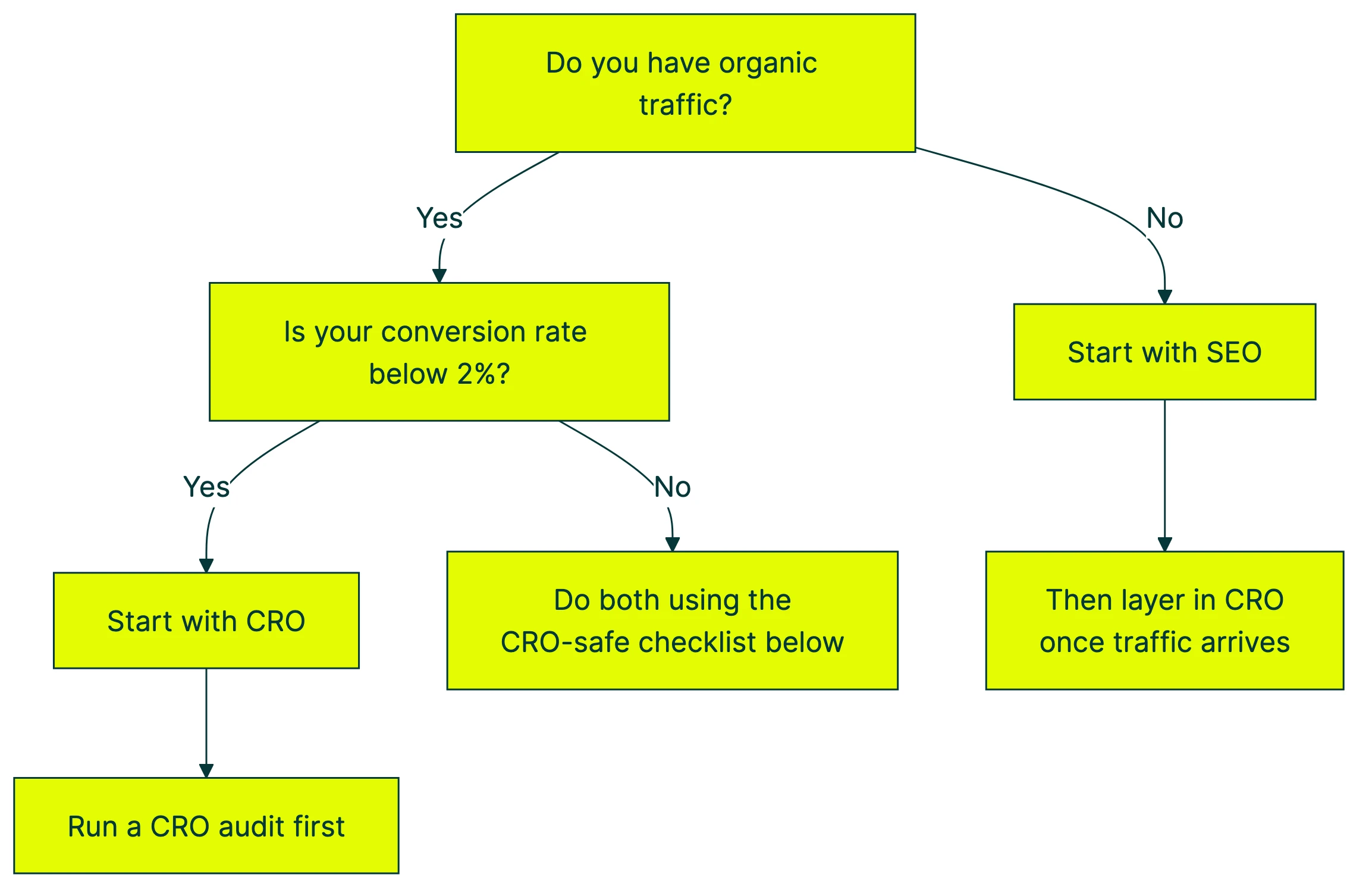
Start with SEO when: You’re a new site with thin content and little organic traffic. No traffic means nothing to convert. Build the foundation first.
Start with CRO when: You’re getting traffic but it’s not converting. Even small improvements compound. Say 1,000 people visit your site monthly. Improving your conversion rate from 2% to 3% means 10 extra customers per month, without spending a dime more on traffic. Run a CRO audit to find the biggest gaps, or talk to a conversion rate optimisation consultant who can identify quick wins. For businesses that rely on local search, our guide to optimizing conversions for local search covers where CRO and local SEO overlap.
Do both when: You have steady traffic and a reasonable conversion rate. Focus on changes that improve both (next section).
The real unlock is testing. Right now, only about 40% of companies have a documented CRO process. Most teams make changes to their website based on opinion, not data. Whether you call it CRO or SEO, the fix is the same: stop guessing. Start testing.
The CRO-safe SEO checklist: changes that help both
These are the changes where CRO and SEO services agree completely. If you’re a small team trying to figure out where to start, this list is your shortcut.
1. Make your pages faster. Helps conversions directly (remember, 0.1 seconds = 8.4% more retail conversions). Helps SEO as a tiebreaker. RedBus improved their Core Web Vitals and saw an 80-100% increase in mobile conversion rate AND 192% better domain rankings.
2. Design mobile-first. Google uses the mobile version of your site for indexing. Mobile visitors are also less patient. A page that works beautifully on mobile helps your rankings and your conversions. If you’re split testing your landing pages, always check the mobile version separately.
3. Use a clear heading structure. H1 for the page title, H2s for major sections, H3s for subsections. This helps Google understand your content AND helps visitors scan the page quickly.
4. Add descriptive internal links. Links between your pages help Google discover and rank your content. They also guide visitors toward pages where they’re most likely to convert. Good for Google, good for you. “Read our CRO testing guide” is better than “click here” for both purposes.
5. Add structured data (search result extras). Schema markup is code that tells Google extra details about your page. It can add star ratings, pricing, or FAQ answers to your search listing. More informative search results get more clicks AND set better expectations before someone lands on your page.
6. Answer the query in the first paragraph. Google rewards pages that directly answer what someone searched for. Visitors reward pages that don’t waste their time. Lead with the answer, add depth after.
7. Compress your images. Smaller images mean faster pages. Add alt text (descriptions for screen readers and search engines) to every image. Faster load plus better accessibility plus more keyword context for Google. This matters especially for landing page SEO, where every millisecond counts.
8. Remove intrusive pop-ups. Gets rid of a potential Google penalty AND removes friction for visitors. Use subtle banners or exit-intent triggers instead of full-screen takeovers.
How to A/B test CRO changes without risking SEO
Good news: Google has stated clearly that A/B testing doesn’t violate their guidelines. You’re not going to get penalized for running a test.
The rules:
- Use canonical tags (a tag that tells Google “this is the main version”). Point test pages back to the original so Google knows which version to index. Most CRO testing tools handle this automatically.
- Don’t cloak. Show Google the same thing you show visitors. If Google sees version A and your visitors see version B, that’s cloaking. Bad idea.
- Keep tests time-limited. Don’t run permanent split URLs. Pick a winner and implement it.
- Check Google Search Console during tests. Look for any weird indexing changes. If Google starts indexing your test URL instead of the original, something’s misconfigured.
- Test BEFORE you deploy. The biggest SEO risk isn’t from A/B testing. It’s from making permanent changes without testing at all. That’s how you wake up one morning to a 20% traffic drop and no idea why.
A tool like Kirro lets you test headline and layout changes on your live pages without touching any code. You see which version converts better, then decide whether to make it permanent. If the change hurts conversions, you haven’t touched your SEO because the original is still the canonical version. If it helps conversions, you deploy it with confidence.
That’s better than changing your page, waiting two months, checking your analytics, and wondering what happened. For your full technical walkthrough, check our SEO A/B testing guide. And if you’re evaluating SEO split testing tools, our comparison covers what each platform actually requires.
Avoid common A/B testing mistakes like ending tests too early or testing too many things at once. And if you’re comparing test methods, our guide to multivariate testing explains when to keep things simple.
Want to test your own pages? You can set up a free split test in about three minutes and let the numbers tell you what works.
FAQ
Does CRO hurt SEO?
Not by default. Most CRO work (better headlines, clearer buttons, faster pages) helps SEO too. The specific tactics that can hurt are content gating, aggressive mobile pop-ups, hiding content in tabs, and adding heavy scripts. These are avoidable. Test changes before you make them permanent and you’ll catch conflicts before they cost you traffic.
Should I focus on CRO or SEO first?
If you have organic traffic but your conversion rate is low, start with CRO. You’re already getting visitors and leaving money on the table.
If you have almost no organic traffic, start with SEO. There’s nothing to convert yet.
If you’re somewhere in the middle, use the CRO-safe SEO checklist above. Those changes improve both. For a broader view of where CRO fits in your marketing strategy, see our CRO guide. If you’re starting from scratch, our full CRO implementation guide walks through the entire process step by step.
What does CRO stand for in SEO?
CRO stands for conversion rate optimization. In an SEO context, it means improving the pages that rank in search so more organic visitors actually do the thing you want (buy, sign up, book a call).
SEO gets them to the page. CRO gets them to act. They work on the same pages, which is why they sometimes conflict. If you’re new to CRO, start with our full CRO explainer.
How does CRO relate to SEO?
SEO brings visitors to your site through search engines. CRO turns those visitors into customers. They share many of the same tools (page speed, UX, content quality) but sometimes pull in opposite directions. The best approach is to identify changes that help both, avoid the known conflict areas, and test everything else before deploying it. Look into the right CRO tools and keep learning from the best CRO blogs in the space.
What is CRO SEM?
CRO SEM is conversion rate optimization applied to search engine marketing (paid search). SEO focuses on organic rankings. SEM focuses on paid ads (like Google Ads). Both benefit from CRO techniques: better landing pages, clearer calls to action, faster load times. The principles are the same. The traffic source is different. If you’re running paid ads, the CRO-safe checklist above applies just as much to your ad landing pages as to your organic pages. Tracking the right CRO metrics helps you measure performance across both channels.

Randy Wattilete
CRO expert and founder with nearly a decade running conversion experiments for companies from early-stage startups to global brands. Built programs for Nestlé, felyx, and Storytel. Founder of Kirro (A/B testing).
View all author posts