Your landing page can absolutely rank on Google. It just needs to be built like a real page, not a stripped-down ad destination. The difference between a landing page that shows up in search results and one that doesn’t? Whether it gives the searcher what they came for while still getting them to take action. That’s landing page SEO in one sentence.
Most guides act like you have to choose between ranking and converting. You don’t. The pages that rank best also tend to convert well. Google rewards the same things your visitors do: clear answers, fast load times, and pages that actually work on a phone. Conversion rate optimization and SEO aren’t competing priorities. They’re the same job with different names.
The trick is knowing which landing page SEO elements matter, and which “best practices” are noise. The landing page checklist covers both conversion and SEO fundamentals in one audit.
What is an SEO landing page (and how it differs from a paid ads page)
The split is simple. A paid ads landing page (the kind you build for Google Ads or Facebook campaigns) is usually stripped down. No navigation menu. No links to other pages. One goal, one button, one message. Often you tell Google not to show it in search results at all.
An SEO landing page is different. It needs real content. It needs to connect to the rest of your site. It needs to answer the question someone typed into Google, not just pitch your product. If you’re after high-converting landing pages, SEO is what brings the traffic. Design is what converts it. Our guide to landing page best practices covers both sides.
The conversion gap between these two types is real. PPC landing pages convert at roughly 10.9%, while SEO landing pages sit around 2.4% (LanderLab). Wondering what a good conversion rate looks like for your industry? Context matters.
The gap sounds worse than it is. SEO pages serve people still researching. PPC pages serve people who already clicked an ad. Different mindsets, different numbers.
The real opportunity? SEO traffic is free after you rank. PPC traffic stops the second you stop paying. A well-built SEO landing page can bring visitors for months (or years) without spending another cent on ads.
Our take: If your page gets search traffic, treat it like an SEO page. If it only gets ad traffic, treat it like a PPC page. If it gets both, build for SEO first and add conversion elements on top. You can always make a ranking page convert better. Making a thin PPC page rank is much harder.
Want to understand how landing page optimization and SEO fit together? They’re closer than most people think.
Does a landing page need SEO? (when it’s worth it and when it’s not)
Not every landing page needs SEO. A “January flash sale” page shouldn’t rank in July. A page targeting a keyword with 10 searches per month isn’t worth the effort either.
Quick decision:
Index your landing page when:
- The offer is evergreen (it’ll still make sense in 6 months)
- People search for your topic regularly (at least a few hundred searches per month)
- You can write enough useful content to actually help the searcher
Skip SEO when:
- The page is for a time-limited campaign
- The keyword you’d target is absurdly competitive for your site
- There’s no real search demand for the topic
SEO expert Adam Riemer recommends defaulting to a noindex tag (telling Google “don’t show this page”) for campaign-specific pages. Evergreen pages? Make them visible to search.
The question comes down to math. If a keyword gets 3,600 searches per month and your page could realistically rank on the first page, that’s thousands of free visitors. Compare that to paying per click. Even modest rankings pay for themselves.
Track your numbers before and after. You can track conversions in GA4 to see exactly how organic traffic performs versus paid. And if you want a quick read on where your page stands right now, landing page analyzer tools can flag the biggest issues in seconds.
The landing page SEO checklist (7 elements that actually matter)
There are dozens of “SEO tips” floating around the internet. Most of them are either outdated or so vague they’re useless. These seven actually move the needle for landing pages.
1. Target keyword in the right places. Put your main keyword in the title tag (the clickable headline in Google results), the H1 heading on your page, the first paragraph, and your URL. Once in each spot, naturally. Not crammed into every sentence.
2. Title tag and meta description. Your title tag is the first thing a searcher sees. Titles between 40 and 60 characters get the highest click-through rate. Pages with a meta description (that two-line summary under your title in Google) get 5.8% more clicks than pages without one (Backlinko, 4M search results).
3. URL structure. Keep it short and descriptive. /landing-page-seo beats /page?id=4231&ref=campaign_spring. Include your keyword. Skip the random numbers and session IDs.
(You’d be surprised how many landing pages still have URLs that look like a cat walked across a keyboard.)
4. Heading structure. One H1 per page (your main title). Use H2 headings for each major section. H3s for sub-points. This helps Google understand your page and helps visitors scan.
5. Image alt text. Every image on your page needs a description (called alt text). It’s what screen readers use for accessibility and what Google reads to understand your images. Be descriptive: “landing page conversion form with email field” beats “image1.”
6. Internal links. Connect your landing page to other pages on your site. A page with no links pointing to it (an orphan page) is almost invisible to Google. Link to it from related blog posts. Link from it to your other content. Build a web. And make sure those links aren’t competing with each other. Keyword cannibalization in CRO can undo your SEO work if two pages fight for the same query.
7. Structured data. Think of this as labels you add to your code so Google understands exactly what your page is about, like labels on a filing cabinet. FAQ structured data can get your page those expandable answers in search results. Product structured data helps ecommerce pages. Local business structured data helps service pages.
Our take: Don’t try to do all seven at once on an existing page. Start with #1 and #2. Those two changes take 10 minutes and have the biggest impact. Then work down the list.
The content problem: how much is enough for SEO without killing conversions?
This is the real tension. Google wants substantive content to rank your page. But more text can distract visitors from your “sign up” or “buy now” button. So how much content do you actually need?
There’s no magic word count. Match the depth to the question.
A “plumber in Brooklyn” landing page needs your address, phone number, and some trust signals. Not 2,000 words. A “project management software” page needs feature explanations, comparison tables, and FAQs. Different queries, different depths.
The structural fix: put your conversion elements above the fold (what visitors see before scrolling) and your SEO content below. Visitors get the pitch immediately. Google gets the depth it needs.
The “fold” still matters, but less than it used to. Visitors now spend about 57% of their viewing time above the fold, down from 80% back in 2010 (NNGroup, 120 participants, 130K eye fixations). People scroll more than they used to. But they still spend more time at the top.
This stat should change how you write. Pages at a 5th to 7th grade reading level convert at 11.1%. Professional reading level? Just 5.3%. That’s from Unbounce’s analysis of 464 million visitors across 41,000 landing pages (Unbounce 2024 Benchmark). Even Unbounce’s own SEO article doesn’t cite their own data. Wild.
Write simply. Short sentences. Common words. Not because your readers are dumb, but because simple writing is easier to act on. Someone scanning your landing page at 11 PM doesn’t want to decode corporate speak.
This connects directly to CRO and SEO working together. Simpler content satisfies more searchers (good for rankings) AND converts better (good for business). Same job.
Page speed and core web vitals: the SEO factor that also drives conversions
The data tells a weird story.
Google measures three speed metrics called Core Web Vitals. How fast your page loads. How quickly it responds to clicks. How much the layout jumps around while loading. The benchmarks: load your largest element in under 2.5 seconds, respond to clicks in under 200 milliseconds, keep layout shifts below 0.1 (Google CWV docs).
Google’s own John Mueller says page speed is a “lightweight” ranking signal. Content quality overrides it when they conflict (Google Page Experience blog). A slow page with great content beats a fast page with thin content.
So why care about speed at all?
Because the conversion data is overwhelming. A 0.1-second improvement in mobile load speed increased lead generation form submissions by 21.6%. Retail conversions went up 8.4%. That’s from a Deloitte and Google study called “Milliseconds Make Millions.”
For B2B sites, pages loading in 1 second convert at roughly 40%. At 6 seconds, it drops to around 20% (Portent, 100M page views).
Fix speed for your visitors, not for Google. Run your page through Google PageSpeed Insights. Fix the biggest issue first.
Don’t chase a perfect 100 score. A score of 75 with great content beats 100 with nothing useful to read.
One thing to watch: testing tools can slow your pages down. Most A/B testing scripts add 100 to 200KB of code. Kirro’s script is 9KB, which has zero measurable impact on page speed. If you’re running tests on a ranking page, that difference matters.
Mobile: your landing page’s real homepage
Since July 2024, Google uses only the mobile version of your site for ranking decisions. This is called mobile-first indexing (Google crawls and evaluates your mobile page, not your desktop page).
If your landing page looks great on a laptop but is stripped down on a phone, Google sees the stripped-down version. That’s the one competing in search results.
The rule is simple: whatever content exists on your desktop page needs to exist on your mobile page too. Google’s own documentation warns that if your mobile page has less content, “expect some traffic loss” (Google mobile-first indexing docs).
And yet. Mobile drives 83% of landing page visits, but desktop converts 8% better overall. In professional services, desktop converts 40% better than mobile (Unbounce 2024).
So build for mobile first (that’s what Google ranks). But don’t neglect desktop (that’s where many conversions happen). Test both experiences.
One gotcha: any content that requires a tap or click to reveal (accordions, tabs, “read more” buttons) might not get indexed. Some pages load this content only when someone clicks (developers call this lazy loading). Google doesn’t click buttons. If your SEO content is hidden behind a “show more” that loads dynamically, Google might never see it.
Think about UX and conversion optimization as the same problem. A page that’s easy to use on a phone converts better AND ranks better.
Should landing pages be indexed? (the real answer)
This is the question most guides dodge completely. Every competitor article assumes your landing page should be indexed (shown in Google search results). But that’s not always true, and getting it wrong can actually hurt your other pages.
Here’s a simple decision tree:
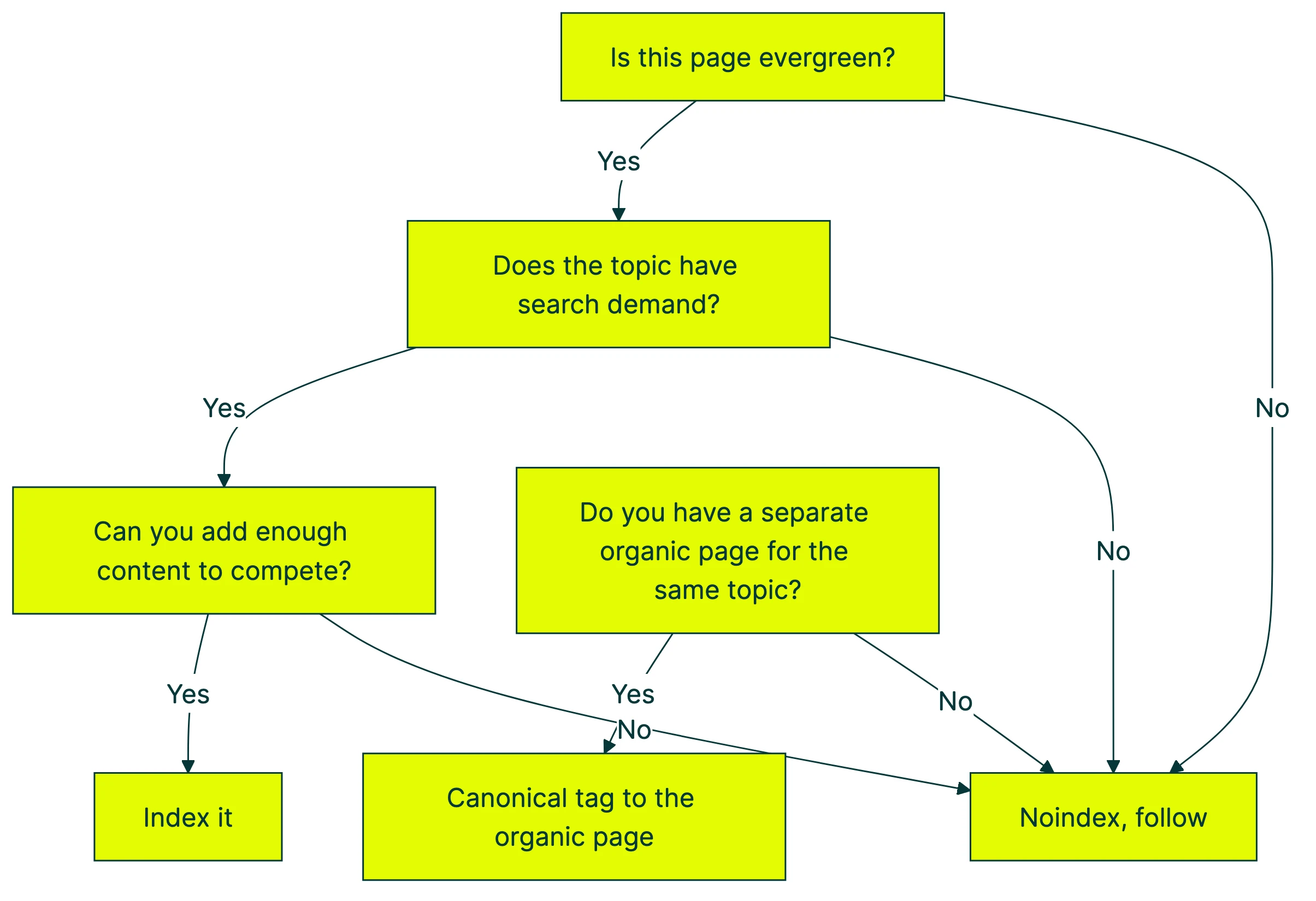
Index when: The page targets a keyword with consistent monthly search volume, the offer is evergreen, and you can write enough content to genuinely help the searcher.
Noindex when: The page is campaign-specific, time-limited, or a PPC-only destination with an organic equivalent. Use noindex, follow (this tells Google “don’t show this page in search results, but still follow the links on it”).
Use a canonical tag when: You have multiple versions of a similar page (like A/B test variants). A canonical tag tells Google which version is the “real” one. Pick your best version and point all others to it.
Nobody talks about this: since Google’s March 2024 update, thin landing pages can drag down your entire site’s quality signals (Search Engine Land). Got 50 PPC-only pages indexed with almost no useful content? They might be hurting the rankings of your good pages. Clean them up.
Adam Riemer’s recommendation is practical: default to noindex unless you have a specific reason to index. It’s easier to add a page to Google’s index later than to undo the damage of thin indexed pages.
How to build backlinks to a landing page
Let’s be honest. Nobody links to a sales page. “Check out this amazing pricing page” isn’t something people tweet. Landing pages are commercial by nature, and other websites rarely link to commercial content.
But links from other websites are still one of Google’s strongest ranking signals. So what do you do?
Add something linkable. Embed a calculator, an interactive tool, or original data on your landing page. If your landing page has a unique stat or benchmark, other sites have a reason to reference it. A landing page for project management software that includes “average project failure rates by industry” gives bloggers something to cite.
Build a resource section below the fold. Add genuinely useful reference content that other sites want to link to. Industry stats, comparison data, methodology explanations. This doesn’t distract from your conversion goal (it’s below the pitch) but gives your page link-worthy substance.
Use your own content. The most reliable “links” you can build are internal ones from your own blog posts and pages. Write about topics related to your landing page and link back to it. This is why having a CRO best practices guide and other blog content matters. They funnel authority to your landing pages. If you’re building on WordPress, Elementor landing page templates optimized for conversions give you a head start on both structure and SEO.
Pitch your data. If your landing page contains original research, email it to journalists and bloggers who cover your space. “Our analysis of 10,000 landing pages found X” is a story. “Buy our product” is not.
Skip the generic advice about guest posting and directory submissions. Those tactics rarely move the needle for landing pages specifically.
Common landing page SEO mistakes (that also hurt conversions)
Mistake 1: No indexing strategy. Having 50 campaign pages indexed when they should be noindexed. This dilutes your site quality and confuses Google about which pages matter. Run a CRO audit on your landing pages. Noindex anything that doesn’t belong in search results.
Mistake 2: Ignoring mobile. Your ranking is based on your mobile page. If your mobile landing page has a different layout, less content, or broken forms, you’re ranking with a handicap.
Mistake 3: Sacrificing speed for visuals. That auto-playing hero video and those uncompressed images look great. They also add 3 seconds to your load time. Remember: 0.1 seconds faster can mean 21.6% more form submissions. Cut the video. Compress the images.
Mistake 4: Orphan pages. No internal links pointing to your landing page? Google can barely find it. Every important landing page should be linked from at least 3 to 5 other pages on your site.
Then there’s keyword stuffing. Cramming “best project management software” into every heading doesn’t help. Google understands synonyms and related phrases. Use your keyword in the title, H1, and first paragraph. Then let it go.
Mistake 6: Running tests on ranking pages without SEO safeguards. Changing your headline or restructuring your content can tank your rankings overnight. If your landing page ranks well and you want to test changes, use SEO-safe A/B testing methodology. Tools like Kirro run tests on the visitor’s side (called client-side testing). Google sees your original page. Visitors see the test version. You can split test your landing pages without risking what you’ve already built.
If you want to try testing a change on your own landing page, it takes about three minutes to set up. Change a headline, a button, whatever you think might work better. Let the data decide.
Want a structured approach to testing? Check out a CRO testing framework before you start changing things randomly.
For a walkthrough of SEO fundamentals applied to landing pages, Ahrefs covers the key concepts:
FAQ
Can landing pages rank on Google?
Yes. Google doesn’t care whether you call it a “landing page” or a “regular page.” If it has useful content, satisfies the searcher’s intent, and is technically sound, it can rank.
The question is whether YOUR landing page has enough depth to compete with what’s already ranking. Check the first page of Google for your target keyword. If every result is a 2,000-word guide and your page is a form with three bullet points, you need more content.
How do you SEO a landing page?
Start with the checklist above. Put your target keyword in the title tag, H1, URL, and first paragraph. Write a meta description. Make sure the page loads fast on mobile.
Add internal links from your other pages. Include structured data if relevant. And write enough content to actually answer the searcher’s question, not just pitch your product.
Should landing pages be indexed?
It depends. Evergreen pages with search demand should be indexed. Campaign-specific pages, PPC-only destinations, and time-limited offers should use a noindex tag.
See the decision tree above. Default to noindex unless you have a clear reason to index. Thin indexed pages can hurt your entire site’s quality signals after Google’s 2024 update.
What is the 80/20 rule for SEO?
About 80% of your organic search traffic typically comes from 20% of your pages. For landing pages, this means: focus your SEO effort on the pages with the highest search volume potential.
Don’t try to rank every landing page. Pick the ones targeting keywords with real monthly search demand. Track your conversion metrics to figure out which pages drive results, and double down on those.
How long should an SEO landing page be?
There’s no minimum word count. Match content depth to query complexity.
A local service page (“dentist in Austin”) might rank with 300 words plus local business structured data. A software comparison page might need 2,000 words with feature tables, pricing, and FAQs. Look at what’s currently ranking for your keyword. That tells you how much depth Google expects. Write something better, not just longer.
If you’re not sure whether your landing page is converting as well as it could, set up a quick A/B test and find out. Change the headline. Swap the button text. See what happens. The data beats guessing every time.

Randy Wattilete
CRO expert and founder with nearly a decade running conversion experiments for companies from early-stage startups to global brands. Built programs for Nestlé, felyx, and Storytel. Founder of Kirro (A/B testing).
View all author posts