SEO A/B testing means splitting your pages into two groups, changing something on one group, and measuring whether organic traffic goes up or down. It’s how big sites figure out which SEO changes actually work before rolling them out everywhere.
That’s the short version. The longer version is more interesting, more frustrating, and way more useful than what most guides tell you.
Most SEO testing guides are written by companies selling enterprise testing tools. They show you the wins. They skip the part where 75% of SEO tests show no clear result at all. They assume you have 300+ similar pages and 30,000 monthly visits. And they never mention what to do if you don’t.
This guide covers all of it. The method, the tools, the failure rates, and the honest alternatives for smaller sites. No PhD required. (New to testing in general? Our A/B testing guide covers the fundamentals. For an overview of the SEO testing topic area, start there.)
What SEO A/B testing is (and why it’s not regular A/B testing)
Most people mix these up. Regular A/B testing (the kind Kirro does) splits visitors. Half your visitors see Version A of a page, the other half see Version B. Same URL, two different experiences.
SEO testing can’t work that way. Google is one crawler. You can’t show it two versions of the same page. As Kevin Indig, ex-Director of SEO at Shopify, puts it: “Classic A/B or multivariate testing is impossible in SEO because you’re dealing with one search engine, and a sample size of 1.”
So instead, you split pages. Take 200 product pages. Put 100 in the control group (don’t touch them). Put 100 in the test group (change their title tags). Wait a few weeks. Compare traffic.
Think of it like this. Regular A/B testing is changing the menu font for half your diners. SEO testing is changing the menu at half your restaurant locations and comparing foot traffic.
The difference matters because it changes everything about how you run the test, how long it takes, and how many pages you need.
How SEO A/B testing works (step by step)
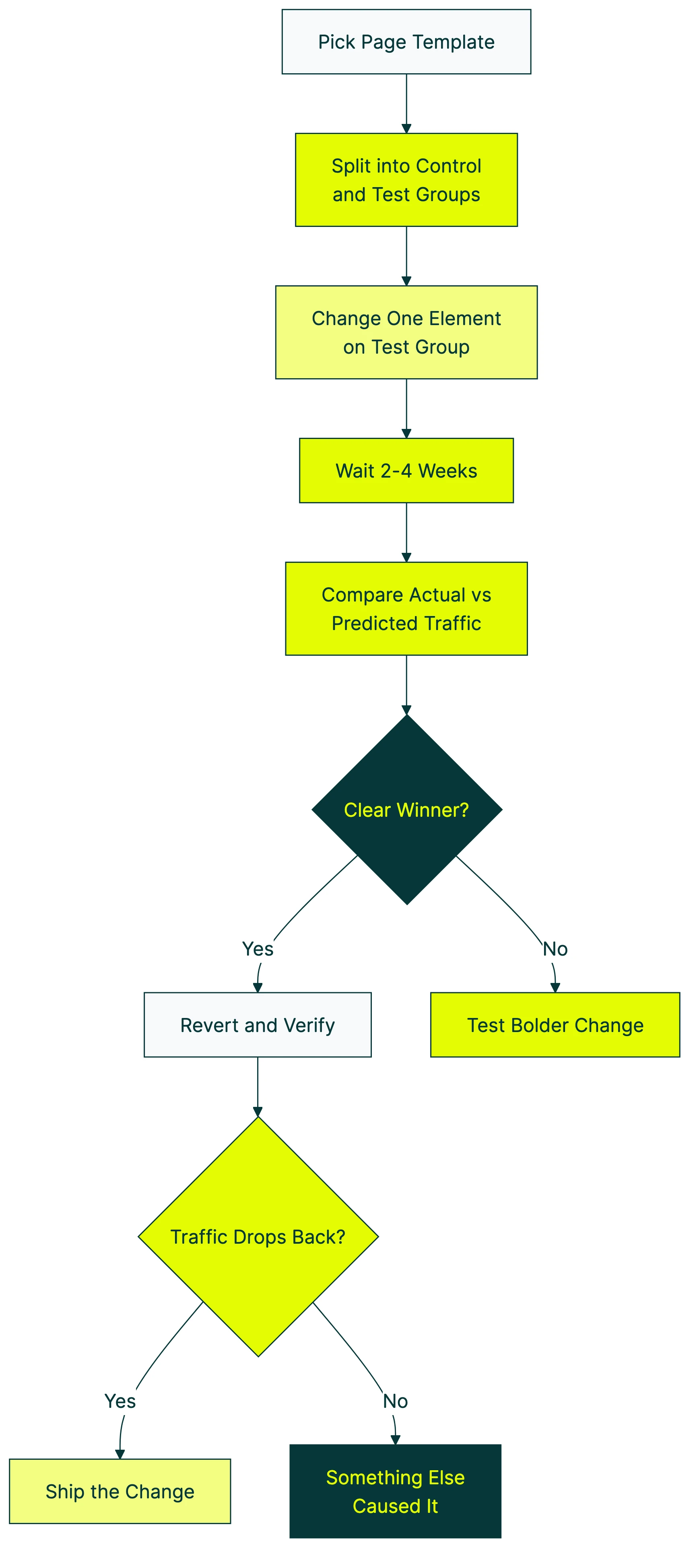
Here’s the process, stripped down to what actually matters:
1. Pick a page template. You need a set of pages that look and behave similarly. Product pages, blog posts, category pages, location pages. They need to share a template so the only difference is your test change.
2. Split them into two groups. Random assignment, but balanced. The smart way (what Etsy does) is to rank pages by traffic, break them into small groups, then randomly assign from each group. That way your control and test groups have similar traffic patterns. Just shuffling randomly can give you lopsided groups.
3. Make one change to the test group. One. Not three. Title tags, meta descriptions, H1 headings, structured data (the code snippets that help Google understand your page), internal links. Pick one thing so you know what caused any change you see.
4. Wait 2-4 weeks. High-traffic sites can sometimes get results faster. Lower traffic? You might need 4-6 weeks. The key rule: decide how long before you start. Never stop a test early because the numbers look good. That’s one of the most common A/B testing mistakes.
5. Compare actual traffic vs. predicted traffic. This is the math part. A tool called CausalImpact (built by Google, free to use) predicts what traffic would have been without your change. Then you compare that prediction against reality. The gap is your test result.
6. Revert and verify. This is the step most guides skip. Kevin Indig calls it the proof step: undo your change and see if traffic drops back to the baseline. If it does, you know the change caused the lift. If it doesn’t, something else was going on.
Our take: Step 6 is what separates real testing from guessing. If you skip the revert, you’re basically trusting a coin flip. We’d never ship a product change at Kirro without this step, and you shouldn’t ship an SEO change without it either.
What you can test (with real examples and results)
Enough theory. These are actual test results from real companies, based on SearchPilot data across hundreds of tests:
Title tag changes (the most common test):
- Moving the brand name to the end of the title: +15% traffic
- Adding “The Best” to titles: +10%
- Adding freshness signals (current year): +11%
- Shortening overly long titles: +11%
Heading changes:
- Rephrasing H2s as questions: +12%
Content changes:
- Removing product carousels that pushed content down: +29%
- Adding AI-generated supporting content: +13% (US traffic)
- Adding pros/cons comparison tables: +50%
Internal linking:
- Adding contextual internal links: +13%
Those numbers look great. And they are, for those specific sites. The catch? The same test on a different site often shows zero impact.
Pinterest found that improving text descriptions boosted traffic by nearly 30%. But they also found that “well-known SEO strategies didn’t work for them” while uncertain ones “worked like a charm.”
Booking.com runs over 1,000 tests at once and gets 2-3x higher conversion than competitors. Their secret isn’t a magic tactic. It’s volume.
Before running any SEO test, make sure the pages you’re testing aren’t competing with each other. Fix CRO cannibalization issues first — split traffic between competing URLs will pollute your test data.
Once you’ve figured out which SEO changes drive more search traffic, the next step is improving what happens after visitors land. That’s where conversion testing comes in. A better title tag gets more clicks from search results. A better landing page (tested with Kirro) turns those clicks into customers. If you’re building landing pages for organic traffic, our landing page SEO guide covers the full checklist.
The uncomfortable truth: most SEO tests fail
This is the section no competitor will write, because it’s bad for selling testing tools.
SearchPilot, the company with probably the largest dataset of SEO A/B tests in the world, published their numbers: 75% of tests are inconclusive. About 7-8% are negative (the change actually hurt). Only around 15% show a clear positive result.
Title tag tests, the most “obvious” SEO change? 56% failure rate. “Fixing” breadcrumb markup dropped traffic by 12%. Adding prices to title tags lost 15%.
Will Critchlow, who founded SearchPilot, says it plainly: “Sometimes our biggest wins come from never deploying losers.”
Read that again. Testing isn’t about finding winners. It’s about preventing disasters.
Say your team wants to overhaul all your title tags based on a blog post they read. Without testing, you roll it out to 5,000 pages. It fails (56% chance). You just tanked your organic traffic for months.
With testing, you try it on 100 pages first. See that it does nothing. Save yourself the rollout. That’s the real value.
The math gets even messier. One analysis from BlindFiveYearOld found that adding up all the projected gains from individual SEO tests predicted 250% traffic growth. Actual site growth was 30%. The explanation? Control groups themselves can vary by 10% naturally. A “5% win” might just be noise.
Our take: If someone shows you a case study where every test was a winner, they’re cherry-picking. The honest truth is most changes don’t move the needle. And that’s fine. The ones that do move it can be massive, and the ones you prevent from going live save you from invisible damage.
SEO split testing vs regular A/B testing
Two completely different things that happen to share a name:
| SEO split testing | Regular A/B testing | |
|---|---|---|
| What you split | Pages (groups of similar pages) | Visitors (same URL, two experiences) |
| What changes | Server-side HTML that Google crawls | Visual changes visitors see |
| What you measure | Organic traffic from Google | Conversions, clicks, signups |
| Timeline | 2-6 weeks minimum | Hours to days |
| Traffic needed | 10,000-30,000+ monthly sessions | Moderate (depends on conversion rate) |
| Tools | SearchPilot, SplitSignal, Statsig | Kirro, VWO, Optimizely |
| Who it’s for | SEO teams at large sites | Anyone with a website |
Can you run both at the same time? Yes. Carefully. SEO testing measures what Google does. Conversion testing (like A/B testing your conversion rate) measures what visitors do. Different audience, different data, both matter.
Google’s rules for testing (straight from their documentation):
- Don’t cloak (never show Google different content than visitors see)
- Use 302 temporary redirects, not 301 permanent ones
- Tell Google which page is the “real” one (using a canonical tag)
- Don’t run tests forever. Clean up when you’re done.
Follow those four rules and testing won’t hurt your SEO. Google explicitly says it’s fine.
Can small sites do SEO A/B testing? (honest answer)
This is the section every other guide skips. And the reason is simple: the guides are written by companies selling tools that only work at enterprise scale.
Semrush’s SplitSignal needs 100,000 clicks over 100 days. SearchPilot works best with 30,000+ monthly sessions. Statsig assumes you have an engineering team. That rules out roughly 90% of websites.
So what do you do if you’re not Booking.com?
Option 1: Before-and-after testing with Search Console. Make a change. Wait 4 weeks. Compare your Search Console data before and after. It’s not rigorous, but it’s better than nothing. The weakness: you can’t separate your change from other things that shifted (algorithm updates, seasonal trends, competitors).
Option 2: Use Google’s CausalImpact. This is a free statistics tool (it runs in a programming language called R) that predicts what your traffic would have been and compares it to what actually happened. You need some data skills, but it’s the same math the enterprise tools use.
Option 3: Use Google Ads as a proxy for title testing. Run two ad headlines for the same page. The one with the higher click-through rate probably makes a better title tag too. It’s not perfect, but it’s fast and cheap.
Option 4: Just make the change. Seriously. If you have strong evidence that something will help (like adding missing H1 tags, or fixing broken internal links), and your site gets under 10,000 visits a month, testing wastes more time than it saves. Just do it and track the results in Search Console.
While true SEO split testing needs enterprise-scale traffic, you can still test what happens after visitors arrive from search. Test your landing pages, headlines, and CTAs with Kirro to improve the conversion rate of your organic traffic. That’s something any site can do, starting today. Set up a free test and see which version of your page turns more searchers into customers.
SEO A/B testing software and tools
Here’s an honest look at what’s out there for SEO split testing software:
| Tool | Best for | How it works | Minimum requirements |
|---|---|---|---|
| SearchPilot | Large sites (publishers, marketplaces, e-commerce) | Server-side changes, AI-powered traffic predictions | 300+ similar pages, ~30K sessions/month |
| SplitSignal (Semrush) | Teams already using Semrush | Predicts what traffic would have been, compares to actual | 300+ pages, 100K Search Console clicks over 100 days |
| Statsig | Teams with developers | URL-based page splitting with noise reduction | Engineering resources required |
| RankScience | Programmatic and marketplace sites | AI picks tests and automates rollout | Varies |
| SEOTesting.com | Smaller teams wanting simple data | Before-and-after analysis using Search Console | A Search Console account |
| CausalImpact | Data-comfortable teams on a budget | Free R package. DIY statistical analysis | Knowledge of R or willingness to learn |
Let’s be honest about what this list shows. Every dedicated SEO testing platform is built for big sites with big traffic. If you’re a small business or solo founder, SEOTesting.com or CausalImpact are your realistic options. For a deeper look at how these platforms compare on features, pricing, and real-world fit, see our SEO A/B testing software comparison.
There’s also an approach called Edge SEO. You use a content delivery network (the system that serves your site to visitors worldwide) like Cloudflare Workers to make changes at the network level. About 10 milliseconds of delay, no backend code changes. The late Hamlet Batista pioneered it. Technical, but powerful for teams that want speed without touching their CMS.
For conversion testing (what visitors do on your page), the tools are different. Split testing software and A/B testing software like Kirro, VWO, and Optimizely handle the visitor side. Kirro is the simplest option if you want to start testing without a developer. Which of the best A/B testing tools fits you depends on budget and team size. (Switching from Google Optimize? Check our Google Optimize alternatives guide.)
Looking for CRO tools beyond just testing? Our roundup covers the full toolkit.
Does A/B testing hurt SEO? (Google’s official answer)
This question scares most marketers away from testing. The answer: no, properly run A/B tests do not damage your rankings. Google’s documentation says so explicitly.
The four rules (again, because they matter):
Rule 1: Don’t cloak. Never show Google different content than what visitors see. If Google gets Version A and visitors get Version B, that’s cloaking. Google penalizes it.
Rule 2: Use 302 redirects. If you’re redirecting visitors to a test page, use a 302 (temporary). Not a 301 (permanent). A 301 tells Google “this page moved forever,” which messes with your index.
Rule 3: Use canonical tags. A canonical tag is a line of code that tells Google “this is the real version of the page.” Point your test URL back to the original. Google will treat the original as the main page and ignore the test copy in its index.
Rule 4: Clean up. Don’t leave test pages running for months. When the test is done, pick a winner and remove the other version.
Bad testing is the real risk. Tests that accidentally cloak content, create thousands of duplicate pages, or mess with your internal link structure can hurt. The test itself? Harmless.
One thing to know about browser-based testing (JavaScript changes): Google has a 5-second rendering timeout. If your test relies on JavaScript to change content, Google might not even see the change. That’s actually a safety feature for conversion testing. Tools like Kirro that change what visitors see (not what Google sees) don’t affect your SEO at all.
Pinterest learned this the hard way. A failed JavaScript experiment took a full month to recover from. Server-side changes are safer for SEO tests because Google sees them immediately and consistently.
Best practices that actually work (and ones that don’t)
Hundreds of test results later, a few things hold up:
Test one thing at a time. Changing title tags, headings, and content in the same test tells you nothing about which change worked. One variable. Always. This applies to all testing, not just SEO. Our A/B testing best practices for SEO guide covers the full set of rules.
Use proper control groups. Etsy nailed this: they sort pages by traffic, then randomly split from each traffic level (called stratified sampling) so both groups look similar. Bad grouping gives bad results.
Set your timeline before starting. 10,000+ monthly sessions minimum. Use 95% confidence as your bar for calling a result real (that means you’re 95% sure it wasn’t random). Pick the duration before the test starts. Never peek early and declare a winner.
Wayfair ranks their test ideas using RICE scoring (a system that weighs potential impact against effort). They plan in 6-month cycles and share both wins and failures company-wide. Smaller teams can borrow this: rank your test ideas by expected traffic impact and effort.
And accept that best practices backfire. SearchPilot’s year-in-review data tells the story. “Fixing” breadcrumb navigation code cost 12% traffic. Adding star-rating markup worked on product pages (+16%) but did nothing on business profiles. The same title tag change showed +11% on two sites and zero on three others.
Thumbtack runs 30 A/B tests per month. Half their engineers own a test within six months of joining. That’s the mindset. Not “test once and celebrate.” Test constantly and learn.
FAQ
What is A/B testing in SEO?
A/B testing in SEO means comparing two versions of a page element (like a title tag or heading) across groups of similar pages to measure which gets more search traffic. The key difference from regular A/B testing: SEO testing splits pages, not visitors. You can’t show two versions to a single search engine crawler. You need at least 100 similar pages for a meaningful test. Read more about what split testing means.
How long should an SEO A/B test run?
Most SEO A/B tests need 2-4 weeks minimum on high-traffic sites. Lower traffic? Plan for 4-6 weeks. More traffic means faster, more reliable results. The golden rule: decide the duration before you start. Never end a test early because the numbers look good. That’s called peeking, and it almost always gives you a false result. If you need to check results before the test ends, sequential testing methods can handle that safely. Understanding your sample size formula helps set realistic timelines.
Does A/B testing affect SEO rankings?
No, when done correctly. Google explicitly says website testing is fine. Follow their four rules: don’t cloak content, use 302 redirects, add canonical tags, and remove tests when done. Client-side testing tools (like Kirro) that change what visitors see through JavaScript are even safer. Google may not even process the JavaScript changes.
Can you do SEO A/B testing without special tools?
Yes. Google’s CausalImpact package is free and open source. You can also do before-and-after analysis using Search Console data. The tradeoff: enterprise tools automate the statistics. The free route means doing the math yourself (or learning enough R or Python to let a computer do it). For most small sites, before-and-after tracking in Search Console is the practical choice.
What’s the difference between SEO testing and CRO testing?
SEO testing measures how search engines respond to changes. You’re testing for Google. CRO testing (conversion rate optimization) measures how visitors respond. You’re testing for people. SEO testing tells you “this title gets more clicks in search results.” CRO testing tells you “this page turns more visitors into customers.” You need both, and understanding how CRO and SEO interact helps you run tests that improve conversions without hurting rankings. SEO testing uses platforms like SearchPilot. CRO testing uses tools like Kirro. Read the full CRO guide for more.
How many pages do I need to run an SEO split test?
Enterprise tools typically need 300+ similar pages. Some work with as few as 100. More pages means more reliable results. With fewer pages, natural traffic variation (the “noise”) drowns out real effects. Under 100 template pages? Before-and-after analysis is more realistic than a proper split test. The page count is about getting enough data points to trust the math. Same logic as needing enough visitors in regular A/B testing.

Randy Wattilete
CRO expert and founder with nearly a decade running conversion experiments for companies from early-stage startups to global brands. Built programs for Nestlé, felyx, and Storytel. Founder of Kirro (A/B testing).
View all author posts