Split testing means showing two (or more) versions of something to different visitors, then keeping the one that gets better results. That’s it. You change a headline, a button, an entire page layout. Half your visitors see the original (the control group in split testing). The other half see the new version. The data picks the winner.
The term sounds technical. It isn’t. (If you already know what it means and just want to calculate how many visitors you need, use the sample size calculator.) You’ve been split testing your whole life. Choosing between two subject lines for a work email. Trying a new coffee order while keeping your old favorite as a backup. Same idea, just applied to your website with actual numbers behind it.
The confusing part? The marketing world can’t agree on what “split testing” actually means. Some people use it as a synonym for A/B testing (our A/B testing guide covers the basics). Others insist it means something different. Both are partially right. The real answer involves three types, and each uses a different testing methodology.
What split testing means (and why everyone defines it differently)
So what is a split test, really? It’s a way to stop guessing and start knowing. Instead of redesigning your pricing page because your boss thinks it “feels off,” you test two versions with real visitors and let the numbers decide.
The problem is that the industry uses this term loosely. Ask five companies what split testing means and you’ll get five different answers. (For a detailed A/B testing vs split testing comparison, we break down exactly where the terms overlap and where they don’t.)
VWO says split testing specifically means sending visitors to different URLs. Eppo says it’s basically the same as A/B testing. Mida agrees with Eppo. Matomo breaks it into three distinct types. Everyone’s technically right, depending on how narrow their definition is.
We think of “split testing” as the big umbrella. Underneath it sit three flavors that work differently and need different amounts of traffic. Pick the wrong type and you waste time and money.
Think of it like cooking. “Cooking” is the umbrella. Grilling, baking, and sautéing are all cooking. But you wouldn’t bake a steak. Same energy.
Our take: Most articles say “split testing and A/B testing are the same thing” and call it a day. That’s lazy. They’re related, sure. But the type you pick changes how you set up the test, what tools you need, and how much traffic you’ll burn through.
Once you understand the three types, you’ll never be confused by the terminology again. And you’ll know exactly which one fits your situation.
The 3 types of split testing (and when to use each)
This is the part every other “what is split testing” article skips. They define it, list some benefits, and move on. But knowing the types is what actually helps you run the right test.
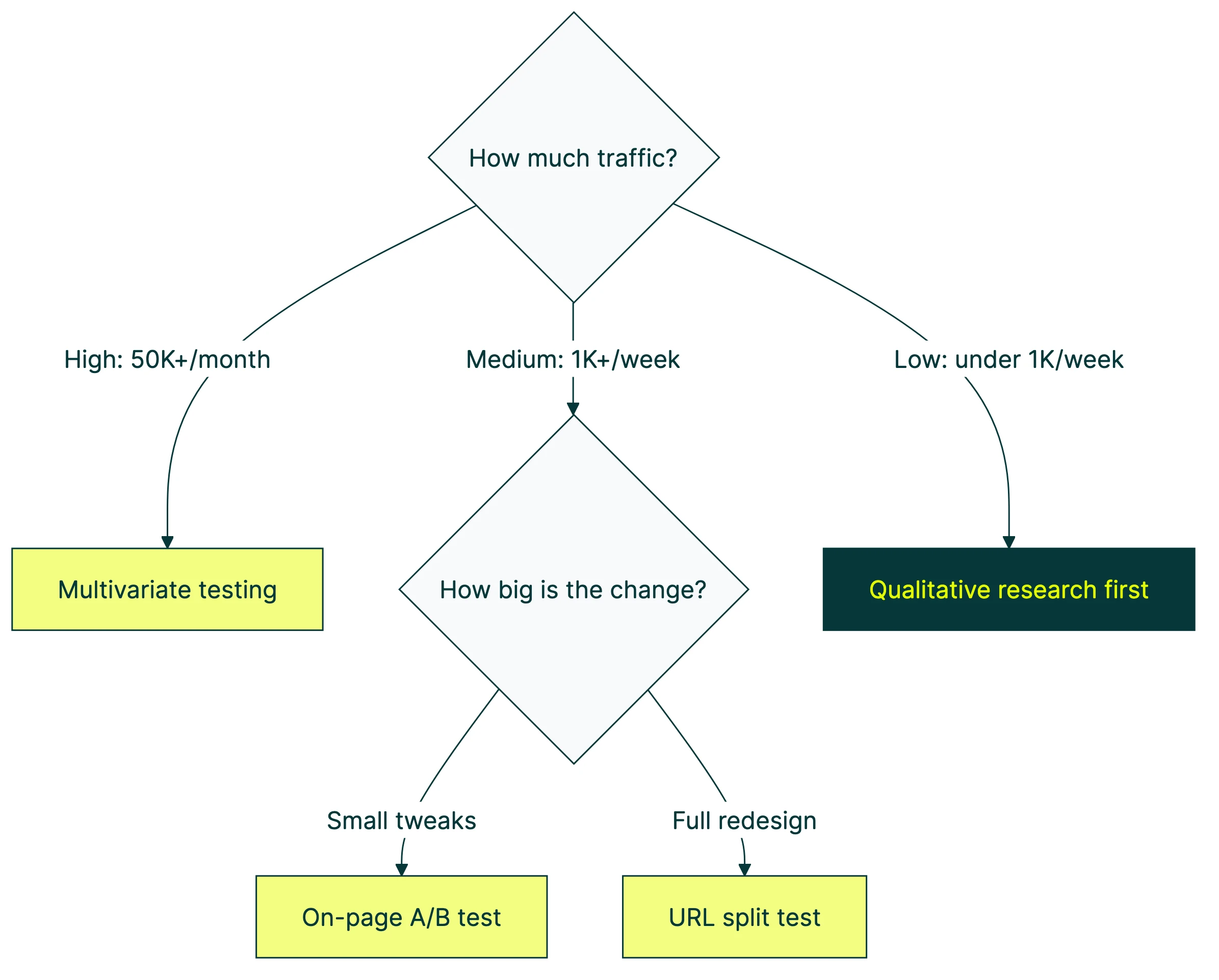
Type 1: On-page A/B testing
Same page, different elements. This is client-side testing — a tool uses code that runs in the visitor’s browser (called JavaScript) to swap out headlines, button text, or images. Visitor A sees your current page. Visitor B sees the tweaked version. Same URL. Just a few things changed.
Best for: Testing headlines, button text, hero images, call-to-action wording, or any single element you want to improve. This is where most people should start.
Traffic needed: Around 1,000 visitors per week to the page you’re testing. Fewer than that and you’ll wait a long time for an answer you can trust.
This is what most people mean when they say “A/B testing.” And it’s what tools like Kirro, VWO, and Optimizely handle out of the box with a visual editor (a point-and-click tool for changing page elements without writing code).
Type 2: URL split testing (redirect testing)
Completely different pages. Instead of swapping elements on one page, the tool sends visitors to entirely different URLs. Half your visitors land on yoursite.com/pricing. The other half get redirected to yoursite.com/pricing-v2.
Best for: Testing full page redesigns, totally different layouts, new checkout flows, or when the changes are too big to swap with JavaScript. If you’re comparing two fundamentally different approaches, this is the one.
Traffic needed: Same as A/B testing (around 1,000 visitors/week), but the setup is slightly more involved because you need two fully built pages.
One thing to watch: URL split tests can affect your search rankings if done wrong. Google’s official guidance says to use temporary redirects (called 302 redirects, not permanent 301s). You also need a tag that tells search engines which page is the “real” one (a rel=canonical tag). Skip either one and Google might get confused about which page to show in search results. There’s also a whole discipline called SEO A/B testing that’s specifically about measuring how page changes affect your search traffic.
Type 3: Multivariate testing (MVT)
Testing multiple things at once to find the best combination. Say you want to test 3 headlines and 2 button colors. That’s 6 combinations (3 × 2). The tool shows every combo to different visitor groups and finds the winning mix.
Sounds great in theory. In practice, it needs a LOT of traffic. Matomo’s research suggests you need 10,000+ visitors per month for even a basic multivariate test. Most small business websites don’t hit that. See our A/B and multivariate testing comparison for the full traffic math.
Best for: Large sites with heavy traffic that want to find the perfect combination of elements. Think Amazon, Booking.com, major e-commerce brands.
Not great for: Most small businesses. If you’re getting fewer than 10,000 monthly visitors to a page, stick with A/B testing. You’ll get faster answers and waste less time.
Quick comparison
| On-page A/B test | URL split test | Multivariate test | |
|---|---|---|---|
| What changes | One or two elements on the same page | Entirely different pages | Multiple elements in every combination |
| Same URL? | Yes | No (different URLs) | Yes |
| Best for | Headlines, buttons, images | Full redesigns, new layouts | Finding the best combo of changes |
| Traffic needed | ~1,000 visitors/week | ~1,000 visitors/week | 10,000+ visitors/month |
| Complexity | Low | Medium | High |
| Where to start | Here. Start here. | When A/B testing isn’t enough | When you’ve outgrown A/B testing |
Tools like Kirro handle both on-page A/B testing and URL split testing. You pick the type that fits your situation. No code needed for either. For a full breakdown of tools, check out our split testing software comparison. You might also hear about feature flags and how they differ from split testing — they’re a related concept but serve a different purpose.
For a visual walkthrough, Moz covers the fundamentals of A/B and split testing in this guide:
How website split testing works (step by step)
The process is the same whether you’re running an on-page A/B test or a URL split test. Five steps.
1. Pick what to test. Start with your highest-traffic, highest-value page. Your homepage, your pricing page, whatever gets the most visits and matters most. A page with 50 monthly visitors won’t teach you anything. Focus on split testing your landing pages that actually get traffic.
2. Create your variation. This is the change you think will improve results. A different headline. A new button color. A completely redesigned layout. Make one change at a time so you know what caused the difference.
Peep Laja founded CXL, one of the biggest names in conversion rate optimization. His advice? “Testing stupid stuff that makes no difference is the biggest reason for tests that end in ‘no difference.’” Test bold changes. Swapping “Submit” for “Submit Now” probably won’t move the needle. Rewriting your entire value proposition might. Here are value proposition examples to start from.
3. Split your traffic. Your testing tool randomly assigns each visitor to see either the original or the variation. This random assignment is what makes the results trustworthy. If you let people choose, you’d learn nothing.
4. Let it run long enough. This is where most people mess up. You need enough visitors to see each version before the results mean anything. Aim for at least 1,000 to 2,000 visitors per version. Run it for at least one to two full weeks so you catch weekday vs. weekend differences. Our guide on common A/B testing mistakes covers this in detail.
The number one beginner mistake? Stopping a test after two days because one version “looks like it’s winning.” With a small group of visitors, random chance can make anything look good. Wait for the tool to tell you it’s confident.
5. Read the results and pick a winner. Your tool will tell you which version got more conversions. (Conversions = the percentage of visitors who did the thing you wanted, like signing up or buying.) Some tools use math that works well with smaller traffic, called Bayesian statistics. Others use a traditional approach that needs bigger numbers.
Either way, the tool should give you a clear answer: “Version B is better” or “We don’t have enough data yet.” To understand how tests can give wrong answers (and how to prevent it), read about Type 1 vs Type 2 errors in testing. If you want to dig deeper into what those numbers mean, here’s our guide on measuring your conversion rate during tests.
Want to try it? You can set up your first split test in about three minutes and see how it works with your own traffic.
Split testing in marketing: real examples that moved the needle
Everyone talks about split testing in the abstract. “Test things. Make data-driven decisions. Improve your conversions.” Fine. But what does that look like in practice, with actual numbers?
Here are real split test marketing examples backed by data.
The $60 million button test
In 2008, Barack Obama’s team tested different versions of their donation page signup form. Four different buttons. Six different media options (three images, three videos).
The winning combination got 40.6% more email signups than the original. Those extra signups turned into an additional $60 million in donations.
The wild part? The campaign team was convinced the videos would win. Every video lost to every image. They never would have known without testing.
Bing’s $100 million headline
Ron Kohavi ran Microsoft’s experimentation platform. He shared a case where a Bing engineer submitted a low-priority idea for a headline change. It sat in the backlog for months. When they finally tested it, that single headline change generated $100 million in additional annual revenue.
A headline. $100 million. That’s the power of split testing even the “small stuff.”
Booking.com: 25,000 tests a year
According to Harvard Business Review, Booking.com runs about 25,000 tests per year. That’s roughly 70 tests launched every single day. And 9 out of 10 don’t produce a winner. Every test still gives them data about what their customers want.
If the world’s biggest testing company sees 90% of tests end without a clear win, imagine how your first few tests might go. That’s normal. It’s not failure. It’s learning.
What the data really shows
Industry research from DRIP Agency analyzed thousands of A/B tests and found that only 36.3% produce a clear winner. Another 41.6% are inconclusive. And 22.1% are significant losses (meaning the change actually made things worse).
Econsultancy found that companies with a structured testing approach run 6.45 tests per month on average. Companies with declining sales? They run 2.42. More testing, even when individual tests don’t win, tends to mean better business outcomes.
Our take: Most “split testing meaning” articles don’t include a single statistic. They just define the term and wave their hands about “data-driven decisions.” We think the real data is more interesting (and more honest) than the theory.
When NOT to split test (the low-traffic reality check)
This is the part no other guide tells you. And honestly, it’s the most useful part if you’re running a smaller website.
Split testing needs visitors. Lots of them. Without enough people seeing each version, the results are basically random noise. Asking five people if they prefer your blue button or your green button isn’t a split test. It’s a coin flip.
The rough math: for a basic A/B test where your current conversion rate is around 3%, you’d need roughly 1,000 to 2,000 visitors per version. That’s the minimum before results become trustworthy. Want to calculate the exact number? A sample size formula can help.
Below 1,000 weekly visitors, you’re looking at months before you have enough data. And during those months, outside factors creep in. Seasons change. Trends shift. Browser cookies expire. By the time your test “finishes,” the results may not apply anymore.
What to do instead (if your traffic is low)
Don’t just sit and wait for more traffic. There’s plenty you can do.
Use qualitative research. Watch recordings of visitors using your site (tools like Hotjar or FullStory do this). Run a quick 5-person user test or send a one-question survey. These methods work with tiny audiences and reveal problems you’d never spot in a spreadsheet.
Make bold changes based on best practices. If your headline is generic (“Welcome to our platform”), replace it with something specific. Don’t A/B test it. Just change it. Test the next thing. When you’re small, action beats analysis.
Focus on your conversion rate optimization foundations first. Make sure your site loads fast, your value proposition is clear, and your buttons are obvious. These are basics that don’t need testing. They just need doing.
Start testing when you’re ready. Once you’re getting around 1,000+ weekly visitors to a key page, that’s when split testing becomes powerful. At that point, try a simple A/B test on your highest-traffic page and let the numbers guide you.
For a broader look at the tools that help beyond testing, check out our CRO tools roundup and our CRO guide.
Split testing on Facebook and other platforms
Website split testing is what we’ve covered so far. But the same idea works across every marketing channel. The difference: on platforms like Facebook or Mailchimp, the platform does the heavy lifting. You don’t need a separate tool.
Facebook split test
Meta (the company behind Facebook and Instagram) has an Experiments tool built right into Ads Manager. You can split test your ad creatives, audiences, placements, and budget strategies.
A few things to know from Meta’s official guidance:
- You can test up to 5 different versions at once
- Meta recommends running tests for at least 7 days
- Use the same budget for each version so the comparison is fair
- The platform handles the random traffic splitting automatically
This is different from website split testing because you’re not installing any tool or writing any code. Meta’s system does the randomization and tracking.
Email split testing
Most email platforms (Mailchimp, HubSpot, ConvertKit) let you A/B test subject lines, send times, and email content. The platform splits your list in half and sends each version to one group. Then it tells you which one got more opens or clicks.
Subject line testing is probably the most common split test in all of marketing. And the results compound. A 2% improvement in open rate might sound small, but across 50,000 emails a month, that’s 1,000 more people reading your message.
Google Ads
Google Ads lets you run multiple ad variations within the same ad group. It rotates them automatically and flags top performers. You can also test landing pages by sending ad traffic to different URLs and comparing results.
The core lesson across all platforms: split testing isn’t just for websites. It’s a way of thinking. Wherever you’re making marketing decisions, you can probably test two options and let the data decide.
How dedicated tools handle split testing (VWO and beyond)
Platform split testing (Facebook, email, Google Ads) works fine for ads and emails. But for website split testing, you’ll want a dedicated tool. Here’s how VWO split testing works, and what to look for in any tool.
VWO’s approach to split testing
VWO is one of the most established names in split testing. For URL split tests, VWO uses a JavaScript redirect to route visitors between page versions. It stores a cookie to track where the visitor originally came from, keeping your analytics accurate.
VWO recommends URL split testing for big changes. Think completely different page designs, or single-page vs. multi-page checkout flows. Basically anything where swapping elements on the same page isn’t practical. For a deeper look, see our VWO vs Optimizely comparison.
What to look for in any split testing tool
Not all tools are equal. Four things to look for:
A visual editor so you can make changes without writing code. A math engine that tells you when results are trustworthy (bonus points for Bayesian stats, which work better with smaller traffic).
SEO protection for URL split tests, so search engines don’t index your test pages by mistake. And analytics integration, especially with GA4, which most businesses already use.
If you’re comparing options, our guides on A/B testing tools and A/B testing software break down the top tools by price, team size, and traffic level.
Kirro handles both on-page A/B testing and URL split testing at EUR 99/month with unlimited tests. No per-visitor pricing that punishes you for growing. For comparison, VWO starts around $299/month and Optimizely starts at roughly $36,000/year.
And if you switched from Google Optimize when it shut down in 2023 and haven’t found a replacement you like, check out our Google Optimize alternatives guide.
FAQ
What is split testing in marketing?
Split testing in marketing means comparing two versions of any marketing asset (a webpage, email subject line, ad creative, or landing page) to see which one gets better results. You show each version to a random group and let the data pick the winner. It’s the opposite of guessing what works.
Is split testing the same as A/B testing?
In everyday conversation, yes. Most people use the terms interchangeably, and that’s fine. If you want to get technical: “split testing” is the broader term. A/B testing (changing elements on the same page) is one type of split test. URL split testing (sending visitors to entirely different pages) is another. And testing multiple things at once (multivariate testing) is a third.
What is the difference between A/B testing and split testing?
A/B testing typically changes elements on the same page using JavaScript (code running in the browser). URL split testing sends visitors to completely different pages at different web addresses. Both compare two versions and measure which one converts better. The difference is in how the variation is delivered, not in the goal.
How does split testing work?
A testing tool randomly divides your visitors into groups. Each group sees a different version of your page. The tool tracks which version gets more of the result you care about (signups, purchases, clicks). After enough visitors have seen both versions, the tool tells you which one won. The randomization is what makes it trustworthy: you’re comparing like with like.
What is an example of split testing?
A clothing store tests two versions of its product page. Version A has a “Buy Now” button. Version B changes it to “Add to Cart.” After 2,000 visitors see each version, Version B gets 15% more purchases. The store switches all product pages to “Add to Cart.” That’s a split test. One change, measured with real visitors, leading to a clear decision.

Randy Wattilete
CRO expert and founder with nearly a decade running conversion experiments for companies from early-stage startups to global brands. Built programs for Nestlé, felyx, and Storytel. Founder of Kirro (A/B testing).
View all author posts