Kirro, VWO, and Convert handle split URL tests out of the box. But most “split testing software” articles won’t tell you what split testing actually is. They use it as a synonym for A/B testing, list the same 15 tools, and move on.
Split testing and A/B testing are different things (our A/B testing guide explains the core concepts). If you’re still fuzzy on what split testing means, start there. Picking the wrong tool for the wrong type of test wastes money and time. This guide covers 8 tools that handle real split tests (sending visitors to entirely different pages). What each one costs. Which one fits your situation. For a broader look at all testing tool categories, see our A/B testing tools overview.
Already know the difference? Jump to the comparison table. Want the full context first? Keep reading.
What split testing software actually does (and how it differs from A/B testing)
Think of it like restaurants. A/B testing is changing the font on one menu and seeing if more people order dessert. Split testing is handing half your customers a completely different menu and comparing the results. For a full breakdown of the difference between A/B testing and split testing, we wrote a dedicated guide.
In technical terms: split testing (also called redirect testing or split URL testing) sends visitors to two different URLs. Visitor A sees yoursite.com/pricing. Visitor B gets redirected to yoursite.com/pricing-v2. The tool tracks which page gets more conversions.
A/B testing keeps everyone on the same URL. The tool uses JavaScript (code that runs in the browser) to swap elements like headlines, buttons, or images. Same page, different look.
Why does this matter when choosing software? Because not every tool supports both. Some only do in-page A/B tests. Some only handle server-side redirects. And a few do both well.
When to use split testing:
- You’ve redesigned an entire page and want to test the old vs. new version
- You’re comparing two completely different checkout flows
- You’re testing different landing pages for the same ad campaign
- Changes are too complex to make with a visual editor (different layouts, different structures)
When to stick with regular A/B testing:
- You’re testing a headline, button color, or image swap
- The change is small and lives on one page
- You want quick results without building a second page
Most teams need both. The best A/B testing software handles in-page changes. This guide focuses on tools that also handle URL-level redirect tests. For the full picture of testing tools by category, see our A/B testing tools guide.
For a visual breakdown, Neil Patel explains the key differences between these two approaches:
Our take: Every competitor in the search results uses “split testing” and “A/B testing” as the same thing. They’re not. If you’re searching for split testing software specifically, you probably want to test entire pages against each other. That’s what this guide is about.
Best split testing software at a glance
| Tool | Best for | Split URL testing | Starting price | Free plan |
|---|---|---|---|---|
| Kirro | Small teams, solo founders | Yes | EUR 99/month | 30-day trial |
| VWO | Mid-market teams | Yes | ~$299/month | Free (50K visitors) |
| Optimizely | Enterprise teams | Yes (server-side) | ~$36,000/year | No |
| Convert | Privacy-first teams | Yes | $399/month | 15-day trial |
| GrowthBook | Developer teams | Yes (needs setup) | Free (open source) | Yes |
| AB Tasty | European enterprise | Yes | ~$60,000/year | No |
| LaunchDarkly | Engineering teams | Yes (feature flags) | $10/seat/month | Yes |
| Unbounce | Landing page tests only | Yes (own pages only) | $99/month | 14-day trial |
Now for the part that actually matters: what each tool does well and where it falls short.
Best split testing tools reviewed
Kirro (best for small teams and solo founders)
Full disclosure: this is us. We built Kirro because every split testing tool was either too expensive or too complicated for small teams.
Kirro handles both split URL testing and in-page A/B tests. You set up a redirect test through the visual editor. Pick your original page, enter the URL of your new version, choose a conversion goal, and hit start. Kirro splits your traffic automatically.
The script is 9KB. For comparison, most testing tools load 100-200KB. That matters because heavy scripts slow your page down, and slow pages hurt your test results before you even start.
Pricing: EUR 99/month flat. No per-visitor charges. No annual contracts. Unlimited tests, unlimited visitors. Try it free for 30 days.
Works with: GA4 integration (your existing analytics goals become your test goals), Google Tag Manager one-click install.
Limitations: Built for marketers, not engineering teams. No feature flags or server-side SDK. If you need developer-level control, look at GrowthBook or LaunchDarkly.
VWO (best mid-market split testing suite)
VWO is the tool most teams graduate to when they outgrow simpler options. Split URL testing is built in and works well. You create your original and new version URLs, set targeting rules, and VWO handles the redirect.
The visual editor is solid for in-page tests too. You also get heatmaps, session recordings, and surveys in the same dashboard, which means fewer tools to manage.
Pricing: Starts at ~$299/month. Scales up based on visitors. The “free” plan caps at 50K tested visitors per month and doesn’t include the full split testing suite. Check out our VWO vs Optimizely comparison for more detail.
Limitations: Gets expensive fast as traffic grows. The dashboard has a learning curve. And VWO’s been adding features aggressively, so you’re paying for things you may never use.
Optimizely (best for enterprise split testing)
If your company has a dedicated testing team and a six-figure testing budget, Optimizely is the deepest platform on this list. Their server-side testing (tests that run on your web server, not in the browser) is the strongest available.
For split URL testing, Optimizely’s server-side approach means zero flicker. No flash of the original page before the new version loads. That’s a real advantage for tests where first impressions matter.
Pricing: Starts around $36,000/year. That’s not a typo. Enterprise pricing, hidden behind a “contact sales” button. We break down Optimizely’s pricing in detail. If you’re comparing alternatives, see our Optimizely alternatives roundup.
Limitations: Overkill for most teams. The setup requires developer involvement. And the price puts it out of reach for anyone spending less than $500/month on testing tools.
Convert (best for privacy-first teams)
Convert’s pitch is simple: full-featured testing that doesn’t store personal data. If your team cares about GDPR (the European privacy law), or you work in healthcare or finance, Convert handles that for you.
Split URL testing is included on all plans. The setup is straightforward. Pick your original URL, add the new version’s URL, set your goals.
Pricing: Starts at $399/month. Not cheap. But every plan includes the same features, so you’re not paying extra for split testing like you do with some competitors.
Limitations: The interface feels dated compared to VWO or Kirro. And $399/month is steep if you’re testing once or twice a month. Our Convert A/B testing guide covers the full pros and cons.
GrowthBook (best free/open-source option)
GrowthBook is open-source, which means you can host it yourself for free. It connects directly to your data warehouse (the big database where your company stores analytics data). This “warehouse-native” approach means your test results live alongside all your other data. Engineers love this.
Split URL testing works through their SDK (a code library developers install). It’s not point-and-click. You’ll need a developer to set up each test.
Pricing: Free if you self-host. Cloud plans start at $0 with limits. No visual editor, no marketing-friendly interface.
Limitations: Not for non-technical teams. Period. If you don’t have a developer who can write code to set up tests, GrowthBook isn’t an option. For most marketers, a simple tool with a clear price is a better fit. Kirro handles both test types without code.
AB Tasty (best for European enterprise teams)
AB Tasty recently merged with Kameleoon, making them one of the bigger players in Europe. They offer split URL testing, personalization (showing different content to different visitor groups), and feature management.
The platform handles split tests well. You set up URL redirects through their interface, target specific audiences, and track results. It works. No surprises, good or bad.
Pricing: Not public. Enterprise sales model. Based on reported deals, expect $60,000/year or more. That’s similar territory to Optimizely.
Limitations: Like Optimizely, you’re paying for an enterprise platform even if you only need split testing. And “enterprise sales process” means weeks of demos and calls before you get a price.
LaunchDarkly (best for developer-led split testing)
LaunchDarkly is a feature flag system (a way for developers to turn features on or off for different visitors) with testing built in. Server-side only. No visual editor. If your marketing team wants to test a headline, this is the wrong tool.
But for engineering teams running split tests on backend features (like testing a new checkout flow or recommendation algorithm), it’s excellent. LaunchDarkly also supports mobile testing through its native SDKs (see our full guide to A/B testing tools for mobile). The split happens at the server level, so there’s zero page flicker. And at $10/seat/month, it’s way cheaper than Optimizely for small engineering teams. Pro plans with full testing features cost more.
Unbounce (best for landing page split tests)
Unbounce does one thing well: landing page testing. If you build your landing pages in Unbounce, you get split testing built in. Their Smart Traffic feature (AI that automatically sends visitors to the better-performing version) is a nice touch.
The tradeoff: it only works on pages built inside Unbounce. Can’t test your main website, your checkout flow, or pages built in WordPress. It’s split testing, but only within their walled garden. Starts at $99/month, which is reasonable if you’re already an Unbounce customer. If not, you need a different tool.
When do you need multivariate testing instead of a split test?
Split testing compares Page A vs. Page B. What if you want to test a new headline, a new button, and a new image all at once?
That’s multivariate testing (testing multiple changes at once). Instead of 2 versions, you might have 8 or 16 combinations. The tool figures out which combination works best.
Sounds great in theory.
You need a lot of visitors. A simple split test (2 pages) needs roughly 1,000-2,000 visitors per version for solid results.
With multivariate testing, the traffic requirement multiplies with every combination. Testing 3 elements with 2 versions each? That’s 8 combinations. Now you need 8,000-16,000 visitors minimum.
If your page gets 10,000 visitors per month, a simple split test gives results in a couple of weeks. A multivariate test with 8 combinations? That’s 2+ months.
From our list, VWO, Optimizely, AB Tasty, and Convert support multivariate testing. Kirro and GrowthBook focus on simpler A/B and split URL tests, which is the right call for most teams. Getting fewer than 100,000 monthly visitors? Stick with split tests. You’ll get faster answers. For a detailed breakdown of which tools handle MVT best, see our multivariate testing software roundup.
We cover where multivariate testing fits inside a full CRO software stack in a separate guide.
How do you pick the right split testing tool?
Most comparison articles rank tools by features. Features don’t matter if the tool doesn’t fit how you work.
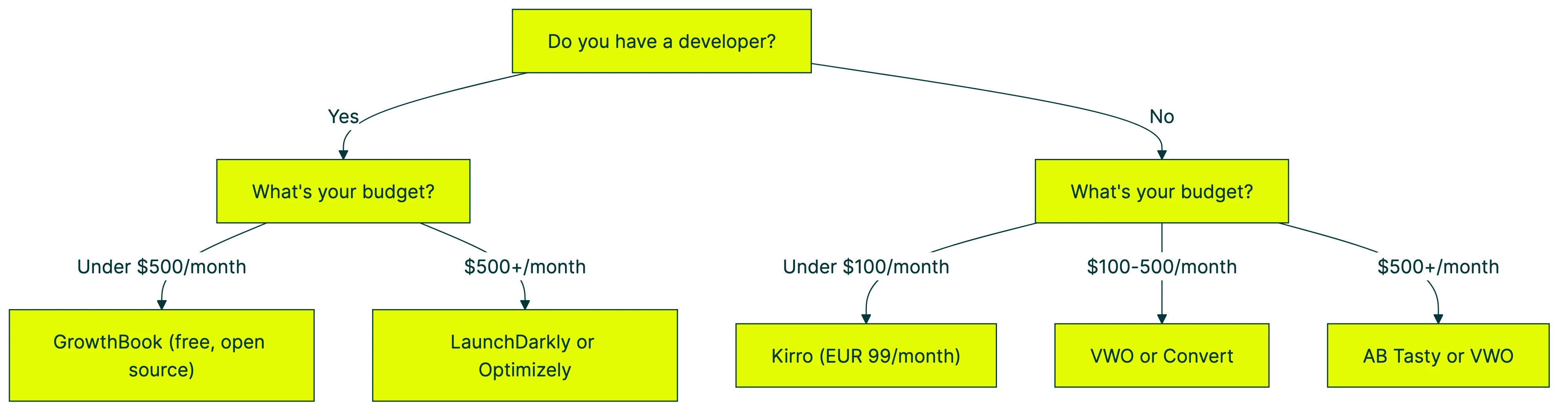
Or even simpler:
Testing landing pages only? Unbounce, if you build pages there. Otherwise, Kirro. Our landing page split testing playbook covers the full workflow from page selection to reading results.
Small team, small budget, no developer? Kirro. EUR 99/month. Set up in 3 minutes. Start a free trial and run your first split test today.
Growing team with 100K+ monthly visitors? VWO or Convert. They handle scale and give you extras like heatmaps.
Engineering team running server-side tests? GrowthBook (free) or LaunchDarkly (paid, more polished).
Enterprise with a dedicated testing team? Optimizely or AB Tasty. You already know who you are.
For a wider view of conversion optimization tools beyond just testing, we’ve covered the full stack separately.
Our take: The best split testing tool is the one you’ll actually use. We’ve seen teams buy Optimizely and run three tests in a year because setup took a month. Meanwhile, a solo founder with a $99 tool runs 30 tests and finds two winners. Tools don’t run tests. People do.
What does every split testing comparison leave out?
This is the section every other tool comparison skips because it’s bad for sales. We’re including it because it’ll save you money and frustration.
Most tests don’t produce winners
Optimizely analyzed 127,000 experiments and found that 88% of test ideas are not winners. At Google and Bing, only 10-20% of experiments work. That’s according to Ronny Kohavi, one of the most respected names in testing.
A separate analysis of 115 A/B tests found the average improvement was just under 4%.
This isn’t a failure of tools. It’s normal. The software you choose matters less than how many tests you run. A cheap tool that lets you test 20 ideas beats an expensive tool you use twice.
When you’re picking split testing software, pick the one you can afford to keep running month after month. Our guide on A/B testing mistakes covers the pitfalls we see most often.
Client-side testing creates “flicker”
Most split testing tools use JavaScript (code that runs in your visitor’s browser). When the test loads, there’s a brief flash where visitors see the original page before the new version appears. The industry calls this “flicker.”
It’s annoying. And it can mess with your results, because some visitors bounce before the test even loads. Amplitude’s research found that client-side testing (browser-based testing) can add 1-2 seconds of perceived load time.
Server-side testing (where the redirect happens on your server before the page loads) fixes this completely. But it requires a developer to set up. For most small teams, a fast client-side script (like Kirro’s 9KB snippet) minimizes the problem without the complexity.
Traffic thresholds are real
You need roughly 1,000-5,000 visitors per page version for trustworthy results. Our A/B test conversion rate guide breaks down exactly what traffic levels can detect at each threshold. If your test page gets 2,000 visitors per month, even a simple two-page split test takes 1-3 months.
Multivariate testing? With 8 combinations and 2,000 monthly visitors, you’re looking at 6-12 months. By then, your market has probably changed.
Most “best split testing tools” articles skip this because it’s not great for selling software. But knowing your traffic is the most important step before buying any testing tool.
Total cost of ownership vs. sticker price
The subscription is just the start. Factor in:
- Setup time: Enterprise tools take 10-40 hours to implement. That’s developer time you’re paying for.
- Training: Complex tools need training. That’s team hours not spent on actual testing.
- Scaling costs: Per-visitor pricing means your bill grows with your traffic. VWO, Convert, and Optimizely all scale up.
Year 1 total for an enterprise tool: $12,000-20,000+ when you add implementation and management hours. Kirro at EUR 99/month with a 3-minute setup and no developer? Year 1 cost: about EUR 1,188. That’s a 10x difference.
Companies spent $745 million on split testing tools in 2024. That number keeps climbing, mostly because enterprise tools keep raising prices. For small teams, simpler tools with flat pricing are a better deal.
FAQ
What is an example of split testing?
You send half your visitors to your current checkout page. The other half goes to a completely redesigned checkout page at a different URL. You measure which version gets more purchases. The key difference from A/B testing: the two versions live at different web addresses, not on the same page.
What is the difference between split testing and A/B testing?
Split testing redirects visitors to different URLs (like site.com/page-a vs. site.com/page-b). A/B testing changes elements on the same URL using JavaScript. Many people use the terms interchangeably, but the software requirements are different. Split testing needs redirect capability. A/B testing needs a visual editor or code injection. Most A/B testing tools handle both, but some only do one. If you’re comparing whole page redesigns, you need split testing specifically.
How do I do split testing?
Pick a tool from this list. Create two versions of your page (your current page and the new one). Set up a redirect rule so the tool sends half your traffic to each version. Choose a conversion goal (purchases, signups, clicks). Let it run until you have enough visitors for a reliable answer (usually 1,000+ per version). Most modern tools like Kirro handle the redirect automatically through a visual editor.
Can I use VWO for free?
VWO offers a free plan for up to 50,000 tested visitors per month. It includes basic A/B testing, but not the full split URL testing features. For split URL tests, you’ll need a paid plan starting around $299/month.
How much traffic do I need for split testing?
At minimum, about 1,000 visitors per page version. For a simple two-page split test, that’s 2,000 total visitors. If your page gets 10,000 visitors per month, you’ll have results in about a week. If it gets 2,000 per month, expect 4-6 weeks. Testing multiple things at once needs much more (we’re talking 100K+ monthly visitors minimum).
Is split testing bad for SEO?
Not if done correctly. Google recommends using rel="canonical" tags (a piece of code that tells search engines which version is the “real” page) on your test versions. With proper setup, split testing won’t hurt your rankings.
Some teams even use split testing to improve their SEO by testing different page structures. Read more about SEO A/B testing, what conversion rate optimization means, and our full CRO guide.

Randy Wattilete
CRO expert and founder with nearly a decade running conversion experiments for companies from early-stage startups to global brands. Built programs for Nestlé, felyx, and Storytel. Founder of Kirro (A/B testing).
View all author posts