Convert is a solid A/B testing tool for privacy-conscious teams with a budget of $300 to $600 per month. It’s genuinely strong on data compliance (EU servers, no third-party cookies). The stats engine is flexible. Support is rated 9.5/10 on G2. But it’s not cheap. The visual editor is behind VWO and Optimizely. And there’s a HIPAA compliance gap that nobody else talks about.
If you’re evaluating Convert, you’re probably comparing it to three or four other tools (our guide to A/B testing can help you decide what matters most). For more competitor comparisons, we’ve reviewed the other major players too. This review covers what it actually costs, where it shines, and where it falls short. We tested it ourselves and dug through 86 verified G2 reviews and TrustRadius feedback to get past the marketing pages.
Looking for a broader view? Check our best A/B testing software roundup.
What Convert is (and who it’s built for)
Convert Experiences has been around since 2008. Founded by Dennis van der Heijden, it’s a bootstrapped company of about 61 people spread across 20+ countries. They raised a $400K seed round early on, burned through it chasing VC money, then rebuilt as a bootstrapped business. They donate 10% of revenue. Unusual for a SaaS company.
The main audience is CRO agencies (companies that help businesses improve their websites) and mid-market teams that care deeply about data privacy. If you’re looking for Google Optimize alternatives since Google shut that down, Convert is on most shortlists.
Convert isn’t a beginner tool, though. It’s built for professional testers who want compliance baked in from day one.
If “privacy-first” sounds vague, here’s the short version. Your visitor data stays on EU servers. It doesn’t get shared with third parties. And there are no cookies tracking people across websites. For teams in Europe or anyone handling sensitive customer data, that matters.
Convert pricing breakdown (what you’ll actually pay)
Convert has three plans. Here’s what they actually cost in 2026, pulled from Convert’s pricing page:
| Plan | Monthly price | Annual price | Tested visitors | Key limits |
|---|---|---|---|---|
| Growth | $399/mo | $299/mo | 100K | 5 projects, 5 tests per project |
| Pro | $599/mo | $420/mo | 250K | Unlimited tests, server-side testing, testing multiple things at once |
| Enterprise | Custom | Custom | 1M+ | Dedicated account manager, single sign-on |
All plans come with a 15-day free trial. No credit card needed. If you’re running a Convert A/B test for the first time, start with Growth.
The word “tested visitors” trips people up. Convert charges per unique person who sees your test, not per page load. So if one visitor loads five pages, that’s one tested visitor, not five. That’s better than it sounds. Still, your bill grows as your traffic grows.
The overage fees are where it gets real. Go past 100K visitors on Growth? That’s an extra $399 per 100K. On Pro, it’s $699 per 250K. A site with 300K monthly visitors on the Growth plan would pay $299 + $798 = $1,097/month (on the annual billing). That adds up.
The “affordable” pricing myth
Every review you’ll read calls Convert “affordable.” That framing needs context.
Convert Growth at $299/month is the exact same price as VWO for 100K visitors. It’s not cheaper. GrowthBook is free if you host it yourself. PostHog gives you testing for free under 1 million events per month. Kirro is EUR 99/month with unlimited everything.
Convert is only “affordable” when you compare it to enterprise tools. And yes, compared to Optimizely’s pricing ($36,000+ per year), Convert looks like a bargain. But that’s like saying a $400 dinner is cheap because some restaurants charge $1,000.
Here’s a real cost comparison across traffic levels:
| Monthly visitors | Convert (Growth) | VWO | GrowthBook (cloud) | Kirro |
|---|---|---|---|---|
| 50K | $299/mo | $299/mo | $20/user/mo | EUR 99/mo |
| 100K | $299/mo | $299/mo | $20/user/mo | EUR 99/mo |
| 250K | $897/mo | ~$599/mo | $20/user/mo | EUR 99/mo |
| 500K | $1,495/mo | Custom | $20/user/mo | EUR 99/mo |
Our take: Convert isn’t expensive. But it’s not the budget option people make it out to be. If you’re a small team watching every dollar, there are genuinely cheaper tools that do the basics well. Kirro starts at EUR 99/month with no per-visitor pricing. Your success doesn’t make your bill go up.
What Convert does well
Convert earns its reputation in a few specific areas. These aren’t marketing fluff. We verified them through testing and independent review data.
Privacy compliance is the real deal. GDPR (Europe’s data privacy law), CCPA (California’s version), and PCI-DSS (the standard for handling payment card data) compliant. Data lives on EU servers. No third-party cookies. No personal data stored. If compliance is your top priority, Convert is one of the strongest picks in the split testing software market.
The CNIL (France’s data protection authority) even allows A/B testing cookies without consent under strict conditions. Convert is built for exactly this regulatory environment.
The stats engine is unusually flexible, too. Most tools give you one approach. Convert gives you three. First: fixed-sample testing, where you decide the traffic amount upfront. Second: sequential testing, which checks results as data comes in and adjusts for accuracy. Third: Bayesian A/B testing, which works with less traffic by updating its estimate as results arrive. You pick per test. Very few competitors offer that.
Support? G2 rates it 9.5/10. TrustRadius gives it 9.9/10. When you’re stuck at 10pm and your test isn’t tracking right, response time matters. Convert delivers.
If you manage tests for multiple clients, the agency features earn their keep. Multi-project management, running tests across different websites (cross-domain testing), and putting your own branding on reports (white-labeling). That’s why CRO agencies are their core audience.
One more thing Convert gets right: the flicker problem. You know that annoying flash when a page loads one version and switches to another? Convert built SmartInsert to prevent it. The script loads synchronously, which adds about 450ms to the first page load. After that, it’s cached. The script is around 50-60KB (not the lightest), but you won’t see the flicker.
Where Convert falls short
No tool is perfect. Convert has real limitations that most reviews skip because they’re earning affiliate commissions.
The visual editor is basic. Rich Page gave Convert a 9/10 and clearly likes the product. Even so, he calls the editor “too basic compared to Optimizely and VWO.” The new layout “causes UX issues.” And you can’t set up single-page app tests (websites that load content without refreshing the page) through the visual editor. If you need drag-and-drop changes without code, VWO does this better.
Onboarding is another rough spot. Below the Growth plan, you get limited help and basic tooltips. Multiple TrustRadius reviewers say “human onboarding was almost mandatory.” This isn’t a tool you’ll figure out in 15 minutes. Budget for a learning curve.
Feature gating is the third issue. Testing multiple things at once (multivariate testing) got removed from the entry-level plan. Running tests on the server instead of in the browser (server-side testing) is Pro-only. Same for sequential testing, which lets you check results early without hurting accuracy.
If you’re interested in multivariate testing, you’ll need the $420/month Pro plan at minimum.
The HIPAA compliance gap
No competing review mentions this, so we will.
Convert’s own security page says it plainly: “Convert Insights Inc. is not a Business Associate” and their services “are not HIPAA compliant.” HIPAA is the US law that protects healthcare data. If you handle patient info, your tools need to comply.
Their Capterra listing says “HIPAA-ready,” though. Some marketing pages imply compliance too.
Those two things can’t both be true. “HIPAA-ready” is not “HIPAA compliant.” It’s like a restaurant saying it’s “health inspection-ready” without passing the inspection. If your organization handles protected health information, Convert can’t be used. Full stop.
Growth Method’s review claims “SOC 2, EU servers” without checking. Rich Page doesn’t mention HIPAA at all. InsightWhale’s guide skips compliance details.
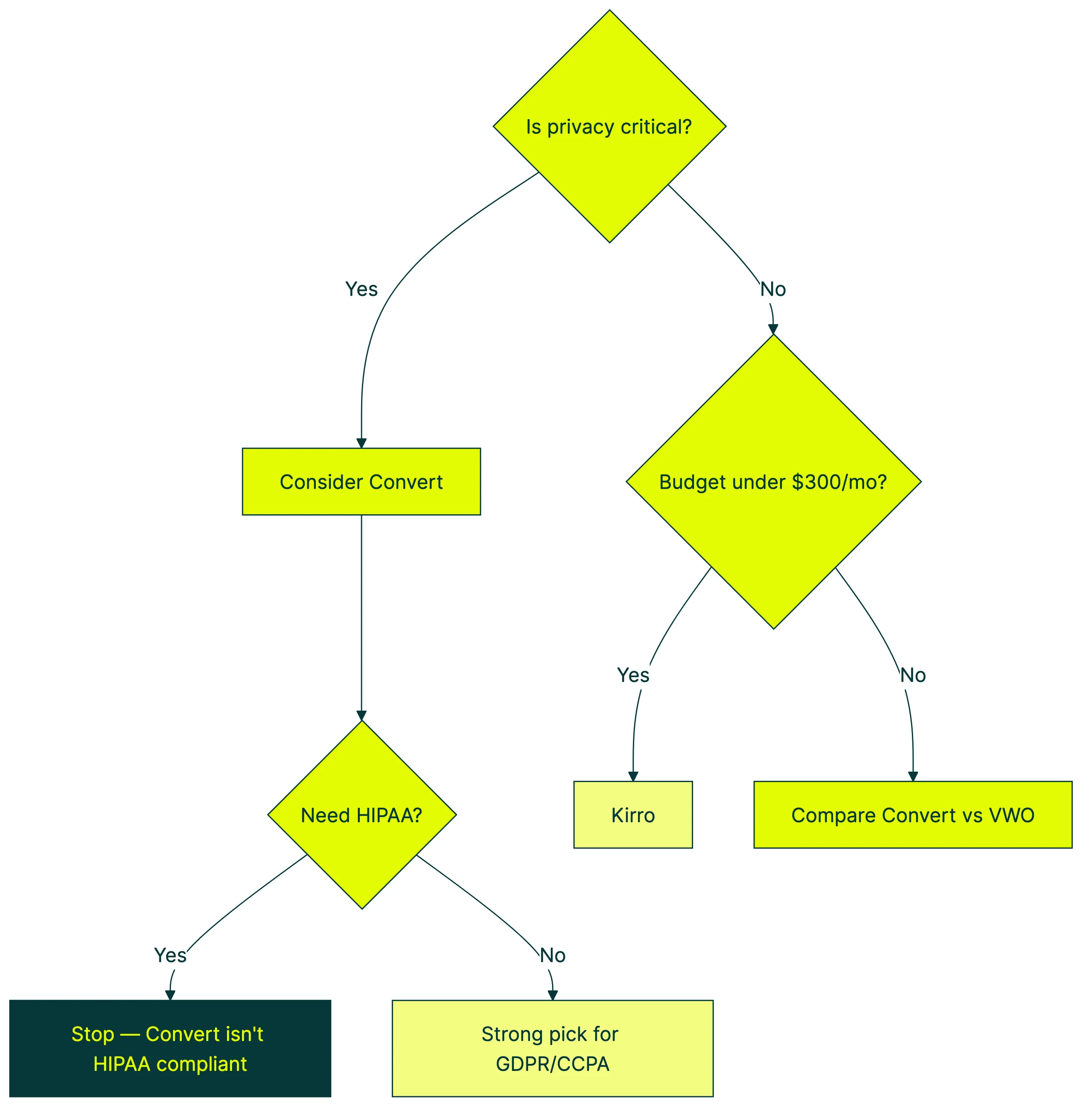
Our take: Convert is genuinely strong on GDPR and CCPA. But the HIPAA gap is a dealbreaker for healthcare and medical teams. Check the security page yourself before signing contracts.
Convert vs the competition (honest comparison)
Most “Convert alternatives” articles compare it to one or two tools. Here’s how it stacks up against four, across the dimensions that actually matter.
| Feature | Convert | VWO | Optimizely | GrowthBook | Kirro |
|---|---|---|---|---|---|
| Starting price | $299/mo | $299/mo | ~$3,000/mo | Free (self-hosted) | EUR 99/mo |
| Script size | ~50-60KB | ~80-120KB | ~80-100KB | Varies | 9KB |
| Stats engine | Frequentist + Bayesian | Bayesian | Frequentist (sequential) | Frequentist + Bayesian | Bayesian |
| Visual editor | Basic | Strong | Strong | None | Simple |
| Privacy | GDPR, CCPA, PCI-DSS | GDPR | GDPR | Self-hosted option | GDPR |
| Heatmaps | No | Yes (built-in) | No | No | No |
| Per-visitor pricing | Yes | Yes | Custom | No | No |
Convert vs VWO: Same price for the same traffic. VWO has a better visual editor plus built-in heatmaps and session recordings. Convert has better privacy and more flexible stats. VWO recently merged with AB Tasty. More on that in our VWO vs Optimizely comparison. If you’re weighing Convert against the now-merged VWO/AB Tasty platform, see our AB Tasty pricing details and our AB Tasty alternative options guide for how the landscape shifted.
Against Optimizely, it’s a different game. Optimizely costs 10 to 20 times more but has a much stronger visual editor and deeper enterprise features. Convert wins on price and privacy. If you’re comparing these two, read our Optimizely alternatives post. Kameleoon is another enterprise option worth knowing about, especially for teams that need EU data residency and AI-powered personalization.
GrowthBook is free if you host it yourself, or $20 per user per month on their cloud. It’s developer-first: connects to your data warehouse, requires technical setup. Convert is more marketer-friendly. Different audiences entirely.
Then there’s Kirro. EUR 99/month with unlimited everything and a 9KB script. Bayesian stats. Simple visual editor. No per-visitor pricing. Built for small teams who want simplicity over enterprise compliance features. If Convert feels like too much, give Kirro a try.
Who should (and shouldn’t) use Convert
Use Convert if:
- You’re a CRO agency managing tests across multiple clients. The multi-project setup and white-labeling (putting your own branding on reports) make it practical. Check our CRO tools guide for more agency options.
- You’re in a regulated industry (finance, insurance, strict EU data rules) and need EU data residency without compromise.
- Stats flexibility matters to your team. Choosing between Bayesian and Frequentist per test is genuinely useful if your team knows the difference.
- Your traffic is 100K+ monthly and your testing budget is $300 to $600 per month.
Don’t use Convert if:
- Budget is tight. At $299 to $399 per month, Convert is a real expense. Kirro at EUR 99/month handles the basics with a lighter script and no per-visitor pricing.
- You need a great visual editor. VWO and Optimizely are both ahead here. If your team makes changes visually and can’t write code, the editor matters.
- Your team writes code. GrowthBook is free and connects directly to your data warehouse. Convert’s strength is compliance, not developer experience.
- You handle healthcare data. Convert is not HIPAA compliant. Their own security page says so.
Building a full CRO software stack? Convert might be one piece, but you’ll likely need heatmaps and analytics tools alongside it.
How to switch away from Convert (migration checklist)
Every review you’ll find is about migrating TO Convert (usually from Google Optimize). Nobody talks about leaving. Teams outgrow tools, though. The visual editor isn’t enough. The budget doesn’t match the results. Or you need HIPAA compliance.
Here’s how to leave without losing data or breaking live tests:
- Export your test data. Convert supports raw data export on Pro and above. Download everything: configs, results, goal definitions. On Growth, grab what you can from the reporting interface.
- Document your active tests. What each test measures, which pages it runs on, what the targeting rules are. You’ll need this to rebuild in your new tool.
- Map your integrations. Convert connects to 90+ tools. List every one you actually use (GA4, Hotjar, Slack, whatever) and check that your new tool supports them.
- Run both tools in parallel for two weeks. Same test, both platforms, compare numbers. If they’re close, you’re good. Way off? Investigate before pulling the plug.
- Swap the scripts. Once you’re confident, remove Convert and add the new tool. Don’t run both forever. Two testing scripts slow your site down.
Worth knowing: if you’ve built custom integrations using Convert’s API, those need rebuilding. Budget time for it.
Frequently asked questions
How much does Convert A/B testing cost?
Growth starts at $299/month on annual billing ($399/month if you pay monthly). That includes 100K tested visitors, 5 projects, and 5 tests per project. Pro runs $420 to $599/month with 250K visitors and unlimited tests. Enterprise is custom pricing. Watch out for overage fees: $399 per additional 100K visitors on Growth.
Is Convert better than Optimizely?
Depends on budget and team. Convert is roughly 10 times cheaper with better privacy features. Optimizely has a stronger visual editor, mature feature flags (turning features on for some visitors, off for others), and a bigger integration ecosystem. Mid-market teams prioritizing privacy? Convert wins. Enterprise teams needing advanced features? Optimizely. See our Optimizely alternatives comparison for more.
What’s the best Convert alternative?
It depends on what you need. Kirro for simplicity and price (EUR 99/month, no per-visitor pricing). VWO for an all-in-one CRO tool with heatmaps. GrowthBook for developer teams who want free, warehouse-connected testing. Optimizely for enterprise. Browse our full A/B testing tools list for more options.
Is Convert GDPR compliant?
Yes. EU servers, no third-party cookies, no personal data stored. GDPR, CCPA, and PCI-DSS compliant. But not HIPAA compliant, despite some marketing materials suggesting otherwise. Their security page makes this explicit.
Does Convert cause page flicker?
Convert’s SmartInsert technology prevents visible flicker. It loads the test synchronously, so visitors see the right version from the start. The tradeoff: it adds about 450ms to the first page load. After that, it’s cached. Most visitors won’t notice the delay, but performance-obsessed teams should know about it.
Should I switch from Convert to something else?
If Convert is working for you, probably not. Switching tools mid-program is disruptive. But if the visual editor frustrates you, the pricing feels off, or you need HIPAA compliance, look at alternatives. Our migration checklist above walks through the switch. And avoiding common A/B testing mistakes during migration saves real headaches.

Randy Wattilete
CRO expert and founder with nearly a decade running conversion experiments for companies from early-stage startups to global brands. Built programs for Nestlé, felyx, and Storytel. Founder of Kirro (A/B testing).
View all author posts