Mobile app A/B testing is how you show two versions of something inside your app and measure which one gets more taps, signups, or purchases. Same goal as web A/B testing. Completely different mechanics. It’s one piece of app conversion rate optimization, which covers the full journey from store listing to paying subscriber.
On a website, you paste a script and start testing in minutes. On mobile, you’re dealing with app store review delays, people stuck on old app versions, and way less traffic per screen. You can’t just swap a headline the way you can on a web page. Most of the best A/B testing tools were built for websites first. Apps were an afterthought, if they were thought about at all.
This guide covers what actually works for mobile. Which tools to use, how to run your first test, and the privacy changes that made mobile testing trickier since 2024. For a detailed comparison of the A/B testing tools for mobile apps, we break that down separately. And for how mobile tools fit into the broader A/B testing tools space, we cover that too.
What makes mobile A/B testing different from web testing
If you’ve run A/B tests on a website, here’s why you can’t use the same playbook for a mobile app.
App store review delays slow everything down. On the web, you push a change and it’s live instantly. On iOS, Apple reviews your update. That takes 1 to 7 days. Android is faster, but still not instant. Every iteration costs you a week.
That’s why most mobile A/B tests use server-side testing. Instead of baking the test into the app code, the test logic lives on your server. You can change what people see without submitting a new app version.
People stay on old versions. On a website, everyone sees the latest version. On mobile, some people haven’t updated since last year. Your test might show Version B to people on the current release and nothing to people on version 3.2. That’s version fragmentation. It makes test results messy.
Your onboarding screen might get 500 views a day. That’s not a lot to split between two versions. Mobile tests take longer to reach confidence. Our sample size formula guide breaks down the math.
Web testing tools let you click on a headline and change it. Mobile apps are compiled code, not editable HTML. You need feature flags (a way to turn features on for some people and off for others). Or remote configuration. Either way, swapping content requires a plan, not just a visual editor.
And multivariate testing (testing multiple changes at once)? Already traffic-hungry on websites. On mobile, it’s usually impractical unless you have millions of daily active people.
Our take: Most guides treat mobile A/B testing like web testing with extra steps. It’s not. It’s a different discipline. The tools are different, the timelines are different, and the stats need more patience.
Two types of mobile tests you should know about
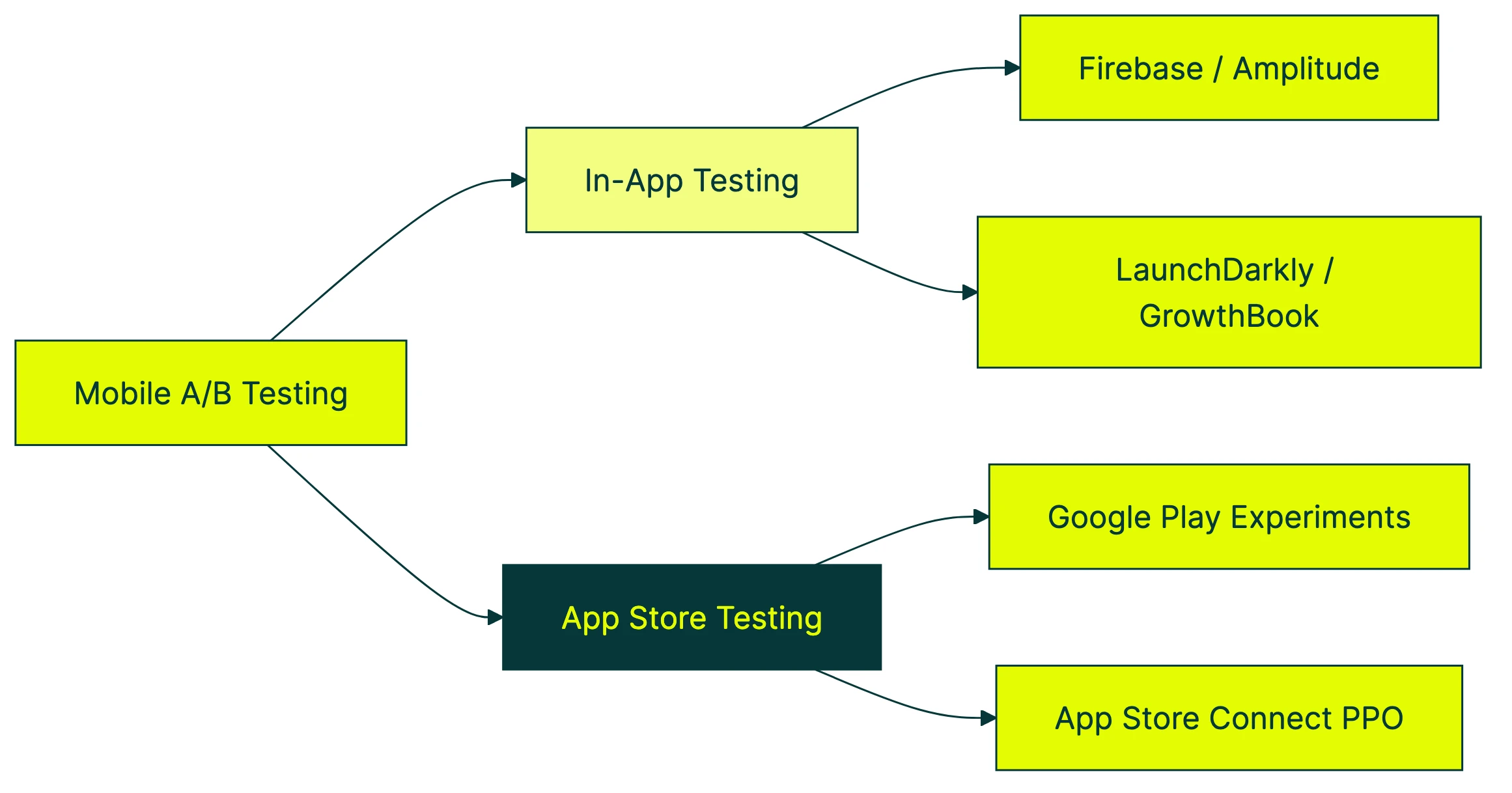
This is the part every competitor article misses. When people say “mobile A/B testing,” they usually mean one of two completely different things.
In-app testing
This is what most people think of. You change something inside the app and measure the impact. New onboarding flow. Different subscription screen. Rearranged checkout steps. Button color. (Yes, people still test button colors.)
In-app testing requires an SDK (a small code package your developer adds to the app) or a server setup. The testing tool decides which version each person sees. Results come back through the tool’s dashboard or your analytics.
App store testing
This is the free lever most teams completely ignore. Before anyone opens your app, they see your app store listing. The icon, screenshots, description, preview video. All of those affect whether someone taps “Download.”
Both Apple and Google give you free built-in tools to test these:
- Google Play Experiments lets you test up to 5 versions of your store listing. Different icons, screenshots, descriptions, short descriptions. Free. Built right into the Google Play Console.
- App Store Connect Product Page Optimization is Apple’s version. Test different icons, screenshots, and app preview videos. Also free. Also built in.
According to AppTweak’s ASO Trends Report, store listing changes can improve install rates by 20 to 30 percent. That’s a huge lift for something that costs nothing and needs no developer time. For baseline numbers to compare against, see our app store conversion rate data by category.
There’s also a third angle most mobile teams overlook: testing the web pages that drive app installs. Your ads don’t always send people straight to the App Store. Sometimes they land on your website first. Testing that landing page can improve install rates before you touch any app code. That’s where a tool like Kirro fits. It handles the web side of the funnel while your mobile tools handle the in-app side.
Our take: If you haven’t tested your app store screenshots yet, stop reading and go do that first. It’s free, it doesn’t require a developer, and it affects every single person who considers downloading your app.
Best mobile A/B testing tools (2026)
This isn’t a ranked list from best to worst. The right mobile ab testing tool depends on your team, your stack, and what you’re actually testing.
For teams in the Google ecosystem: Firebase A/B Testing
Firebase is free and integrates with Remote Config (Google’s way of changing app behavior without an update). If you already use Firebase for analytics, push notifications, or crash reporting, adding A/B testing is straightforward.
Firebase’s analytics aren’t great for deep analysis, though. You’ll know which version won, but understanding why takes extra work. Good enough for most small teams starting out.
Price: Free Best for: Android-first teams, indie developers, anyone already using Firebase
For product teams wanting analytics and testing: Amplitude Experiment
Amplitude combines experimentation with product analytics. Run a test and immediately see how it affects retention, engagement, and conversion in the same dashboard. Strong mobile SDKs for both iOS and Android.
It’s more expensive than Firebase (obviously, since Firebase is free). But if you’re already paying for Amplitude Analytics, adding experimentation makes sense.
Price: Free tier available, paid plans start around $49/month Best for: Product-led teams that want testing and analytics in one place
For developer-led teams: LaunchDarkly
LaunchDarkly started as a feature flag platform and added experimentation on top. It’s server-side, which is ideal for mobile (no app store review delays for test changes). Very mature, very reliable.
It’s built for engineers, though. If you don’t have a developer on the team, you’ll struggle. Pricing is enterprise-level too, starting around $10,000/year.
If you want something similar but open-source, GrowthBook does server-side feature flags and experimentation for free. You’ll need someone technical to set it up and maintain it.
Price: LaunchDarkly from ~$10,000/year. GrowthBook is free (self-hosted) Best for: Engineering teams that want feature flags and testing in one system
For app store testing: SplitMetrics and StoreMaven
These are dedicated tools for testing your App Store and Google Play listings. They go beyond what the built-in platform tools offer, with more variants, faster results, and better analytics.
SplitMetrics also offers a pre-launch testing tool that lets you test store listing concepts before your app is even live.
Price: Custom pricing (not cheap, designed for studios with multiple apps) Best for: Teams that take app store optimization seriously and have the budget for it
For teams that also test their website: Kirro
Full disclosure: this is us. Kirro is a web A/B testing tool, not a mobile SDK. We’re including it here because mobile teams don’t only have a mobile funnel.
Your ads, social posts, and search results often send people to your website before they reach the App Store. Testing those landing pages, headlines, and calls to action can improve install rates without any app code changes. You can set up a test on your landing page in about three minutes. No developer needed.
Use Kirro for the web side. Use Firebase, Amplitude, or LaunchDarkly for the in-app side. That combination covers the full funnel.
Price: EUR 99/month (flat, unlimited tests and visitors) Best for: Teams that want to test the web pages that drive app installs
Quick comparison
| Tool | In-app testing | App store testing | Web testing | Price |
|---|---|---|---|---|
| Firebase A/B Testing | Yes | No | No | Free |
| Amplitude Experiment | Yes | No | No | Free tier, paid from $49/mo |
| LaunchDarkly | Yes | No | No | ~$10,000/yr |
| GrowthBook | Yes | No | No | Free (self-hosted) |
| SplitMetrics | No | Yes | No | Custom |
| StoreMaven | No | Yes | No | Custom |
| Kirro | No | No | Yes | EUR 99/mo |
| Google Play Experiments | No | Yes | No | Free |
| App Store Connect PPO | No | Yes | No | Free |
Notice the pattern? In-app tools don’t do app store testing. App store tools don’t do in-app testing. And none of them test your website. That’s why most mobile teams end up with two or three tools from this list.
If you’re looking for a broader comparison of web-focused options, our A/B testing software and split testing software guides cover that ground.
How to run your first mobile A/B test
The step-by-step below is for an in-app test. App store testing is simpler (just use Google Play Experiments or App Store Connect and follow their wizard).
Step 1: Pick the screen that matters most
Open your analytics. Find where people drop off. Is it the onboarding flow? The subscription screen? The checkout page? Start there. Testing your settings page won’t move the needle.
Step 2: Decide what you’re actually testing
“Let’s see what happens” isn’t a test. “I think a shorter onboarding flow will improve completion rates” is. Write down what you expect to change and how you’ll measure it. This doesn’t need to be formal. A sentence is enough.
Step 3: Figure out how many people you need
This is where mobile gets tricky. If your test screen only gets 200 views a day, splitting that between two versions means 100 per version. That’s not enough to detect small changes. You might need 4 to 6 weeks.
Use a sample size calculator to set expectations before you start. It’s better to know upfront that your test needs a month than to shut it down early because you got impatient.
Step 4: Choose how to deliver the test
Two main options:
- Server-side (recommended for mobile): Your server decides which version each person sees. No app update needed to change the test. Works with LaunchDarkly, GrowthBook, Firebase Remote Config, or a custom setup.
- Client-side: The test logic lives in the app code. Simpler to set up but requires an app update to start, change, or stop a test.
Server-side wins for mobile because it skips the app store review cycle.
Step 5: Set up and launch
Integrate your chosen tool’s SDK (or connect to your server). Define your two versions. Set your traffic split (usually 50/50). Set your goal (the thing you want people to do). Launch.
Step 6: Don’t peek
This is the hardest part. Mobile tests take longer because traffic per screen is lower. Checking results daily and making decisions based on early data is one of the most common A/B testing mistakes. Let the test run for the full duration your sample size calculation recommended.
Step 7: Analyze with the right method
When the test hits your sample size target, check the results. Bayesian testing methods work well for mobile because they handle smaller samples better than traditional approaches. They tell you “Version B has an 85% chance of being better” instead of requiring a fixed threshold.
Make sure you’re actually measuring the right conversion rate. Sometimes a test improves one metric (taps) while hurting another (purchases). Look at the metric that matters to your business.
Step 8: Roll out the winner carefully
Don’t flip the switch for everyone at once. Use a staged rollout (releasing to a small group first, then gradually everyone). This catches issues that testing alone might miss, like a version that works great for new people but confuses existing ones.
Realistic timeline: expect your first mobile A/B test to take 3 to 6 weeks from idea to results. That’s slower than web testing. It’s normal.
The privacy wall: how ATT changed mobile testing
Nobody else writing about this topic covers what comes next. It’s arguably the biggest challenge for mobile A/B testing in 2026.
What happened
In 2021, Apple introduced App Tracking Transparency (ATT). In plain English: your iPhone now shows a pop-up asking “Allow this app to track your activity across other companies’ apps and websites?” Most people tap “Ask App Not to Track.” Only about 25 to 35 percent opt in.
Before ATT, apps used something called the IDFA (a unique ID for your device) to follow you across sessions. It tracked conversions and kept you in the same test group. After ATT, that ID is gone for most people.
Why it matters for A/B testing
A/B tests need to show the same version to the same person every time they open the app. If someone sees Version A on Monday and Version B on Wednesday, your data is garbage. Without a persistent identifier (something that says “this is the same person”), consistent assignment gets harder.
It also makes measuring results across sessions trickier. Did the person who saw Version B come back and purchase a week later? Without reliable tracking, you might miss that conversion entirely.
What to do about it
Use first-party data. If people sign in to your app, use their authenticated user ID for test assignment. This works perfectly and doesn’t depend on any device identifier. It’s the most reliable approach.
Go server-side. Server-side testing can assign people based on their account, not their device. This sidesteps the IDFA problem completely for logged-in people.
For anonymous users, try fingerprint-style matching. Some tools combine device details (screen size, OS version, language settings) to create a temporary identifier. Think of it as recognizing someone by their outfit instead of their name. Not perfect, but better than nothing.
Watch Android too. Google’s Privacy Sandbox for Android is bringing similar changes to the Android world. If you’re building a testing system that relies on device-level tracking, it’ll break there too eventually.
For web pages that drive app installs, privacy is simpler. Tools like Kirro work with first-party cookies and don’t depend on any device ID. If you want to test your app’s landing page, the privacy constraints are much lighter than in-app testing.
Common mobile A/B testing mistakes (and how to avoid them)
Ronny Kohavi ran experimentation at Microsoft, Amazon, and Airbnb. His research shows only about a third of A/B tests produce a positive result. The other two-thirds show no difference or make things worse. That’s on the web, where sample sizes are large. On mobile, odds are even tougher.
Here are the mistakes we see most often.
Stopping tests too early. Mobile traffic per screen is smaller. The temptation to peek after three days is real. But early stopping inflates false positives. A test that looks like a winner after 500 visitors might just be noise. Let it run. We wrote a whole piece on A/B testing mistakes where this is mistake number one.
Version fragmentation is sneaky. You launch a test in version 4.5 of your app. But 40% of your people are still on version 4.3. They never see the test. Your data skews toward people who update quickly, and those tend to be power users, not your typical customer.
Falling for the novelty effect. A new onboarding flow looks amazing in the first week. Engagement is up 20%. Then it drops back to baseline as people get used to it. The bump was curiosity, not improvement. Run tests longer to see past the spike.
Then there’s the classic: testing the wrong thing. Changing a button color when your onboarding flow loses 60% of people at step three is like rearranging deck chairs. Test structural changes first. Cosmetic ones later. Understanding what split testing means helps you pick better test targets.
Copy-pasting your web playbook. The tools, timelines, and sample sizes are all different on mobile. A test that runs for one week on a website might need four weeks in an app. What works in a browser (visual editors, client-side scripts) doesn’t apply to native apps.
And finally: don’t run too many tests at once. On a website with 50,000 daily visitors, you can get away with overlapping tests. On an app screen with 1,000 daily visitors, overlapping tests muddy each other’s results. One test per screen.
Frequently asked questions
How long should a mobile A/B test run?
Typically 2 to 4 weeks minimum. Apps with lower traffic might need 4 to 6 weeks. It depends on your daily active people and how big a change you’re trying to detect. Use a sample size calculator instead of guessing. And never stop early because one version looks ahead. That’s the fastest path to false results.
Can I A/B test my app store listing for free?
Yes. Google Play Experiments and App Store Connect Product Page Optimization are both free and built into the platforms. Google lets you test up to 5 variants of your listing elements. Apple lets you test icons, screenshots, and app preview videos. No third-party tool needed. According to industry data, these changes can meaningfully improve install rates, and most teams haven’t tried them yet.
What’s the difference between A/B testing and feature flags in mobile apps?
A/B testing measures which version performs better. You split traffic, track results, pick a winner. Feature flags let you turn features on or off for specific groups. Different concepts, but many mobile teams use feature flags as the delivery method for their A/B tests. Tools like LaunchDarkly and GrowthBook combine both. Think of feature flags as the delivery truck and A/B testing as the measurement system.
Do I need a developer to run mobile A/B tests?
For in-app tests, usually yes. Someone needs to integrate an SDK (a code package that connects to your testing tool) and wire up the test logic. For app store tests (icons, screenshots, descriptions), no coding needed at all. And for web landing pages that drive app installs, no-code tools like Kirro let you test headlines, buttons, and page layouts without writing a line of code.
How is mobile A/B testing different from web A/B testing?
Three big differences. First, you can’t just inject a script. Mobile apps are compiled code, so you need an SDK or a server-side setup. Second, app store review delays slow your iteration speed (especially on iOS). Third, not everyone runs the same version of your app, so version fragmentation means some people might never see your test.
On the web, tools like Kirro or VWO let you start testing in minutes with a visual editor. On mobile, plan for days of setup and weeks of runtime. Same concept, very different execution.
Is Firebase A/B Testing good enough for most apps?
For getting started, yes. Firebase is free, integrates with Remote Config, and works on both iOS and Android. Even Meta built something similar for their own apps, so the approach is solid. The limitation is analytics depth. If you need to understand test impacts across your whole funnel, you’ll eventually want Amplitude or a dedicated analytics tool alongside it.
What should I A/B test first in my mobile app?
The screen where you lose the most people. Open your analytics, find the biggest drop-off. For most apps, that’s the onboarding flow, the subscription screen, or whatever comes right after signup. Don’t start with button colors. Start with structural changes (a shorter onboarding, a different value proposition). Knowing the typical mobile app conversion rates for your category helps you set realistic targets for each test. Conversion rate optimization principles apply here too. Fix the biggest leak first.

Randy Wattilete
CRO expert and founder with nearly a decade running conversion experiments for companies from early-stage startups to global brands. Built programs for Nestlé, felyx, and Storytel. Founder of Kirro (A/B testing).
View all author posts