Microsoft Clarity is the best free session replay tool. Hotjar is the most popular all-in-one option. PostHog wins for technical teams who want open source. But the right pick depends on your budget, your team, and how seriously you take visitor privacy.
This guide compares 8 session replay tools side by side. Session recordings feed directly into your A/B testing workflow by showing you what to test next. We also cover two things every other roundup skips: the privacy lawsuits happening right now in California, and why session replay is only half the job.
Quick comparison table
| Tool | Best for | Starting price | Free plan? | Heatmaps? | Mobile? |
|---|---|---|---|---|---|
| Microsoft Clarity | Zero-budget teams | Free | Yes (unlimited) | Yes | Yes |
| Hotjar | Beginners who want surveys too | $39/month | Yes (35 sessions/day) | Yes | Yes |
| FullStory | Product teams with UX researchers | Custom pricing | Yes (limited) | Yes | Yes |
| Lucky Orange | Small business owners | $14/month | No | Yes | Yes |
| Mouseflow | CRO teams | $24/month | Yes (limited) | Yes | Yes |
| PostHog | Developer teams | Free (5K recordings/month) | Yes | Yes | Yes |
| Smartlook | Mobile app teams | $39/month | Yes (limited) | Yes | Yes |
| LogRocket | Debugging user-reported bugs | $99/month | No | No | Yes |
Two things to notice. First, every tool except LogRocket includes heatmaps. Second, “free” doesn’t always mean free. The best session replay software sometimes costs you in ways that aren’t on the price tag. More on that in the privacy section below.
What is session recording software (and why it matters)
Think of a physical store with a security camera. You’d watch the footage to see where shoppers pause, where they turn around, and where they leave empty-handed. Session recording software does the same thing for your website.
It captures mouse movements, clicks, scrolls, and form interactions. Then it plays them back as a video. You watch a real person use your site and spot the exact moment they got stuck.
Why bother? Because your analytics only tell you WHAT happened. “50 people left the pricing page.” Session replay shows you WHY. Maybe the pricing table was confusing. Maybe the buy button looked broken on mobile. Maybe visitors scrolled right past your value proposition without stopping.
Contentsquare’s 2025 benchmark report analyzed 90 billion sessions. The finding? 40% of online visits include some form of user frustration. Rage-clicking, spinning loading screens, broken buttons. Your analytics won’t flag most of those. Session recordings will.
NNGroup’s eye-tracking research puts a number on this: 57% of viewing time happens above the fold (the part of the page you see before scrolling). Your key message is below the fold? Most visitors never see it. Session replays and scroll maps (a type of heatmap that shows how far people scroll) make this painfully obvious.
Session replay, heatmaps, and click tracking are all part of the same family. Think of them as different camera angles on the same problem.
Heatmaps show you the pattern across hundreds of visits. Recordings show you the story of one specific visit. Click tracking tells you which buttons people actually hit. Together, they’re the research half of conversion rate optimization. They’re essential CRO tools for any testing program.
Our take: You don’t need all three on day one. Start with recordings. Watch 10 sessions. You’ll spot problems analytics never showed you. If that hooks you (it usually does), heatmaps and click tracking will make sense next.
The 8 best session replay tools
1. Microsoft Clarity: best free option
Clarity is 100% free. No session limits. No traffic caps. No premium tier hiding the good features.
You get heatmaps, session recordings, and scroll maps at no cost. It also integrates with Google Analytics, so your recording data sits next to your traffic data.
For most small businesses, this is the right starting point. Watch unlimited recordings. Generate heatmaps for any page. Filter sessions by “rage clicks” (when someone clicks the same spot repeatedly out of frustration).
The catch nobody mentions.
Microsoft’s terms let them use your visitors’ behavioral data for advertising purposes. A detailed analysis by Beantin.net found that Microsoft reserves the right to create visitor profiles for ad targeting. Clarity also doesn’t honor Do Not Track browser settings.
In plain English: Microsoft picks up the tab by learning from your visitors’ behavior to improve its ad products. Every other roundup calls Clarity “free with no catches.” That’s not the full picture. It’s free in dollars. The cost is your visitors’ data.
Does that matter? For a small blog, probably not. For a healthcare site or a business in the EU that needs GDPR compliance, it’s worth thinking about.
Best for: Small businesses testing the waters. Anyone who needs heatmaps and recordings but can’t spend money yet. Pair it with GA4 and you’ve got a solid research stack for $0.
2. Hotjar (now part of Contentsquare): best all-in-one for beginners
Hotjar is probably the first name that pops into your head when someone says “heatmaps.” It bundles session recordings, heatmaps, surveys, and feedback widgets into one dashboard. If you want to see WHERE visitors click AND ask them WHY, Hotjar does both without switching tools.
Contentsquare acquired Hotjar in July 2025, so the pricing and feature lineup are shifting. Right now, the free plan gives you 35 sessions per day. Paid plans start at $39/month. For the full breakdown, see Hotjar’s current pricing.
Hotjar’s biggest strength is also its limitation. It’s built for marketers who want easy-to-understand visuals. If you need deep funnel analysis or developer-level debugging, you’ll outgrow it.
Looking at alternatives? We’ve got a full breakdown of Hotjar alternatives with real pricing and privacy trade-offs.
Best for: Marketing teams who want heatmaps plus surveys in one place. The free plan is enough to see if session replay is useful for you.
3. FullStory: best for product teams
FullStory combines session replay with product analytics and error tracking. Its standout feature is AI-powered “frustration signals.” It automatically detects rage clicks, dead clicks (clicking something that isn’t clickable), and error clicks. You don’t have to watch hundreds of recordings. FullStory surfaces the worst sessions for you.
They launched a free tier in August 2025, but the real product is enterprise-priced. Custom pricing means you’ll need to talk to sales to find out what it costs. That’s usually a sign it’s not cheap.
If you have a full-time person watching session data, FullStory gives them powerful filtering tools. If you’re a team of two? Probably overkill. We break down the best FullStory alternatives with real pricing data if you’re weighing your options.
4. Lucky Orange: best for small business owners
Lucky Orange is the cheapest paid option at $14/month. It bundles session replay, heatmaps, and live chat. Yes, live chat. You can actually watch a visitor browse your site in real time and start a conversation with them. It’s like being a sales associate in a physical store.
The dashboard is intentionally simple. No complex funnels, no event taxonomies, no setup that requires a developer. That’s the point.
Best for: E-commerce stores and small business websites where the person watching recordings is also the person answering customer questions.
5. Mouseflow: best for CRO teams
Mouseflow goes deeper than basic session replay. It adds funnel analysis (where do people drop off in your checkout flow?) and form analytics (which form field makes people abandon?). There’s also a friction score that highlights your most problematic sessions automatically.
Plans start at $24/month. The friction scoring system is the standout. Instead of watching recordings randomly, Mouseflow ranks them by how frustrated the visitor appeared. That saves hours. For a detailed breakdown, see our Hotjar vs Mouseflow compared.
Best for: Teams doing serious CRO testing work. If you’re already running A/B tests and need the research to back up your next test idea, Mouseflow’s data is built for that workflow.
6. PostHog: best for developer teams
PostHog is open source and self-hostable. Session replay, product analytics, feature flags (a way to turn features on for some visitors and off for others), A/B testing. All in one platform. The free tier gives you 5,000 recordings per month.
The trade-off is complexity. PostHog is built by developers, for developers. The interface assumes you’re comfortable with event streams and data queries. If “event taxonomy” makes your eyes glaze over, PostHog isn’t for you.
Best for: Technical teams who want everything open-source and have an engineer who enjoys setting things up.
7. Smartlook: best for mobile apps
Most session replay tools focus on websites. Smartlook records both web sessions and mobile app sessions in one tool. If you have a website AND an iOS or Android app, you get one dashboard for all of them.
It also generates “retroactive heatmaps” from past session data. You don’t have to set up heatmap tracking in advance. Just tell Smartlook which page you’re curious about, and it builds the heatmap from recordings it already captured. Handy.
Plans start at $39/month with a limited free plan available.
Got a website AND a mobile app? Smartlook gives you one dashboard instead of two.
8. LogRocket: best for debugging
LogRocket is the odd one out on this list. It’s not really a CRO tool. It’s a debugging tool that happens to include session replay. Every recording is tied to error logs, console output, and network requests. When a customer reports “the checkout page broke,” LogRocket shows your engineering team exactly what happened.
Starting at $99/month, it’s the priciest option here. And it doesn’t include heatmaps at all.
Best for: Engineering teams debugging user-reported issues. If your main question is “why did that crash?” rather than “why didn’t they convert?” this is the right tool.
How do you choose the right tool for your team?
Don’t pick the tool with the longest feature list. Pick the one that matches your job.
Zero budget: Microsoft Clarity. But read the privacy section first and understand the data trade-off. If the data trade-off is a dealbreaker, we’ve compared the best Microsoft Clarity alternatives with better privacy options.
Small business or e-commerce: Lucky Orange ($14/month) if you want live chat bundled in. Mouseflow ($24/month) if you want deeper funnel data. If heatmaps matter more than session recordings, check our best Crazy Egg alternatives for tools that combine heatmaps with A/B testing.
Marketing team: Hotjar if you want surveys alongside heatmaps. Mouseflow if you care more about click tracking and funnel drop-offs.
Product team: FullStory if budget isn’t a concern. PostHog if you want open source and your team writes code. Either way, you’ll want to pair replay with A/B testing to actually fix what you find.
Dev team: LogRocket for debugging. PostHog if you want analytics plus replay in one open-source package.
Our take: Most small businesses should start with Microsoft Clarity (free) and add a paid tool only after they’ve watched 50 recordings and know what they need. Buying a $99/month tool before you’ve watched a single session recording is like buying a gym membership before you’ve gone for a walk. Start small.
This video from MeasureSchool compares the two most popular free and paid options side by side:
One more thing to look for: click tracking accuracy. Not all tools track clicks the same way. Some track the exact pixel. Some track the nearest HTML element. If you’re analyzing landing page performance, the pixel-level tools give you sharper data on which buttons people actually hit.
And whatever you pick, make sure it supports consent mode (a setting that waits for your visitor to accept cookies before recording starts). For more on privacy-friendly tracking, see our guide to cookieless tracking. Your visitors need to say yes before you record them. Speaking of which…
Is session replay a privacy risk?
Every other session replay roundup on Google either ignores privacy or gives it one sentence. That’s a problem, because there are active lawsuits over this right now.
The legal situation in the US:
In California, session replay is the subject of active wiretapping lawsuits under CIPA (California Invasion of Privacy Act). A Reed Smith legal analysis reported that the Ninth Circuit Court revived a case against Bloomingdale’s in June 2025. The ruling broadened what counts as illegal recording. Nixon Peabody’s class-action alert tracks the full wave of CIPA cases targeting session replay vendors and their customers.
In plain English: courts in California are actively debating whether recording visitor sessions without proper consent counts as wiretapping. If you’re a US-based business installing session replay on your website, this is worth knowing about.
The research that started the conversation:
A Princeton University study found session replay scripts on 482 of the top 50,000 websites. Some were capturing passwords and credit card numbers before the data got redacted. That was 2017. The technology has improved since then, but the study is still cited in every legal brief about session replay.
What you should check before installing any tool:
- Data redaction: Does the tool automatically mask passwords, credit card fields, and personal info? Most modern tools do, but double-check the default settings.
- Consent mode: Does the tool respect cookie consent banners? In the EU, session replay needs explicit consent under GDPR (the EU’s data privacy law). This isn’t optional.
- Data residency: Where does the recording data live? For EU businesses, this matters for GDPR compliance.
- The vendor’s own terms: What does the vendor do with the data they collect? This is where Clarity’s advertising clause comes back. The Future of Privacy Forum offers guidance on evaluating session replay vendors.
We’re not lawyers, and this isn’t legal advice. But we are saying: don’t install a session replay tool without reading its privacy terms first. Five minutes of reading beats five months of a class-action lawsuit.
How does session replay feed your A/B testing workflow?
Watching recordings alone doesn’t improve anything. You still have to fix what you find. And the only way to know if your fix actually worked is to test it.
The workflow looks like this:
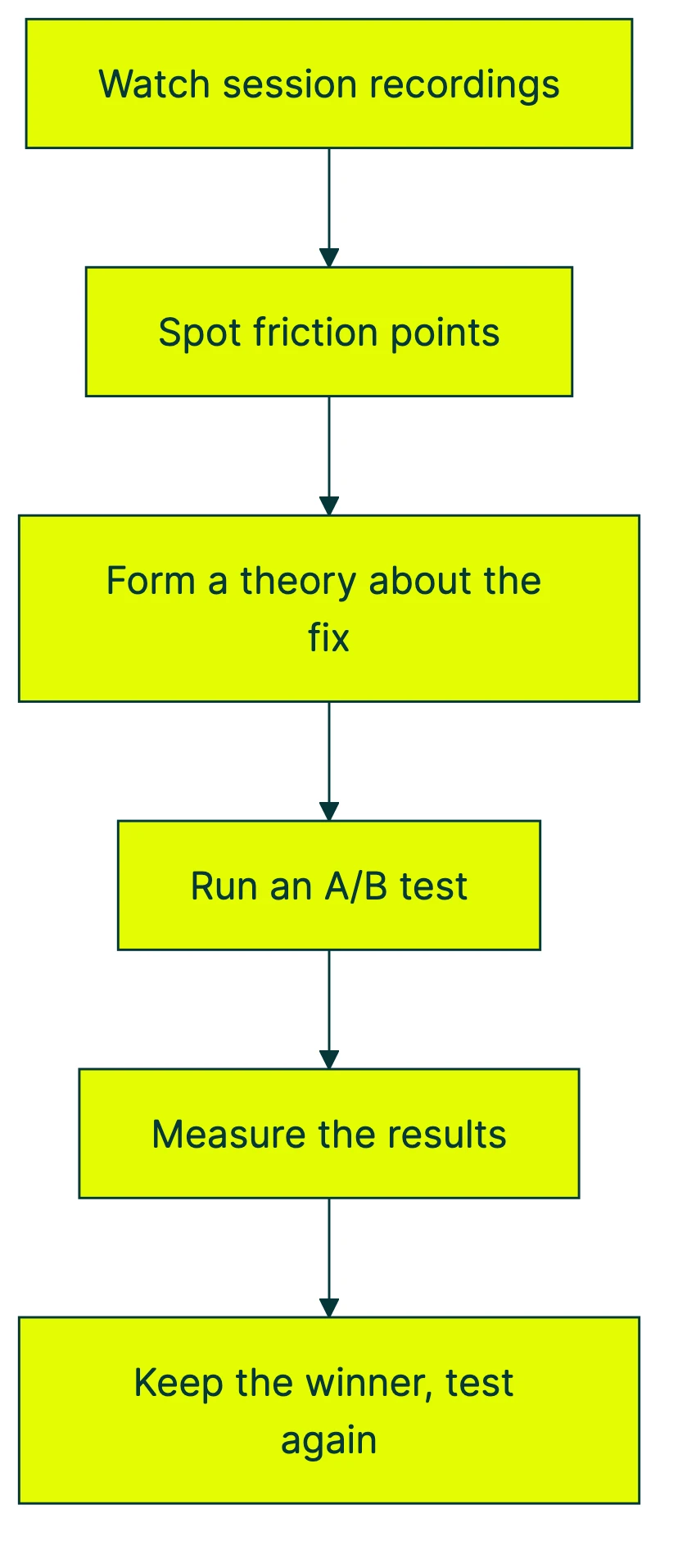
Say your scroll map shows that 70% of visitors never scroll past the hero section. Your CRO audit flags this as a problem. You form a theory: the headline isn’t compelling enough to make people scroll. So you write a better headline and test it.
That’s the CRO workflow in a nutshell. Session replay is the diagnosis. A/B testing is the treatment. You need both.
NNGroup’s research framework backs this up. Session replay is behavioral observation. It shows you what people did. But it can’t tell you why. And it definitely can’t tell you whether your fix will work. That’s what testing is for.
The lightweight stack we’d recommend for most small businesses:
- Google Analytics 4 (free) for traffic data
- Microsoft Clarity (free) for session recordings and heatmaps
- Kirro (EUR 99/month) for A/B testing
That’s your complete CRO toolkit. Three tools. Two of them free. No enterprise contract needed. Heatmaps show nobody scrolls past your hero section. Test a better headline with Kirro and let the numbers decide.
In our experience with A/B testing, the best test ideas almost always come from watching session recordings first. Random testing is a coin flip. Research-backed testing is how you get the 1-in-8 tests that actually win.
FAQ
What is the best free session replay tool?
Microsoft Clarity. It’s free with unlimited recordings, unlimited heatmaps, and no traffic caps. Nothing else comes close on price. But “free” comes with a data trade-off: Microsoft can use visitor data for advertising purposes. If that bothers you, PostHog’s free tier (5,000 recordings/month) is the open-source alternative. You host it yourself, so your data stays yours.
Do I need session recording for my website?
If you get more than a few hundred visitors per month and your conversion rate is below industry average, yes. Even watching 10 session recordings can reveal problems your analytics completely miss. The gap between what you THINK visitors do and what they ACTUALLY do is almost always surprising.
How do heatmaps work with A/B testing?
Heatmaps show you where people click and how far they scroll. That’s the research. A/B testing lets you change what isn’t working and measure whether the change helps. They’re complementary. Heatmaps diagnose the problem. A/B tests measure the fix. Pair them together for the best results.
Do session replay tools slow down my website?
Most modern tools add 30-50KB to your page. That’s about the size of a small image. Sentry’s engineering team measured their replay script at 36KB gzipped. The heaviest option (Contentsquare) is 553KB, which is about 10x larger. Check the script size before you install. A slow website hurts conversions more than any recording could help.
Is session recording legal?
Yes, with conditions. In the EU, you need explicit consent under GDPR (a cookie banner that specifically mentions session recording). In California, session replay is the subject of active wiretapping lawsuits under CIPA. Always: turn on data redaction for passwords and payment fields, get visitor consent, and read your vendor’s privacy terms. When in doubt, talk to a lawyer who knows privacy law in your market.
What’s the difference between session replay and heatmaps?
A heatmap shows the overall pattern across many visits. “Everyone clicks here. Nobody scrolls past there.” A session recording shows one person’s full journey. “This visitor read the headline, scrolled to pricing, hovered over the buy button for 8 seconds, then left.” Use heatmaps for patterns. Use recordings for stories. Both matter for good CRO strategy.
How many session recordings should I watch?
Start with 10-20 per week, focused on high-value pages (your homepage, pricing page, or checkout). CXL’s research methodology guidance warns that watching without a system leads to confirmation bias (you see what you expect to see, not what’s actually there). Tag each session with what you noticed. After 20 tagged sessions, patterns emerge. That’s when you have enough evidence to plan a test.
Once you’ve found a problem worth fixing, you can set up a free A/B test to see if your solution actually works. Watching recordings tells you what’s broken. Testing tells you if you fixed it.
The CRO best practices always follow the same order: observe, hypothesize, test, measure. Session replay handles step one. The rest is up to you.

Randy Wattilete
CRO expert and founder with nearly a decade running conversion experiments for companies from early-stage startups to global brands. Built programs for Nestlé, felyx, and Storytel. Founder of Kirro (A/B testing).
View all author posts