Most A/B testing tools use first-party cookies. That’s the kind your own website sets. Third-party cookies, the kind advertisers use to follow you across the internet, are a different thing entirely. The “death of cookies” headlines? They’re about advertising. Not testing.
Google actually reversed its plan to kill third-party cookies in July 2024. Chrome still has them. Your A/B tests were never in danger from that direction.
The real threats to your tests are smaller and more practical. Consent banners hide 50-75% of your EU visitors from testing. Safari’s 7-day cookie limit messes with returning visitors. Both are fixable. Neither requires rebuilding your tech stack.
This guide breaks down what “cookieless” actually means, what changed (and what didn’t), and the practical fixes for small marketing teams.
What is cookieless tracking (and why it’s confusing)
When people say “cookieless,” they could mean any of these things:
- Third-party cookie deprecation. This is the big headline everyone wrote about. Google said Chrome would block third-party cookies (the ones ad networks use to track you across websites). After four years of delays, Google reversed the decision entirely. It’s not happening.
- GDPR consent requirements. In Europe, you need permission before placing almost any cookie, including A/B testing cookies. When visitors click “Reject All,” they vanish from your test completely.
- Safari’s 7-day cookie cap. Safari limits cookies set by JavaScript to 7 days. If someone visits your site, gets assigned to Version A, then comes back 10 days later, their cookie is gone. They might get assigned to Version B. That corrupts your results.
Three separate problems. Three different fixes. Almost every article about “cookieless A/B testing” mashes them together into one scary blob. Getting your testing methodology right means knowing which problem you’re actually solving.
A quick way to think about it. A first-party cookie is like a store giving you a loyalty card. It’s between you and that store. A third-party cookie is like a stranger following you from store to store, taking notes. The “cookieless future” was about stopping the stranger. Your loyalty card (first-party cookie) was never part of that conversation.
Most A/B testing tools, including Kirro, use first-party cookies. Symplify and VWO have both confirmed this. So if someone tells you A/B testing is “broken” because of cookie changes, they’re probably confused about which cookies are affected.
Our take: The term “cookieless” has become a marketing buzzword. Vendors use it to sell you expensive server-side infrastructure you probably don’t need. For most small teams, first-party cookies with a properly configured consent banner do the job.
How does cookieless tracking work for A/B testing
A normal A/B test works like this. Someone visits your site. Your testing tool flips a coin and shows them Version A or Version B. Then it drops a small cookie that says “this person got Version B.” Next time they visit, the cookie reminds the tool which version to show. Consistent experience. Clean data.
Without that cookie, you’ve got a problem. The tool can’t remember who saw what. A returning visitor might see Version A on Monday and Version B on Thursday. That’s like surveying people twice and counting them as two different respondents. Your sample size numbers become unreliable.
So what are the alternatives?
Server-side assignment means your website’s server decides which version to show before the page even loads. No JavaScript, no browser cookie needed. The server keeps its own records. This is the most reliable cookieless approach, but it needs engineering resources to set up. If you want to understand the tradeoffs, check our guide on client-side vs server-side A/B testing.
User ID assignment works for logged-in visitors. If someone has an account on your site, you can use their login ID instead of a cookie. This is the most reliable method of all, because IDs don’t expire. Great for SaaS products and e-commerce stores where people sign in.
URL parameters pass the version assignment in the web address itself (like ?variant=B). This works for paid traffic and email campaigns where you control the link. But it doesn’t work for organic visitors who just type in your URL.
Local storage is a backup option. Instead of a cookie, the browser stores the assignment in a different spot. It avoids some cookie restrictions but still requires JavaScript, and it’s not a complete fix for Safari’s tracking prevention.
Each approach trades simplicity for durability. For most small teams, the practical answer is simpler than any of these.
What actually changed: the cookie timeline
The actual timeline, stripped of hype:
2017: Apple introduces Intelligent Tracking Prevention (ITP) in Safari. Third-party cookies blocked. JavaScript-set first-party cookies capped at 7 days. This was the real start of “cookieless,” and it happened quietly.
January 2020: Google announces Chrome will phase out third-party cookies within two years. The CRO industry panics. Articles about the “cookieless future” explode. (Chrome has 70.5% of the browser market, so this was a big deal.)
2020-2024: Google delays. And delays again. And again. Four years of “we’re going to do it… soon.”
July 2024: Google officially reverses the decision. Third-party cookies stay in Chrome. The Privacy Sandbox APIs (Google’s proposed replacement) don’t get adopted. The IAB Tech Lab’s 106-page analysis found they failed to meet 45 out of 45 industry use cases.
2025: Google retires the Privacy Sandbox APIs entirely due to “low adoption.” The replacement for third-party cookies is… nothing. Third-party cookies just stay. (If you switched tools because of this scare, check our Google Optimize alternatives roundup.)
February 2025: The EU withdraws the proposed ePrivacy Regulation. The expected tightening of cookie rules across Europe is dead.
So where does that leave us? Chrome (70.5%) still has third-party cookies. Firefox (2.6%) isolates cookies per site but doesn’t block first-party ones. Safari (19.5%) has the strictest rules: no third-party cookies, and JavaScript-set first-party cookies expire after 7 days.
The “cookieless future” that five years of articles warned about? It only happened on Safari. And Safari’s restrictions have been in place since 2017.
Our take: Every competing article on this topic was written between 2021 and 2023, when everyone assumed Chrome would follow Safari’s lead. That never happened. If you’re reading advice from 2022 about preparing for “the cookieless world,” you’re reading outdated information.
The real problem: cookie consent, not cookie deprecation
Nobody talks about this part. And it matters more than anything else for your test results.
Under GDPR, you need consent before placing A/B testing cookies. GDPR.eu’s official guidance confirms that A/B testing cookies are not “strictly necessary” and require opt-in. When a visitor clicks “Reject All” on your consent banner, your testing tool can’t place its cookie. That visitor is invisible to your test.
How many people reject? Consent platforms like Didomi and CookieYes track these numbers. 50-66% of EU visitors click “Reject All” when you give them a clear button. Some sites see rejection rates above 75%.
Think about what that means for your A/B test. You’re surveying your customers, but you can only count people who raised their hand. The quiet ones? They might buy completely differently. Statisticians call this sampling bias. The people you can measure aren’t representative of everyone.
This has real consequences for testing:
- Your number of visitors needed effectively doubles or triples. If only 40% of EU traffic consents, you need 2.5x more total visitors to hit the same sample.
- Your tests take longer to reach confidence, which means more weeks before you can make decisions.
- Your minimum detectable effect gets bigger. With fewer visitors, you can only spot large differences. Subtle improvements (5-10% lifts) become invisible.
- The results might not apply to everyone. Cookie-rejecting visitors may behave differently. Your “winner” might only be winning among the people you can see.
It gets more complicated across countries. In France, the CNIL (their privacy authority) exempts A/B testing cookies under strict conditions. The cookie can only last 13 months. You can’t cross-reference the data with other sources. And the testing must be strictly necessary.
In the UK, the ICO requires consent with no exemption for testing. In the US, CCPA uses an opt-out model. Cookies are allowed by default. People can choose to opt out later.
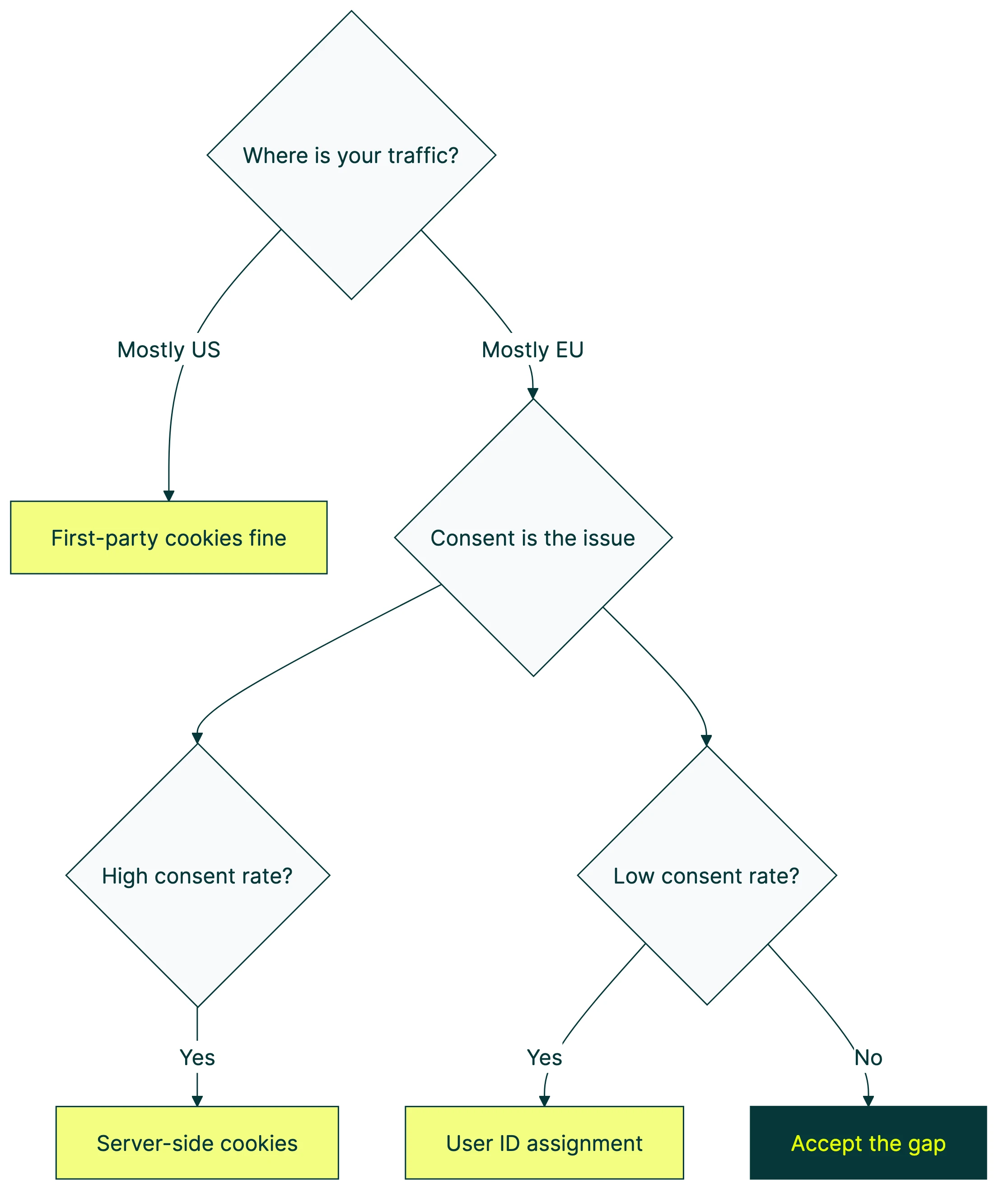
If most of your traffic is from the US, consent isn’t a major issue. If you’re targeting the EU, it’s the biggest factor affecting your test quality.
Safari’s 7-day cookie problem (and how it breaks tests)
Safari has a feature called Intelligent Tracking Prevention (ITP). One rule: cookies set by JavaScript expire after 7 days. Most client-side A/B testing tools set cookies with JavaScript. Server-set cookies (placed by your web server via HTTP headers) aren’t affected.
Why does this matter? Imagine you’re running a test on your pricing page. A Safari visitor lands on Monday, sees Version B, and leaves without buying. The cookie says “show this person Version B.” Eight days later, they come back. The cookie is gone. Your tool flips the coin again. This time they get Version A.
Now you’ve counted one person in both groups. Do that enough times, and your 50/50 split drifts. Maybe it becomes 55/45. Your groups aren’t balanced anymore. Experts call this Sample Ratio Mismatch (SRM). When it happens, you can’t trust the results. It’s one of the most common A/B testing mistakes and a source of Type 1 and Type 2 errors.
How big is the problem? Safari holds about 19.5% of the global browser market. On mobile, it’s higher. Every browser on iPhone uses Safari’s engine under the hood. Chrome on iPhone? Same cookie rules as Safari.
The practical fix: if your tests run less than 7 days, Safari ITP probably won’t affect you. For longer tests (and most tests should run at least 2 weeks for statistical power), you have two options:
- Server-set cookies. If your testing tool or server can set cookies via HTTP response headers instead of JavaScript, those cookies survive ITP. Some tools do this automatically.
- Accept the noise. For small teams, the impact of a few reassigned Safari visitors over a 2-week test may be small enough to live with, especially if most of your traffic is Chrome.
GA4 and cookieless tracking
If your A/B testing tool tracks conversions through GA4 events (purchases, signups, button clicks), pay attention here.
Google Consent Mode v2 became mandatory for EU advertisers in March 2024. When a visitor accepts cookies, everything runs normally. When they reject? Google’s tags still fire, but in a limited way. They send anonymous, aggregated signals with no personal identifiers. Google calls these “cookieless pings.”
Google then uses machine learning to fill in the gaps. Say 100 people visited your page but only 40 consented. Google guesses what the other 60 probably did, based on patterns from the consenting group. That’s modeled data. An educated guess, not a headcount.
For A/B testing, this creates a gap. If your tool uses GA4 events to measure conversions, and a chunk of visitors declined consent, you’re only measuring the consenting group. You’re hoping everyone else behaves the same way. That’s an assumption, not a fact.
Kirro integrates with GA4, which means your existing conversion tracking carries over automatically. When consent is granted, Kirro picks up GA4 events like purchases and signups without any extra setup. For the visitors who do consent, your data is solid. The gap is in the visitors who don’t, and that’s a consent problem, not a tool problem.
One gotcha worth knowing: when someone rejects cookies but then accepts later in the same visit, the session_start event can be lost. GA4 won’t retroactively fix that session. If your ecommerce conversion tracking in GA4 shows odd session numbers, this might be why.
Cookieless tracking solutions: what actually works
For a visual overview, MeasureSchool explains how GA4 cookieless tracking works in practice:
Option 1: first-party cookies via Google Tag Manager with proper consent
This is the answer for 80% of small marketing teams. Install your A/B testing tool through GTM. Set up a consent banner (like CookieYes or Cookiebot). GTM handles Google Consent Mode v2 automatically, so your testing tool respects whatever the visitor chooses.
For visitors who consent, everything works normally. Your tool places its first-party cookie, tracks the version assignment, and measures conversions. For visitors who decline, the tool doesn’t fire. You lose those visitors from your test, but you stay compliant.
Kirro installs through GTM in about 60 seconds. Your existing consent setup carries over. No extra privacy configuration. No new scripts to manage. If you already have a consent banner and GTM running, adding A/B testing is genuinely a one-click operation.
This approach works for Chrome, Firefox, and consenting Safari visitors. It doesn’t solve the Safari 7-day cookie cap or the consent rejection problem, but it handles the basics correctly.
Option 2: server-set cookies
Instead of your testing tool’s JavaScript setting the cookie, your web server sets it via HTTP response headers. Server-set cookies survive Safari’s ITP restrictions. They’re treated as “real” first-party cookies because the server (not a script in the browser) created them.
The catch: this requires backend access. You need to configure your server or use a service like Cloudflare Workers to set the cookie. It’s more durable but more technical.
This makes sense if your team has developer resources, runs tests longer than 7 days, and gets significant Safari traffic.
Option 3: user ID assignment for logged-in visitors
If your visitors log in (SaaS, e-commerce, membership sites), you can use their login ID to assign test versions. No cookie needed at all. The assignment lives in your database, tied to their account.
This is the most reliable method. IDs don’t expire. They work across devices. They survive every browser restriction. The limitation is obvious: it only works for logged-in visitors. Anonymous traffic still needs another approach.
SaaS and e-commerce stores with high login rates get the most out of this one.
Option 4: URL parameters for paid traffic
For traffic you control (Google Ads, email campaigns, social ads), you can pass the variant assignment directly in the URL. Something like yoursite.com/pricing?variant=B. No cookie, no JavaScript, no consent issues.
The limitation: this only works when you control the link. Organic search visitors, direct traffic, and referrals don’t get assigned this way.
If you’re running landing page split tests for paid campaigns, this is your move.
Option 5: fully server-side testing
The test logic runs entirely on your server. Before the page loads, the server decides which version to show. No client-side JavaScript, no cookies, no consent issues for the assignment itself. (You may still need consent for analytics tracking.)
This is the most complete cookieless approach. It’s also the most complex. You need engineers, backend infrastructure, and marketers lose the ability to set up tests on their own. For most small teams, overkill. If you want to explore it, read our full comparison of client-side vs server-side A/B testing.
Engineering teams at companies with serious traffic and strict privacy requirements go this route.
Quick comparison:
| Approach | Complexity | Cookie needed? | Works for anonymous visitors? | Best for |
|---|---|---|---|---|
| GTM + consent banner | Low | Yes (first-party) | Yes (consenting only) | Most small teams |
| Server-set cookies | Medium | Yes (server-set) | Yes | Teams with dev resources |
| User ID assignment | Medium | No | No (logged-in only) | SaaS, e-commerce |
| URL parameters | Low | No | No (controlled traffic only) | Paid campaigns |
| Server-side testing | High | No | Yes | Engineering teams |
What this means for small marketing teams
Let’s be honest. If you’re a marketer at a 5-50 person company, or a solo founder running your own site, the cookieless situation looks like this:
Chrome (70% of your visitors): Your A/B tests work fine. First-party cookies aren’t going anywhere. Nothing changed.
Firefox (3%): Also fine. Firefox isolates cookies between sites but doesn’t block first-party ones.
Safari (20%): If your test runs less than 7 days, you’re fine. If it runs longer, some returning visitors might get reassigned. For most tests, this is a small amount of noise, not a disaster.
EU visitors who decline cookies: This is your real gap. If a big chunk of your traffic is European, you could be losing 50-75% of those visitors from your tests. The fix is a properly configured consent banner, not a new testing architecture.
One more thing that catches people off guard: the misconfigured consent banner. We’ve seen teams install a consent tool and immediately see a 50-95% drop in tracked data. Usually it’s a setup problem. The banner is blocking tags it shouldn’t, or GTM’s consent settings aren’t wired correctly. Before you blame cookies, check your banner.
The practical advice? Run your tests on consenting visitors. Accept that your test population is a subset of total traffic. Make sure your consent banner is set up properly. And if you want to design a marketing experiment that accounts for smaller samples, plan for a slightly bigger minimum detectable effect. If you’re shopping for a tool, our A/B testing software comparison covers what to look for.
You don’t need to rebuild your tech stack. You don’t need server-side infrastructure. A lightweight tool like Kirro that works through GTM and respects your consent banner is the practical answer for most teams. Your tools should match your team size.
If you want to try it yourself, the free trial takes about three minutes to set up. No credit card. No 47-page setup guide.
FAQ
Can you A/B test without cookies?
Yes. Server-side testing, user ID assignment, and URL parameters all work without cookies. But most small teams don’t need to go fully cookieless. First-party cookies with a proper consent setup work for the majority of visitors. The tools that claim you need a fully cookieless architecture are usually the ones selling you that architecture.
What does cookieless mean?
It means operating without browser cookies for tracking visitors. In practice, people usually mean “without third-party cookies” (the kind advertisers use for cross-site tracking). First-party cookies, the kind A/B testing tools use, are a different thing entirely. The confusion between these two is what makes the whole topic feel scarier than it is.
How does consent mode affect A/B testing?
Google Consent Mode v2 lets your tags fire in a limited way when visitors decline cookies. For A/B testing, this means your tool probably can’t assign or track visitors who decline. That shrinks your sample. The fix is making sure your consent banner is properly configured in GTM, and planning for longer test durations if you have significant EU traffic.
What is cookieless measurement?
Cookieless measurement uses techniques like server-side tracking, estimated conversions, or aggregate data to measure results without placing cookies. Google’s Consent Mode “cookieless pings” are one example. The data is modeled (estimated), not directly measured. Think of it as an educated guess rather than a headcount. It fills gaps, but it’s not as reliable as direct measurement.
Is client-side A/B testing still possible after cookie changes?
Yes. Third-party cookie changes don’t affect client-side A/B testing tools because they use first-party cookies. The real challenges are Safari’s 7-day cookie cap and GDPR consent requirements. Both are manageable. If you’re using a tool that installs through GTM, you can set up a test in minutes and your consent banner handles the rest.

Randy Wattilete
CRO expert and founder with nearly a decade running conversion experiments for companies from early-stage startups to global brands. Built programs for Nestlé, felyx, and Storytel. Founder of Kirro (A/B testing).
View all author posts