Website personalization means showing different content to different visitors based on who they are or what they’ve done on your site. A returning customer sees a welcome-back discount. A visitor from Germany sees prices in euros. Someone who browsed your pricing page twice gets a CTA that says “ready to start?” instead of “learn more.”
When it works, it’s powerful. McKinsey found that personalization drives 10 to 15% revenue lifts for companies that do it well. The vendor articles leave out the other half. Gartner surveyed 1,464 buyers and found that 53% reported negative experiences with personalization. Those customers were 3.2x more likely to regret their purchase. And 44% less likely to buy again.
So website personalization isn’t a magic button. It’s a tactic that works brilliantly for some teams and backfires spectacularly for others. This guide covers the difference.
What web personalization actually is (and isn’t)
Most articles skip an important distinction. Personalization is system-driven. The website decides what to show based on visitor data. Customization is user-driven. The visitor picks their preferences (like dark mode or language settings).
When someone says “web personalization,” they mean the automatic kind. Your site recognizes that a visitor is in Sydney and shows Australian pricing. Or it notices someone visited three product pages and serves a comparison table on their fourth visit.
Simple examples that actually work:
- Returning visitor greetings. “Welcome back” with a shortcut to their last-viewed product
- Geo-targeted content. Local pricing, shipping estimates, or store locations
- Referral-source CTAs. Visitors from a Google Ad see a different headline than those from your newsletter
- Industry-specific hero copy. B2B sites showing different value propositions for different verticals
What personalization is not: putting someone’s first name in an email subject line. That’s mail merge. Also not personalization: recommending “products you might like” when you have twelve visitors a day and zero purchase history. That’s guesswork wearing a fancy hat.
Personalization sits within the broader practice of conversion rate optimization. It’s one tool in the CRO strategy toolbox, not the whole shed.
Website personalization examples that actually work
The examples that actually produce results share a pattern: clear segment, reliable data, and a way to measure whether the personalized version beat the generic one.
Amazon’s “customers who bought this” is the obvious one. It works because Amazon has billions of data points. HubSpot studied 330,000 CTAs over six months. Personalized calls to action (buttons and links tailored to the visitor) converted 202% better than generic ones.
Monday.com takes a different approach. Their onboarding quiz personalizes your entire dashboard based on your job role. Project managers see project templates. Developers see sprint boards. The personalization works because they asked you a question first, not because they stalked your LinkedIn.
Then there’s geo-targeting, which is personalization you can do with almost no infrastructure. Show visitors from your city a “local pickup available” badge. Show international visitors a shipping estimate. The data (location) is already in your analytics tool. No customer data platform needed.
Our take: Start with personalization that uses data you already have. Location, device type, returning vs. new visitor. If you need to buy a $50,000 tool before you can personalize anything, you’re not ready yet.
The BCG Personalization Index surveyed 5,000 consumers across 10 countries. Companies doing personalization well grow revenue 10 percentage points faster. But two-thirds of consumers in the same study said they’d experienced personalization that was inappropriate, inaccurate, or invasive.
Good personalization and bad personalization aren’t slightly different. They’re completely different outcomes. And most companies land on the wrong side.
How a personalization engine works
A personalization engine is the technology that makes website personalization happen automatically. It handles three jobs:
1. Data collection. The engine gathers information about each visitor. What pages they viewed. Where they’re located. Whether they’ve visited before. What device they’re using. Whether they came from an ad, an email, or a search result. Some engines also pull in data from your CRM or email tool.
2. Decision logic. Based on that data, the engine decides what to show. This happens two ways:
- Rule-based. You set the rules. “If visitor is from the UK, show pounds. If they’ve visited 3+ times, show a returning visitor offer.” Simple. Predictable. Works at any traffic level.
- AI-driven. Machine learning finds patterns you didn’t program. “Visitors who read the pricing page and then the case studies page are 4x more likely to convert if shown a demo CTA.” Powerful. But needs thousands of data points before it starts outperforming simple rules.
3. Content delivery. The engine swaps in the personalized content. A different headline, a different image, a different CTA. This happens fast enough that the visitor never sees a flash of the generic version.
The data types that fuel all of this:
| Data type | Examples | How you get it |
|---|---|---|
| Behavioral | Pages viewed, time on site, scroll depth | Your analytics tool |
| Demographic | Age, job title, company size | Forms, CRM data |
| Contextual | Device, location, time of day, weather | Automatically detected |
| First-party | Purchase history, email engagement, support tickets | Your own systems |
Tools that collect customer data in one place (the industry calls these CDPs, or customer data platforms) are the backbone of advanced personalization. They pull data from your website, email tool, CRM, and ad platforms into one customer profile.
The price tag? Enterprise personalization engines like Dynamic Yield, Optimizely, and Kameleoon start at $25,000 to $60,000 per year. Mid-market tools run $5,000 to $15,000. For most small teams, that’s the entire marketing budget.
If you’re exploring A/B testing software as a starting point instead, you’ll spend a fraction of that and learn what actually moves the needle before investing in personalization infrastructure.
The uncomfortable truth: why most personalization fails
Every article about website personalization from Optimizely, Dynamic Yield, Adobe, and Salesforce tells the same story: personalization is essential, customers expect it, and the ROI is massive.
They leave out the rest.
Gartner predicted in 2019 that 80% of marketers who invested in personalization would abandon it by 2025. Lack of ROI. Six years later, the prediction held. Only 14% of organizations deliver compelling personalized experiences, according to Adobe and Forrester’s 2025 report. That’s down 25% from 2023. Things are getting worse, not better.
It gets worse. Personalization doesn’t just fail quietly. It backfires. The Gartner June 2025 survey found personalized customers were 2x more likely to feel overwhelmed and 2.8x more likely to feel rushed.
A peer-reviewed experiment (MDPI Behavioral Sciences, 2025, n=360) tested this directly. Heavy personalization using personal data performed no better than a generic message. When people’s privacy concerns were elevated, it performed worse. A little relevance helps. Too much targeting backfires.
And a big chunk of consumers don’t want it at all. Forrester’s 2024 survey found 33% of US consumers say they never want personalized interactions. Over 30% say nothing would motivate them to share more data. 62% want discounts and rewards in exchange, not the “experience” marketers keep selling.
Accenture’s 2024 Empowered Consumer report found 71% of consumers see no improvement in purchase complexity despite all the investment. 74% walked away from purchases because they felt overwhelmed. So much for reducing friction.
So why do all the top Google results for “website personalization” tell a rosy story? Because they’re written by personalization vendors. Optimizely, Dynamic Yield, and Salesforce sell personalization software. They have zero incentive to tell you that you’re not ready.
The sample size problem nobody mentions
None of those articles include the math.
Personalization splits your traffic into segments. Say you get 5,000 visits per month (solid for a small business). You personalize for three segments: new visitors, returning visitors, and visitors from paid ads. Each segment now has roughly 1,600 visits.
Want to know if your personalized version actually outperforms the generic one? You need to test it. And testing with 1,600 visits per segment is like flipping a coin 12 times and calling it a trend. It’s not enough data to know anything.
CRO expert Peep Laja (founder of CXL) puts the threshold at 1,000 conversions per month. Not visitors. Conversions. Below that, the data is noise.
Your CRO metrics need to be reliable before you can layer personalization on top. If you can’t measure baseline performance confidently, you definitely can’t measure whether a personalized variation is winning.
Our take: Personalization isn’t a bad idea. Premature personalization is. And right now, most small teams are premature.
Website personalization strategy: when you’re ready (and when you’re not)
Before you buy a personalization tool, run through this checklist. Be honest.
1. Are you getting 50,000+ unique visitors per month? Below this, your segments are too small to test or validate. Personalization becomes guesswork.
2. Have you tested and proven your baseline? If you haven’t A/B tested your headline, you haven’t earned the right to personalize it. You need to know what works before you can tailor it.
3. Do you have clean first-party data with consent? Personalization needs data. Data needs infrastructure and privacy compliance. If your customer data lives in five disconnected spreadsheets, you’re not ready.
4. Do you have someone to manage ongoing content variations? Three segments means three versions of every page. That’s 3x the copywriting, 3x the design, 3x the QA. Every time you update something, you update it three times.
5. Can you measure the lift? If you can’t isolate whether personalization is driving results (vs. other changes you made that month), you’re flying blind.
If you answered “no” to two or more of these, personalization is probably step 5 on your list, not step 1.
The maturity ladder: fix, test, then personalize
The teams that succeed with personalization followed a path.
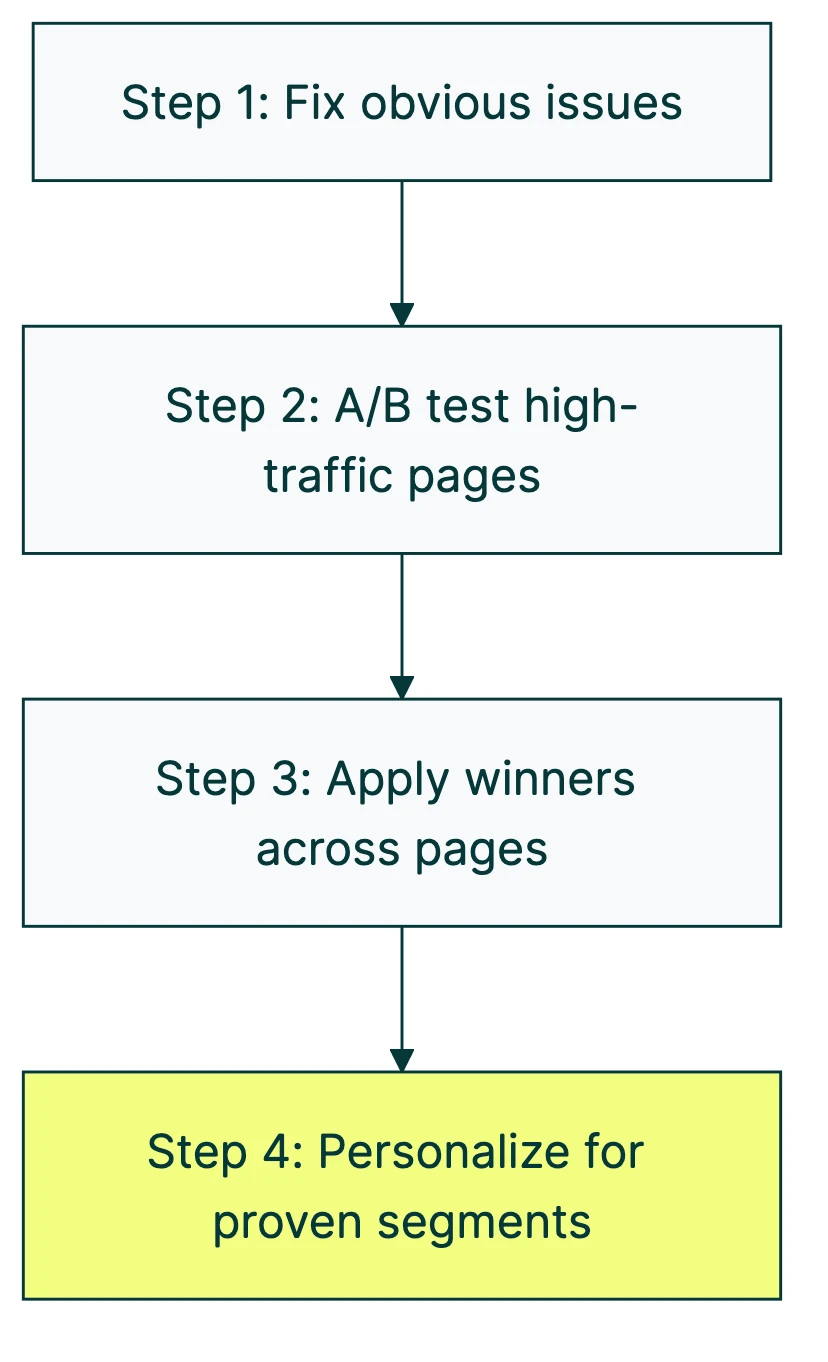
Step 1: Fix the obvious stuff. Broken forms, slow page loads, unclear CTAs. Start with a CRO audit to find what’s broken. No personalization engine will save a page that takes 8 seconds to load.
Step 2: A/B test your highest-traffic page. Test the headline. Test the CTA. Test the hero image. You learn what moves the needle. And you build the data foundation you’ll need later. A good conversion optimization strategy starts here, not with personalization.
Step 3: Apply what you learned. Take your winning headlines and CTAs and roll them out across similar pages. This alone might give you a bigger lift than personalization ever would.
Step 4: Now personalize. You have proven winners. You have enough traffic. You have clean data. Now you can start showing different versions to different segments, because you know which version works and you have enough data to validate whether tailoring it further helps.
Most CRO best practices point the same direction: get the fundamentals right first.
Generative AI and personalization: what’s real and what’s hype
Generative AI has made personalization more accessible. Tools can now write dozens of headline variations, generate product descriptions for different audiences, and automate segment discovery. That’s real progress.
Twilio’s 2024 State of Personalization report found 89% of business leaders believe AI-driven personalization will be critical within three years. Only 41% of consumers are comfortable with it (Twilio/Segment 2023). Big gap between what businesses want to do and what customers want done to them.
The risks are real too. A peer-reviewed study from January 2026 looked at personalized AI systems like ChatGPT Memory, Gemini, and Claude. They found these tools generate answers that match a user’s history rather than objective facts. The researchers called it “personalization-induced hallucinations.” When AI tries too hard to be relevant, it stops being accurate.
Kyle Wilkerson, Director of Digital Marketing at ForeFront Web, put it bluntly: “The cost associated with creating the processes and AI workflows far outweigh the return on investment” for small businesses. Large enterprises have “teams of people and millions of dollars to spare.” His conclusion: “it is too early for medium to small businesses to adopt the major components of AI-powered hyper-personalization technology.”
There are practical starting points though. AI-powered A/B testing tools can help you test faster. They generate headline variations, analyze your analytics, and suggest what to test next. For a full breakdown of AI CRO tools and methods, we wrote a dedicated guide. A small team can do all of this today without a $50,000 personalization engine.
Our take: AI is making personalization cheaper and faster to set up. But it doesn’t change the prerequisites. You still need traffic, data, and a tested baseline. AI is an accelerant, not a shortcut.
The better path: test first, personalize later
Chris Goward, founder and CEO of WiderFunnel (one of the most respected CRO agencies), said it well:
“Personalization is a hot topic. It’s a tactic that can create more relevant experiences and cause a lot of great impact, but it’s only a hypothesis until it’s tested. Companies often buy personalization technology before validating what type of personalization will actually impact their performance, and a lot of companies are actually over-personalizing.”
Testing and personalization aren’t competing approaches. They’re sequential. Testing finds what works. Personalization delivers the winner to the right person. You can’t do step two without step one.
The practical path for a small team:
- Pick your highest-traffic page. Your homepage, your top landing page, or your pricing page.
- A/B test the headline. It takes about three minutes to set up a test with Kirro. Change the headline. See which version gets more clicks, signups, or purchases.
- Learn what actually moves the needle. Maybe the headline matters. Maybe it’s the CTA button. Maybe it’s the hero image. Testing tells you.
- Start with one segment. Once you have a winner, try showing a variation to returning visitors only. Measure whether it outperforms.
- Expand only if it works. If the personalized version wins, add another segment. If it doesn’t, simplify. Not every page needs personalization. Most don’t.
This approach aligns with CRO testing fundamentals. You’re building on data, not assumptions. The McKinsey stat about personalization driving 10 to 15% revenue lift? That comes from companies that already had strong baseline optimization. The lift is from personalization on top of a tested experience, not instead of one.
A solid CRO program builds this muscle over time. Start with testing. Graduate to personalization when the data supports it.
And if you want to see what testing looks like before you think about personalization, try running a free split test. Three minutes. No personalization engine required.
For a visual walkthrough, Dynamic Yield covers the key steps in building a personalization strategy:
Frequently asked questions
What is the difference between A/B testing and personalization?
A/B testing shows different versions of a page to random visitors and measures which one wins. Personalization shows specific versions to specific visitor segments based on their data. Testing finds the best-performing version. Personalization delivers it to the right audience.
The key difference: A/B testing is temporary (the test ends, the winner goes live for everyone). Personalization is ongoing (different segments always see different content).
You need A/B testing before personalization. Testing tells you what works. Personalization tells you who to show it to.
Does my small business website need personalization?
Probably not yet. If you get fewer than 50,000 monthly visitors and haven’t A/B tested your main pages, start with testing.
Personalization is step 5 in a 5-step process. Most businesses see bigger wins from testing a better headline than from building a personalization engine. A simple headline test on Kirro takes three minutes and costs EUR 99/month. An enterprise personalization engine costs $25,000 to $60,000/year.
Start with the CRO recommendations that have the highest impact-to-effort ratio.
When should a small team start personalizing?
When all four of these are true:
- You have enough traffic per segment to measure results (10,000+ visits per segment, per month)
- You’ve already found and applied A/B test winners on your core pages
- You have clean first-party data with proper consent
- You have someone who can manage content variations across segments
Until all four are true, your time and budget are better spent on landing page optimization and basic testing.
What is the difference between personalization and customization?
Personalization is automatic. The website decides what to show based on your data (location, behavior, purchase history). You don’t choose it. The system chooses for you.
Customization is manual. You pick your preferences: dark mode, language, which dashboard widgets to show. You’re in control.
Both improve the experience. But personalization needs data infrastructure and privacy compliance. Customization needs good UI design. They solve different problems.
How much does website personalization cost?
It depends on how deep you go:
| Approach | Typical cost | Best for |
|---|---|---|
| Basic (geo-targeting, returning visitor logic) | $0 to $200/month | Any team with basic dev skills |
| Mid-market tools (Mutiny, Intellimize) | $5,000 to $15,000/year | Teams with 100K+ monthly visitors |
| Enterprise engines (Dynamic Yield, Optimizely, Kameleoon) | $25,000 to $60,000+/year | Large teams with dedicated CRO staff |
For most small teams, starting with an A/B testing tool and testing your way to personalization insights is more cost-effective. You learn what content resonates before investing in the infrastructure to deliver it dynamically. UX conversion optimisation and basic CRO strategy cover a lot of ground before personalization enters the picture.
Is website personalization bad for SEO?
It can be. If your personalization engine uses JavaScript to swap content after the page loads, search engines may not see the personalized version. They’ll index the default content. That’s usually fine. But if your default content is thin because you’re relying on personalization to fill it in, you’ve got a problem.
The safe approach: make sure your default (non-personalized) page is strong enough to rank on its own. Treat personalization as an enhancement layer, not a replacement for good digital CRO fundamentals. Google’s crawlers should see a complete, useful page even without personalization.
If you’re doing SEO alongside A/B testing, the same principles apply. The canonical version of your page should always be solid.

Randy Wattilete
CRO expert and founder with nearly a decade running conversion experiments for companies from early-stage startups to global brands. Built programs for Nestlé, felyx, and Storytel. Founder of Kirro (A/B testing).
View all author posts