What Shopify conversion rate optimization actually means
The average Shopify store converts at 1.4%. The top 20% hit 3.2% or higher. That gap isn’t about secret tactics. It’s about knowing what to fix, what your plan lets you fix, and what order to fix it in. (Littledata benchmark, 2,800 stores)
Most Shopify CRO guides hand you the same ten tips. Change your button color. Add trust badges. Speed up your site. Fine advice. But they skip the part where half those tips require Shopify Plus, which costs $2,300 a month.
Shopify isn’t a blank canvas. It’s more like an apartment you’re renting. You can paint the walls and rearrange the furniture, but you can’t knock down walls unless the landlord says so. Your plan tier is the landlord.
This guide breaks down conversion rate optimization by what you can actually do on your plan, at your store size, with your budget. No generic advice. No tips that only work for stores doing a million a month.
Our take: The biggest waste of time in Shopify CRO is following advice meant for a different plan tier. A merchant on Basic trying to customize checkout is like trying to remodel a kitchen in a hotel room.
This post is the strategic layer: where to invest your CRO effort based on where your store actually is. If you’d rather hire help, our CRO services guide covers how to find the right agency. For the tactical Shopify conversion fixes, we have a separate guide with specific changes you can make today.
The metric that matters more than conversion rate
Here’s a number that sounds terrible: 0.9% conversion rate. Here’s another that sounds great: 3.0%.
Now add context. The 0.9% store sells furniture at $2,000 average order value. Each visitor is worth $18. The 3.0% store sells phone cases at $15. Each visitor is worth $0.45.
Which store would you rather own?
Conversion rate without average order value is like batting average without RBIs. It tells you part of the story and hides the rest. The number that actually matters is revenue per visitor (RPV). It combines your conversion rate and your average order value into a single number.
Jonny Longden, Conversion Director at Journey Further, puts it bluntly: “Improving a metric like conversion rate is a commercial metric but it is not a business strategy.”
A Shopify brand tested two approaches: discount codes vs. permanently lower prices. The lower prices won. Conversion rate doubled. Revenue per visitor more than doubled. (Intelligems case study)
The discount felt like a deal. The lower price removed friction entirely. No coupon hunting, no “is this the best deal?” hesitation at checkout.
One more thing. Loyal customers make up about 21% of a store’s customer base but generate 44% of total revenue. Getting people to come back often beats obsessing over first-visit conversion rate.
When you’re measuring the success of your conversion funnel, look at RPV first. It keeps you honest about whether a change actually helped your business or just moved a number.
Your Shopify plan decides what you can optimize
This is the section no competitor will write. It’s also the most important one.
Basic, Shopify, and Advanced plans
You can change your theme. Colors, layouts, images, copy, page structure. All fair game. You can install third-party apps for reviews, live chat, upsells, and A/B testing tools.
What you can’t touch: the checkout. On these plans, checkout customization is limited to your logo, brand colors, and fonts. No custom fields. No trust badges in the checkout flow. No conditional logic like “show free shipping if cart is over $75.”
You also can’t run A/B tests on checkout pages. Not with Shopify’s built-in tools, not with third-party tools. The checkout is locked.
For analytics, you get Shopify’s standard reports. They’re decent for basics. For anything deeper, you’ll want to track ecommerce conversions in GA4 (Google Analytics 4, the free analytics tool most stores already have installed).
Shopify Plus ($2,300+/month)
Everything above, plus:
- Checkout Extensibility (a fancy way of saying “you can actually change how checkout works”). Add custom fields, trust badges, product recommendations, and post-purchase upsell pages.
- Shopify Functions let you build custom discount rules, shipping rate logic, and payment routing. Basically “if this, then that” rules for your checkout.
- Shopify Audiences gives you first-party customer data you can send directly to Meta and Google ad campaigns. Shopify collects what your buyers have in common, then tells Meta “find more people like these.”
- Web Pixel Extension lets you track exactly what shoppers do in your checkout (clicks, form fills, payment attempts) so you can see where they get stuck.
Two technical changes every Shopify merchant should know about
checkout.liquid is gone. As of August 2024, you can no longer inject custom code into the checkout on any plan. This is how most A/B testing tools used to test checkout pages. It doesn’t work anymore. (Shopify Help Center)
Shopify Scripts are being shut down June 30, 2026. If you’re on Plus and using Scripts for custom discounts or checkout logic, you need to migrate to Shopify Functions before that deadline. (Shopify Changelog)
Our take: Shopify Plus is worth it for CRO only if checkout is where you’re losing people. If your problem is that nobody adds to cart in the first place, Plus won’t help. Diagnose first, upgrade second.
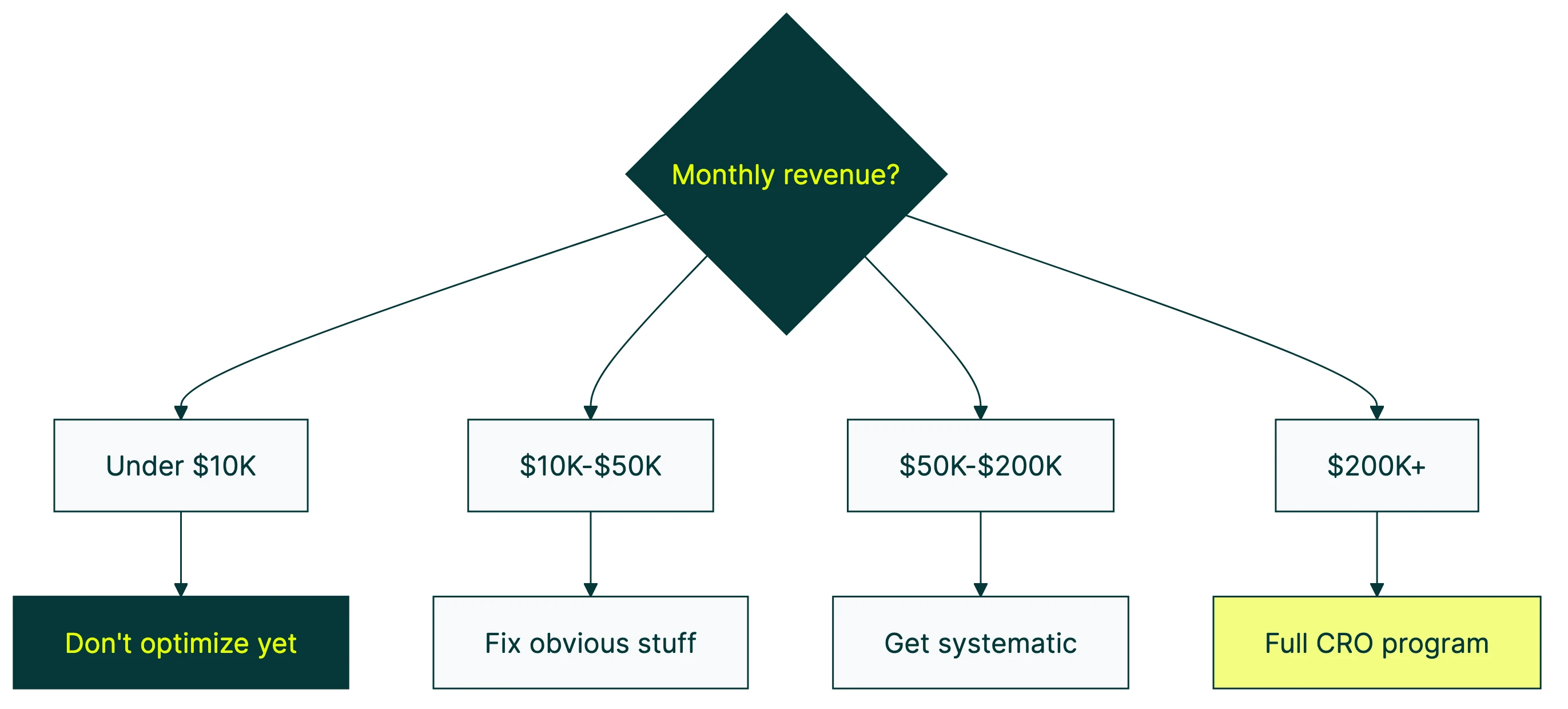
How to improve conversion rate on Shopify at each stage of growth
For a full walkthrough of Shopify CRO by an experienced ecommerce operator, Davie Fogarty breaks down the process:
Under $10K/month: don’t optimize yet
Seriously. If you’re doing less than $10K a month, your problem probably isn’t conversion rate. It’s product-market fit or traffic quality.
Ask yourself: are you getting the right visitors? Do people want what you’re selling at the price you’re selling it? No amount of CRO fixes a product nobody wants.
At this stage, talk to customers. Read support emails. Check where people leave your site. That’s your research.
$10K to $50K/month: fix the obvious stuff
You have enough traffic to see patterns. Open Shopify Analytics and look at where visitors drop off. Usually it’s one of three places: homepage, product pages, or cart.
Pick the page with the biggest drop-off. Fix one thing at a time. Run one A/B test per month. That’s plenty.
At this stage, your CRO best practices toolkit is simple: GA4 conversion rate tracking, Shopify Analytics, and a lightweight testing tool. You don’t need an enterprise platform.
$50K to $200K/month: get systematic
Now it’s worth building a real testing program. Run a CRO audit on your full funnel — our Shopify CRO audit process covers what to check at each stage. Set up proper analytics. Test one thing per week if your traffic supports it.
This is where third-party tools like Kirro start earning their keep. You have enough visitors to get confident test results, and the revenue impact of a winning test actually matters.
If you’re on a standard Shopify plan, you can test everything except checkout. If you’re considering Plus, do the math: is checkout optimization worth $2,300/month to you?
$200K+/month: full CRO program
At this revenue, a 10% conversion lift could mean an extra $20K a month. That justifies a dedicated CRO strategy.
Consider upgrading to Plus for checkout extensibility. Hire a CRO consultant or work with a CRO agency. Test pricing, shipping thresholds, and post-purchase flows.
Run 4+ tests per month. Build a testing backlog. Treat CRO as an ongoing program, not a one-time project.
The app bloat paradox: when your CRO tools kill your conversions
This is the thing nobody in the Shopify app ecosystem wants to talk about.
SpeedBoostr ran a controlled test. They installed six common apps (reviews, chat widget, upsell popup, loyalty program, email capture, countdown timer) on a clean Shopify theme.
| Apps installed | Load time | PageSpeed score |
|---|---|---|
| 0 | 2.2 seconds | 88 |
| 2 | 2.3 seconds | 65 |
| 4 | 6.7 seconds | 44 |
| 6 | 7.3 seconds | 36 |
Six apps turned a fast site into a painfully slow one. And slow sites lose customers. Industry benchmarks suggest each extra second of load time costs you roughly 7% in conversions. A 5-second slowdown is catastrophic.
Think about that. The standard advice for Shopify CRO is “install apps for reviews, chat, and upsells.” But the cumulative weight of those apps may cost you more conversions from speed than they gain from their features.
Loox’s data backs this up: 62% of third-party Shopify integrations hurt site performance.
How to check if this is your problem: Go to PageSpeed Insights (a free Google tool that measures how fast your site loads). Test your store. If your score is below 50 on mobile, your apps are probably the reason.
How to fix it: Remove apps one at a time. After each removal, re-test your speed. Keep only the apps that earn their weight. A review app that adds 0.5 seconds? Probably worth it. A popup that adds 2 seconds? Kill it.
Your ecommerce conversion optimization efforts should start with speed. It’s the foundation everything else sits on.
A/B testing on Shopify: what’s actually possible in 2026
Shopify Rollouts (new in 2026)
Shopify launched “Rollouts” in their Winter 2026 edition. It’s native A/B testing, sort of.
What it can test: theme customizations made in the editor. Colors, layouts, sections, content blocks. You can split traffic by percentage and target specific markets.
What it can’t test: custom code changes, prices, checkout pages, or anything that requires audience targeting (like showing version A to new visitors and version B to returning customers). It also can’t do multivariate testing (testing multiple changes at once).
Convert.com’s take is blunt: Rollouts is “designed for risk mitigation, not conversion optimization.” It’s for safely rolling out theme changes. Not for running real conversion tests.
Third-party testing tools
For proper A/B testing on Shopify, you need a third-party tool. On any plan, these tools can test everything visitors see before checkout: headlines, images, layouts, copy, pricing display, product pages, collection pages, homepage.
One limit: on standard plans, you can’t test the checkout. On Plus, some tools can test checkout elements through the Extensibility API.
And remember the app bloat problem? Your testing tool adds weight to your site too. A typical enterprise A/B testing script is 100 to 200 KB. Kirro’s script is 9 KB. That’s the difference between adding a brick and adding a feather to your page load.
Mobile matters here more than anywhere else. 79% of Shopify traffic is mobile, but mobile converts at just 1.2% vs 1.9% on desktop. If you’re not testing mobile-first, you’re improving the experience for the minority. You can set up a free split test on your highest-traffic mobile page and see real results in two to three weeks.
Check our list of best CRO tools for a full breakdown of what’s available, with pricing.
Shopify checkout optimization: what each plan allows
Shopify claims their checkout beats competitors by an average of 15%. That number comes from a commissioned study, and the methodology isn’t public. Take it with a grain of salt. But it’s probably in the right ballpark. Shopify processes billions in transactions and has put more work into checkout than most stores ever could. (Shopify checkout data)
Shop Pay is Shopify’s one-click checkout option. It reports up to 50% higher conversion vs. guest checkout. On mobile, that jumps to 91% higher. Enabling it is free on every plan. Takes about two minutes.
What you can do on any plan
- Turn on Shop Pay, Apple Pay, and Google Pay. This is the single highest-impact checkout change available to every merchant.
- Show shipping costs on the product page or in the cart. Surprise shipping costs are the number one reason people abandon checkout. 39% of abandoners cite unexpected costs. (Baymard Institute, 50-study aggregate)
- Enable guest checkout. 19% of shoppers abandon when forced to create an account.
- Reduce your return policy anxiety. Put it in the cart, not just in the footer.
What Plus unlocks
- Custom fields (delivery instructions, gift messages, business details)
- Trust badges and security messaging in the checkout flow
- Product recommendations during checkout
- Post-purchase upsell pages (the “you just bought X, want to add Y?” screen)
- Shopify Functions for dynamic discount rules and conditional shipping
The average ecommerce checkout displays 23.5 form elements. Baymard Institute research says the ideal is 12. Shopify’s standard checkout is already leaner than most, but Plus merchants can trim it further. (Baymard checkout research)
70.2% of carts get abandoned. That number hasn’t moved much in a decade. Most of it is structural: people browsing without intent to buy, or comparison shopping. You can’t fix that with CRO. Among people who actually wanted to buy, the fixable reasons are cost surprises, forced account creation, and a clunky checkout.
If you’re running an ecommerce CRO checklist, checkout should be on it, but know that the biggest lever (Shop Pay) is already available on your plan.
When to DIY vs. hire help
DIY makes sense when:
- You’re under $50K/month in revenue
- You have fewer than 20 products
- Your analytics show obvious problems (80% bounce on product pages, 90% cart abandonment)
- You have time to learn the basics and run one test per month
Your toolkit: Shopify Analytics, GA4, and a simple A/B testing tool. Total cost: under $150/month.
Hire a CRO consultant when:
You’re past $50K/month and you’ve already tested the obvious stuff. You need someone who knows Shopify Plus inside and out, but you don’t need a full team. A good consultant gives you a structured testing program without the overhead.
Cost range: $2,000 to $10,000 per month. Read our full guide on finding a CRO consultant.
Hire an agency when:
At $200K+/month, a 10% lift pays for an entire team. Agencies make sense when you need testing velocity (4+ tests per month), specialists across design, copy, and data, and someone managing the whole program end to end.
Cost range: $5,000 to $25,000 per month. Here’s how to pick the right CRO agency.
Red flags in CRO vendors
If someone guarantees a specific conversion lift, walk away. Testing finds what works. Sometimes the answer is “your original was already fine.”
Other warning signs: they never mention how many visitors you need for a reliable test (they’re guessing). They won’t show you raw data, only summaries. Or their plan involves installing 15 apps. You already know how that ends.
For a broader look at what CRO services cost and how to evaluate them, we’ve got a full breakdown.
FAQ
What is the average Shopify conversion rate?
1.4% across all Shopify stores, based on Littledata’s benchmark of 2,800 sites. The top 20% convert at 3.2% or higher. The top 10% hit 4.7%+.
These numbers vary by industry. Food and beverage stores average 1.5%. Fashion stores average 1.9%. If you sell high-consideration products (furniture, electronics, B2B), expect lower rates and higher order values.
The honest benchmark isn’t a single number. It’s a range based on what you sell, who you sell to, and how much it costs. Check what is a good conversion rate for benchmarks across industries.
Can you A/B test on Shopify?
Yes, with limits. Shopify’s new Rollouts feature (launched 2026) handles basic theme tests: layout changes, color swaps, content blocks. It’s free but limited. (Shopify Editions Winter 2026)
For proper A/B testing (headlines, images, copy, product page layouts), you need a third-party tool. On standard plans, you can test everything except the checkout. On Plus, some tools can test checkout elements through Shopify’s Extensibility API.
Kirro works on all Shopify plans. Install the script, pick a page, make a change, and the tool handles the rest. No developer needed.
What tools help with Shopify CRO?
It depends on what you’re testing:
| What you need | Tool | Starting price |
|---|---|---|
| A/B testing (pages, headlines, layouts) | Kirro | EUR 99/month |
| Heatmaps and session recordings | Hotjar or Microsoft Clarity | Free tier available |
| Funnel analysis | GA4 | Free |
| Price and shipping rate testing | Intelligems | Custom pricing |
| Basic theme testing | Shopify Rollouts | Included with plan |
For a full comparison, see our list of A/B testing tools and best CRO tools. For ecommerce-specific picks, our Shopify CRO tools roundup covers checkout optimization and conversion tools built for online stores.
Is it worth upgrading to Shopify Plus for CRO?
Only if two things are true: you’re doing $200K+ per month, and checkout is where you’re losing people.
Check your analytics. If most visitors leave before adding to cart, the problem is product pages or traffic quality. Plus won’t fix that. If they add to cart but don’t complete checkout, Plus gives you tools to fix the checkout flow.
At $200K/month, the math often works. A 5% checkout improvement could add $10K+ per month, which covers the Plus subscription several times over.
How long does it take to see CRO results on Shopify?
A single test needs 2 to 4 weeks with decent traffic (a few thousand visitors per week to the page being tested). A full CRO program takes 3 to 6 months to show compounding results.
The first test usually isn’t the home run. It’s the third or fourth. CRO is a learning process, not a magic trick. Each test teaches you something about your customers, whether it wins or not.
If you want to understand the numbers behind why tests need that much traffic, our guide on app conversion rate optimization covers the math in plain English.

Randy Wattilete
CRO expert and founder with nearly a decade running conversion experiments for companies from early-stage startups to global brands. Built programs for Nestlé, felyx, and Storytel. Founder of Kirro (A/B testing).
View all author posts