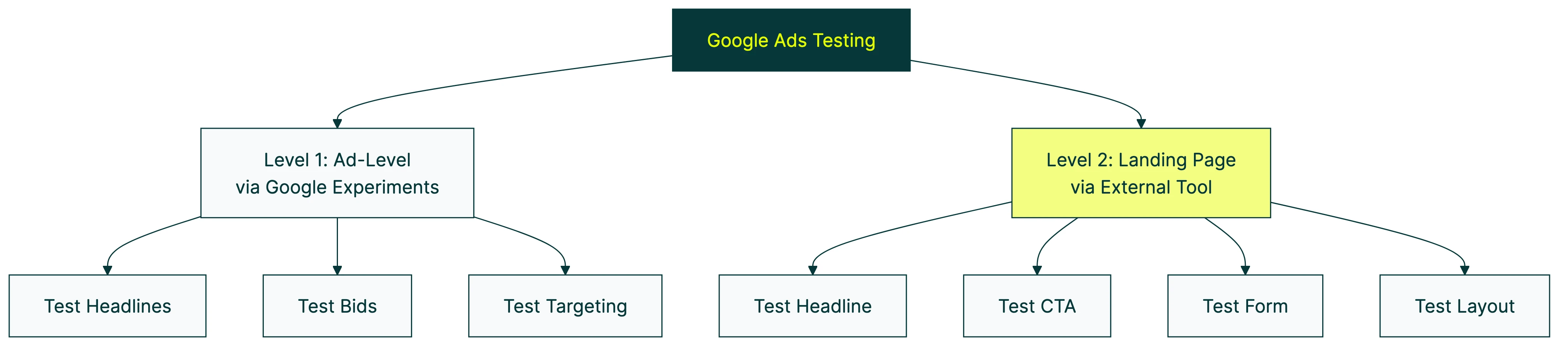
Google Ads A/B testing works on two levels. The first is ad-level testing (headlines, descriptions, bid strategies) which Google handles natively through a feature called Experiments. The second is landing page testing (the page people see after clicking your ad) which Google can’t do. You need a separate tool for that part.
Most guides blend these two together. That’s a problem, because the approach, tools, and impact are completely different. This guide separates them so you know exactly what to do at each level. For more on A/B testing beyond Google Ads, and how platform-specific testing differs, we’ve got separate guides.
Most people focus on the ad side and ignore the rest. But landing page testing is where the bigger wins live. Changing what happens after the click usually moves the needle more than changing the ad itself.
Two types of Google Ads testing
Think of it like a restaurant. Ad testing is the menu outside the door. Landing page testing is the actual food. Both matter. But if people walk in and the food is bad, no amount of menu tweaking will save you.
| Ad-level testing | Landing page testing | |
|---|---|---|
| What you’re testing | Headlines, descriptions, bid strategies, targeting | Page headline, button text, form, layout |
| Built into Google Ads? | Yes (Experiments) | No |
| Free tool available? | Yes | Not anymore (RIP Google Optimize) |
| Typical impact | Small CTR improvements | 20-50%+ conversion lifts |
| Who controls it | Google’s algorithm picks what to show | You |
Ad-level testing covers everything Google controls: headlines, descriptions, images, bid strategies, targeting, and campaign structure. Google Ads has built-in tools for all of this. You don’t need anything extra.
Landing page testing covers your website. Specifically, the page someone lands on after clicking your ad. The headline, the button text, the form length, the layout. Google used to offer a free tool for this (Google Optimize), but they shut it down in September 2023 with no replacement. So now you need an external A/B testing tool.
Unbounce analyzed 57 million conversions and the results are wild. Simplifying landing page copy from professional-level writing to plain English improved conversion rates from 5.3% to 11.1%. That’s a 56% lift from copy changes alone. Most ad copy tests don’t come close.
Our take: Google Ads tests the ad. Kirro tests what happens after the click. If you’re only testing one side, you’re leaving money on the table.
For a step-by-step walkthrough of Google Ads Experiments, Aaron Young covers the full setup:
If you’re running ads on other platforms too, the same two-layer principle applies. Check out our guides on A/B testing on Meta Ads and testing on Webflow sites for platform-specific walkthroughs.
How to A/B test ads in Google Ads (step by step)
Google’s built-in testing tool is called Experiments. It creates a copy of your campaign and splits your traffic between the original and the copy. Then it measures which one performs better.
Here’s how to set one up:
- Open your Google Ads account and pick the campaign you want to test
- Click Experiments in the left sidebar
- Choose your test type (Custom Experiment for most Search campaigns)
- Make your change in the test version (new bid strategy, different ad copy, adjusted targeting)
- Set your traffic split (50/50 gives you the fastest results, 80/20 protects revenue on high-budget campaigns)
- Set a start date and let it run for at least 4-6 weeks
A few things that trip people up:
- One test per campaign at a time. You can’t stack experiments.
- Shared budgets don’t work. If your campaign shares a budget with others, you can’t run a test on it.
- Not everything is testable. App campaigns and standard Shopping campaigns are mostly off-limits.
- Experiments support Search, Display, Video, Hotel, Performance Max, and the new Campaign Mix Experiments (beta).
Google offers three confidence levels for reading results: 95% (strictest), 80%, and 70%. Confidence just means how sure Google is that one version is actually better, not random noise. Stick with 95% if you can. It’s the difference between “probably better” and “almost certainly better.” For more on how this math works, see our guide on Bayesian statistics for A/B testing.
If you’re new to designing a marketing experiment, the short version is: change one thing, measure one outcome, wait for enough data.
The RSA problem: why ad copy testing is harder than it looks
Most Google Ads testing guides skip this part entirely.
Since Google retired expanded text ads (ETAs) in 2022, responsive search ads (RSAs) are the default. You give Google up to 15 headlines and 4 descriptions. Google’s algorithm mixes and matches them for each search.
Sounds smart. And it kind of is, for getting clicks. But it makes A/B testing a mess.
Frederick Vallaeys, CEO of Optmyzr and a former Google employee, found that RSAs get 10% better click-through rates. But they also get 20% lower conversion rates compared to old expanded text ads. RSAs get about 4x more impressions though, so they still deliver more total conversions. The math works out. But the testing part? That’s broken.
The problem is you can’t isolate a single headline. Google decides which headlines to show, and a few headlines get 70-90% of all impressions. The rest? Barely tested. And the performance labels Google gives you (“Good,” “Best,” “Learning”) reflect whether your assets follow Google’s recommendations. Not whether they actually convert.
The workaround most advertisers don’t know about: Google has a feature called Ad Variations. It’s buried in the Experiments section. You can find-and-replace a specific word or phrase across all your ads. That means you can isolate a single variable and run a real controlled test. PPC experts Miles McNair and Bob Meijer at PPC Mastery say this feature is “hardly ever” used. Which is wild, because it’s the only way to do a proper RSA copy test.
Our take: If you’re running RSAs (and you almost certainly are), don’t assume Google is testing your headlines for you. It’s mixing them, not testing them. Those are different things.
How to A/B test Google Ads landing pages
This is where most Google Ads spend is wasted. And it’s the part Google can’t help you with anymore.
Google Optimize used to be the answer. It was free, it worked with GA4, and roughly 2-3 million websites relied on it. Google shut it down in September 2023 and promised a replacement inside GA4. That replacement still hasn’t shown up.
If you’re looking for what to use instead, we’ve got a full breakdown of alternatives to Google Optimize.
So here’s what landing page testing actually looks like today:
- Pick an A/B testing tool and install it on your site (usually just a small script tag or a Google Tag Manager click)
- Choose the landing page you want to test
- Create a variation using the tool’s visual editor: change the headline, swap the button text, shorten a form, add social proof
- The tool splits your traffic between the original and the variation
- When enough visitors have seen both versions, the tool tells you which one converts better
That’s it. No code, no developer needed.
WordStream’s 2025 benchmarks show the average Google Ads conversion rate is 7.52%. But it ranges from 2.55% (finance) to 14.67% (automotive repair). That 6x gap is mostly landing page quality, not ad copy. A landing page analyzer for PPC can help you spot the issues dragging your Quality Score down before you spend another dollar on clicks. For Google Ads CTR benchmarks by industry, we have a full breakdown of what to expect before the click.
And get this: 52% of B2B PPC ads still send traffic to the homepage instead of a dedicated landing page. If that’s you, you don’t even need to test yet. Just build a landing page first.
Kirro works well here because it plugs into your existing GA4 setup. Your conversion tracking carries over automatically. No starting from scratch. You can set up your first landing page test in about three minutes and see which version turns more ad clicks into conversions.
For more on optimizing your landing page beyond testing, we’ve got a separate guide that covers the full picture.
What to test first (a prioritization framework)
Every guide tells you what you CAN test. Nobody tells you what to test FIRST. Here’s the order we’d recommend for most Google Ads accounts:
-
Landing page (biggest impact, most neglected). Test your headline, your main button, your form length, and whether social proof helps. These changes affect every visitor, not just the ones who click a specific ad. A tool like Kirro lets you test headline and button changes in minutes, and it works with GA4 so your existing tracking carries over.
-
Bid strategy (structural impact). Test target CPA vs. Maximize Conversions vs. manual bidding through Google Ads Experiments. This changes how much you pay and how Google allocates your budget.
-
Ad copy (via Ad Variations). Once your landing page is solid, test your headlines and descriptions using the Ad Variations feature mentioned above.
-
Audience targeting. Test different demographic or in-market segments to see if specific groups convert better.
-
Ad extensions and assets. Sitelinks, callouts, and images. These matter, but they’re fine-tuning, not foundation work.
Why this order? Because a better landing page improves your click-through conversion rate for ALL traffic sources. A better ad headline only helps people who see that specific ad. If you want to increase your conversion rate, start where the impact is broadest.
If you’re spending less than $3,000/month: Focus on the landing page only. You probably won’t generate enough conversions for ad-level tests (you need roughly 100 per variation). Your money and time are better spent on conversion rate testing for your landing page.
For even more ideas on what to test, check out our guide to how A/B testing affects conversion rate and our roundup of high-converting landing pages.
Common Google Ads testing mistakes
These are the ones we see over and over:
Testing during seasonal spikes or promotions. Black Friday traffic doesn’t behave like February traffic. If you run a test during a sale, you’re not testing the change. You’re testing the sale. Wait for a normal traffic period.
When you change a bid strategy, Google’s Smart Bidding algorithm needs 1-2 weeks to recalibrate. Any data from that learning period is noise, not signal. Don’t start measuring until it stabilizes.
Testing too many things at once. If you change the headline, the image, and the bid strategy all in the same test, you won’t know what caused the result. One variable at a time. If you want to test multiple elements simultaneously, that’s multivariate testing, and it needs significantly more traffic.
The temptation to declare a winner after three days is real. Don’t. Early results are unreliable. Google recommends at least 95% confidence, which means roughly 100+ conversions per variation. Read more about common A/B testing mistakes if you want the full list.
A test with no winner isn’t a failure. It means both versions perform similarly. That’s useful information. Maybe your original was already good. Maybe you need to test a bigger change.
And the most expensive mistake of all: testing ads when the landing page is the bottleneck. You can have the best ad in the world, but if your landing page doesn’t convert, you’re paying for clicks that go nowhere.
One more thing: a Search Engine Land survey found that trust in Google Ads dropped 54% among PPC professionals. That’s not about testing specifically, but it’s a reminder to verify your results independently. Don’t rely on one platform’s numbers alone.
FAQ
Can you do A/B testing on Google Ads?
Yes. Google Ads has a built-in feature called Experiments that lets you test ad copy, bid strategies, targeting, and campaign structure. You create a test version of your campaign, split traffic between the original and the test, and Google measures the difference. For landing page testing (changing what’s on the page itself), you need a separate A/B testing tool. Google’s native tools only test the ad, not the page it links to.
What is Google Ads Experiments?
Google Ads Experiments is the platform’s built-in A/B testing tool. It duplicates your campaign, splits traffic between the original and a modified version, then tells you which one performed better. It supports Search, Display, Video, Hotel, Performance Max, and the newer Campaign Mix experiments (still in beta). You can only run one experiment per campaign at a time, and campaigns on shared budgets can’t use it.
How do I A/B test Google Ads landing pages?
Google Ads can route traffic to different URLs, but it can’t test the content on those pages. To test landing page elements like headlines, buttons, and layouts, you need a dedicated A/B testing tool. A tool like Kirro installs in 3 minutes and lets you create page variations with a visual editor, no code required. It tracks which version gets more conversions from your ad traffic.
Should I test ads or landing pages first?
Landing pages first. A better landing page improves conversion rates for ALL your traffic, regardless of which ad brought them there. Ad copy changes only affect the people who see that specific ad. In our experience, landing page improvements tend to deliver larger, more consistent gains than ad copy tweaks. The Unbounce data backs this up: just simplifying your page copy can lift conversions by over 50%.
How long should a Google Ads A/B test run?
Google recommends 4-6 weeks minimum. But the real answer depends on how many conversions you get. You need roughly 100 conversions per variation for reliable results. If you’re getting 10 conversions per week per version, that’s 10 weeks. If you’re getting 50 per week, you might be done in 2 weeks. Low-traffic campaigns may need 8 weeks or more, and some won’t reach conclusive results at all.

Randy Wattilete
CRO expert and founder with nearly a decade running conversion experiments for companies from early-stage startups to global brands. Built programs for Nestlé, felyx, and Storytel. Founder of Kirro (A/B testing).
View all author posts