Amazon A/B testing lets you show two versions of a product listing to real shoppers. Whichever version sells more wins. Amazon’s built-in tool for this is called Manage Your Experiments. It’s free for Brand Registry members. Works for titles, images, bullet points, and A+ Content.
That’s the short answer. The longer answer is messier.
Most guides treat Manage Your Experiments like a magic button. It’s not. The tool has real limitations that Amazon doesn’t advertise. (Selling on other platforms too? See how A/B testing on Meta works for Facebook and Instagram ads, or learn about A/B testing for Google Ads if you’re driving traffic through search campaigns.) The eligibility rules are confusing. And some popular third-party “split testing” tools don’t actually run real A/B tests at all. If you want to understand what split testing means on Amazon and make smart decisions, keep reading. (New to A/B testing? Start with the basics first.)
What you can (and can’t) test on Amazon
Amazon’s Manage Your Experiments tool (MYE for short) is one example of platform-specific testing that splits your real traffic into two groups. Group A sees your current listing. Group B sees your new version. After a few weeks, Amazon tells you which one sold more.
What’s on and off the table:
| Listing element | Testable via MYE? | Alternative |
|---|---|---|
| Product title | Yes | PickFu polling |
| Main image | Yes | PickFu, Helium 10 Audience |
| Bullet points | Yes | Sequential testing (less reliable) |
| Product description | Yes | Sequential testing |
| A+ Content | Yes | PickFu polling |
| A+ Brand Story | Yes | No good alternative |
| Price | No | Sequential changes only (risky) |
| Backend keywords | No | None |
| PPC ad copy | No | Amazon Ads has its own tools |
| External traffic sources | No | Split test your landing pages first |
Why can’t you test pricing? Amazon requires every shopper to see the same price at the same time. You can’t show $19.99 to half your visitors and $24.99 to the other half. (Amazon’s own research on price experiments confirms this.) You can change your price for a week, then change it back. But that’s not a real test. It’s a guess wrapped in a spreadsheet.
For things Amazon won’t let you test (like the landing page that drives external traffic to your listing), tools like Kirro let you A/B test that page before a single visitor reaches Amazon. Think of it as the testing layer before Amazon’s testing layer.
Our take: If you’re running Google Ads or social campaigns to Amazon, test the landing page first. You’re paying for every click. Sending traffic to an untested page is like paying for a billboard and guessing the phone number.
How Amazon’s Manage Your Experiments works
Amazon split testing through MYE is straightforward once you qualify. Quick walkthrough:
Requirements first. You need a Professional selling account (not Individual), Brand Registry enrollment, and you must be registered as the Brand Representative. Not a brand member. The Brand Representative. If you’re not sure which one you are, check under Brand Registry in Seller Central.
Step 1: Log into Seller Central. Go to Brands, then Manage Experiments.
Step 2: Pick a product. Amazon will only show products with “enough traffic in recent weeks.” (More on that vague threshold in a minute.)
Step 3: Choose what to test. Title, main image, A+ Content, bullet points, or description.
Step 4: Create your Version B. Amazon gives you machine learning suggestions for titles and A+ Content, drawn from thousands of previous tests. You can use these or write your own.
Step 5: Set the duration. Two options: a custom window (4 to 10 weeks) or “run to significance” (Amazon keeps it running until it’s confident in a winner, usually 8 to 10 weeks).
Step 6: Wait. Then check your results: units sold, sales, the percentage of visitors who bought (that’s your conversion rate), and a projected one-year revenue impact.
There’s also an auto-publish option that pushes the winner live automatically. We’d recommend against it. Review the results yourself first. A “winning” version with 60% confidence isn’t really a winner yet.
One important limitation: MYE is currently only available in the U.S. marketplace. If you sell internationally, you’ll need third-party tools for other regions.
You can also run tests on multiple elements at the same time for the same product. That’s not quite multivariate testing (testing combinations of changes together). But it does let you test your title and images in separate, parallel tests.
The catch-22 most guides won’t tell you about
This is where Amazon A/B testing gets frustrating. MYE requires your product to have “enough traffic in recent weeks” to be eligible. Amazon never defines how much “enough” is.
Sellers on Amazon’s own forums report wildly inconsistent results. Some qualify with roughly 1,000 sessions per month. Others get denied at 6,000+. Amazon confirmed in their forums that bugs have blocked some eligible sellers too. A “Missing Bullet Points value” error prevented bullet point tests entirely for a stretch.
Think about what this means. The sellers who need listing help the most (low traffic, poor conversion rates) are the exact sellers Amazon won’t let use the tool. It’s like a gym that only accepts members who are already in shape.
And the results aren’t always what they seem:
- Parent listings with variations show results based on the best-selling child variant, not the parent as a whole. If your blue widget sells 10x more than the red one, your test results mostly reflect the blue widget.
- Amazon’s own marketing claims contradict each other. One official article says MYE can boost sales “up to 25%”. Another says “up to 20%”. Neither cites a source.
None of this means MYE is useless. It’s the best tool Amazon sellers have for testing listing content on live traffic. But go in with open eyes, not the rosy picture most guides paint.
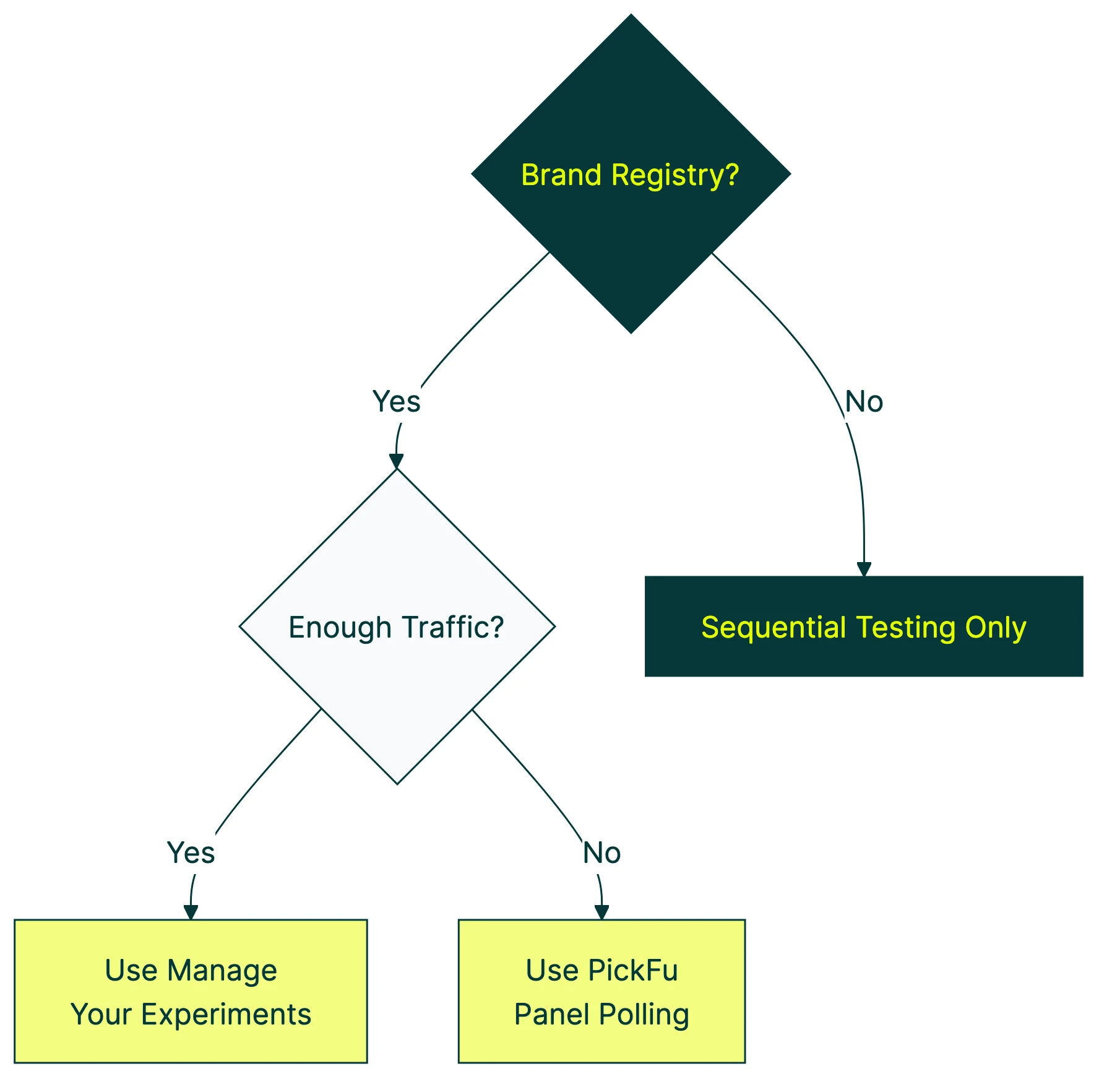
Our take: If your product doesn’t qualify for MYE, don’t wait. Use PickFu to test images and titles before you even list. Then when traffic picks up, switch to MYE for live data. Sitting around hoping for eligibility is the worst option.
Amazon split testing software: third-party alternatives
Amazon split testing software falls into three categories. And the differences between them matter more than most guides admit.
PickFu (panel polling)
PickFu doesn’t test on live Amazon traffic. It recruits real people and asks them to vote on which listing element they prefer. You can filter by demographics, Prime membership, and buying habits. Results come in minutes, not weeks.
Vendo Commerce used PickFu to test product images before launch and saw a 37% lift in daily sales compared to their original images.
The catch: people saying they prefer something and people actually buying it aren’t the same thing. That’s the difference between stated preference (what people tell you) and revealed preference (what people do with their wallets). PickFu is great for fast directional feedback. It’s not a replacement for live traffic testing.
Helium 10 Audience
Same technology as PickFu (Helium 10 licenses it). The advantage is it’s built into the Helium 10 suite, so if you’re already paying for their tools, it’s convenient.
One eye-opening finding from Helium 10’s own image testing data: a back support band image test showed a 64-36 overall preference. Seems clear, right? But when they broke results down by gender, women actually preferred the “losing” image. The aggregate winner was driven entirely by male respondents. If that product primarily sells to women? The “winning” image would be the wrong choice.
Lesson: always segment your test results by your actual target buyer. Averages can hide the truth.
Listing Dojo (Viral Launch)
Listing Dojo is free and lets you rotate up to 7 variations on a schedule. Sounds great on paper.
The problem: it’s not actually an A/B test. It swaps your listing elements on a schedule (Version A for 7 days, then Version B for 7 days). So your “test” is comparing different time periods, not two versions shown at the same time. A sale spike on Black Friday, a competitor going out of stock, a seasonal trend. All of these contaminate your results. Amazon’s own research shows sequential rotation carries 60% more measurement error than proper randomized testing.
Most sellers using Listing Dojo think they’re getting real split test data. They’re not. They’re getting before-and-after snapshots dressed up as science.
For a step-by-step walkthrough of Amazon’s Manage Your Experiments tool, My Amazon Guy covers the full process:
Quick comparison:
| Tool | Method | Speed | Cost | Brand Registry? | True A/B test? |
|---|---|---|---|---|---|
| Manage Your Experiments | Live traffic split | 4-10 weeks | Free | Yes | Yes |
| PickFu | Panel polling | Minutes | From $50/test | No | No (polls, not sales) |
| Helium 10 Audience | Panel polling | Minutes | Included in plans | No | No (polls, not sales) |
| Listing Dojo | Sequential rotation | 2-8 weeks | Free | No | No (time-based, not randomized) |
If you also sell through your own website, you can test that side with proper A/B testing software like Kirro. Sell on Amazon AND through your own store? Use Kirro as a pre-Amazon testing layer. Test your Shopify or landing page variations first, send the winning traffic to Amazon, and stack improvements.
How to split test Amazon listings step by step
A practical checklist for your first Amazon split test. No theory. Just steps.
Before you start:
- Pick your highest-traffic product (it’s more likely to qualify for MYE, and you’ll get results faster)
- Choose ONE element to change. Title or main image first. These have the biggest impact on click-through.
- Make the change meaningfully different. Don’t swap “Ultra Soft” for “Super Soft.” Test “Ultra Soft Organic Cotton Pillowcase” vs “Pillowcase That Stays Cool All Night.” The bigger the difference, the clearer the signal.
What to test first by element type:
Start with titles. Add or remove a key feature. Reorder which benefit comes first. One hardware brand added “front door” to their doorstop title and saw an 8% jump in conversion rate. Two words. That’s all it took.
For images, test lifestyle shots vs product-on-white. Or packaging-forward vs product-forward. AccuTec switched from showing their razor blade packaging to showing the blade itself in the foreground. Click-through improved noticeably.
A+ Content is where conventional wisdom gets interesting. Jungle Scout ran a live test on their own product and found that plain text descriptions beat A+ Content at 77% confidence. Visual richness doesn’t automatically win. Test it for your category instead of assuming.
And for bullet points, try leading with benefits (“Stays cool all night”) vs specs (“300-thread count Egyptian cotton”). Feature order matters more than people think.
Running the test:
Let it run until Amazon reports at least 90% confidence. That means there’s a 90% probability that one version is genuinely better. Below that, you’re still in “maybe” territory.
Amazon recommends 8 to 10 weeks. That feels like forever. We get it. But cutting a test short is one of the most common A/B testing mistakes. That’s how sellers pick “winners” that aren’t actually better. Need help figuring out how many visitors you need? Check our guide on sample size formulas.
When results are inconclusive:
This happens more often than anyone admits. If both versions perform roughly the same after 8+ weeks, that’s not a failure. It means your original was already decent, and you should test something bolder next time. Try a completely different image style, or rewrite the title from scratch instead of tweaking a word.
What the data actually shows
Numbers talk. These are documented split testing Amazon results:
Onkata Hardware manages 12+ brands on Amazon. They added “front door” to a doorstop’s product title. Conversion rate jumped 8%. A two-word change. They replicated this across brands and helped grow AccuTec’s sales from $15,000 to $122,000 in a single year.
Thrasio (the Amazon aggregator) refreshed Angry Orange’s listing creative and saw a 26% conversion rate increase and 46% sales volume growth within 20 days. They didn’t just change a word. They redid the images entirely.
Jungle Scout tested A+ Content vs plain text on their own Jungle Stix product and A+ Content lost. At 77% confidence, the simple text description outperformed the visual-rich A+ version. This contradicts nearly every “always use A+ Content” recommendation out there.
For context, Amazon listings already convert at 10 to 15% on average. Compare that to 1 to 3% for standalone e-commerce sites. People on Amazon are already in buying mode. But rates vary wildly by category. Electronics average 3 to 8%. Beauty runs 12 to 18%. Grocery hits 15 to 25%. A “good” conversion rate depends entirely on what you sell.
What all these cases have in common: the changes that worked were bold, not timid. Tweaking a single adjective rarely moves the needle. Rewriting a title around a different benefit, swapping the entire image concept, rethinking the listing structure. That’s where real gains live.
And if you want to improve the pages that send traffic to Amazon (your website, landing pages, or link-in-bio pages), you can set up a free split test with Kirro and test those in parallel.
Why Amazon’s own research says A/B tests can fail
This section is what separates our guide from every other article on this topic. Nobody else talks about this. We think you should know.
Amazon has an internal research division called Amazon Science. They’ve published over 34 peer-reviewed papers on A/B testing methodology. And their own researchers found two major problems with standard marketplace A/B tests.
Problem 1: Time effects mess up results. A 2022 paper published at KDD (a top data science conference) found the problem. Shopping patterns shift by time of day, day of week, and season. Standard A/B tests that don’t account for this? “Statistically inefficient or invalid, leading to wrong conclusions.”
In plain English: if more people buy your product on weekends, and your test shows Version A more on weekends, Version A might “win” for reasons that have nothing to do with your listing.
Problem 2: Products on Amazon aren’t independent. A 2023 paper in Statistical Science tackled this one. Co-authored by Pat Bajari (Amazon’s VP and Chief Economist) and Guido Imbens (a Nobel laureate in economics). Their finding: standard A/B tests assume each product listing exists in a vacuum. On Amazon, that’s obviously false.
Your listing change might push a competitor down in search results. A competitor’s promotion might steal your traffic mid-test. These ripple effects (researchers call them “spillovers”) can inflate or deflate your results. The MYE dashboard doesn’t account for them.
The gap nobody talks about: Amazon hasn’t said whether Manage Your Experiments uses the corrections their own scientists recommend. The research team knows the problems. The tool team may or may not have fixed them. Sellers just see a confidence percentage and assume it’s reliable.
We’re not saying your MYE results are wrong. We’re saying they might be less precise than the dashboard makes them look. Run tests for the full recommended duration. Don’t make decisions on thin margins. And trust patterns across multiple tests more than any single result.
Understanding Bayesian statistics helps here. Bayesian methods are math that updates its answer as new data comes in, instead of waiting for all the data at once. Amazon uses them partly for that reason. But even Bayesian math can’t fully fix the interference-between-products problem.
FAQ
Does Amazon use A/B testing?
Absolutely. Amazon is one of the most aggressive testers in the world. Their science team has published 34+ research papers on A/B testing methodology alone. For third-party sellers, they offer Manage Your Experiments. It’s free for Brand Registry members and lets you test titles, images, bullet points, descriptions, and A+ Content on live traffic.
What is A/B testing on Amazon?
It’s comparing two versions of a listing element to see which gets more sales. Amazon splits your real shoppers into two groups. Group A sees your current title (or image, or A+ Content). Group B sees your new version. After several weeks, Amazon tells you which performed better. You also get a confidence percentage showing how sure it is.
Can you A/B test on Amazon without Brand Registry?
Not with Amazon’s built-in tool. But you have options. PickFu and Helium 10 Audience let you poll real shoppers for quick feedback before your listing goes live. Listing Dojo offers free sequential testing (though it’s not as reliable as a true A/B test). For testing outside Amazon (your product website, landing pages that drive traffic to listings), Kirro works with any site. No marketplace restrictions. No Brand Registry needed.
How long should an Amazon A/B test run?
Amazon recommends 8 to 10 weeks. The minimum is 4 weeks. Ending early, even if one version looks like it’s winning, is a common testing mistake that leads to false winners. The “run to significance” option lets Amazon decide when enough data has come in. It aims for 90% confidence (a 90% chance the winning version is genuinely better). Use that option if you’re not sure how long to wait.
Can you test pricing on Amazon?
No. Amazon requires every shopper to see the same price at the same time. You can’t split traffic between two price points. Some sellers change their price for a week, then change it back to compare. But Amazon’s own research shows this approach carries 60% more measurement error than randomized testing. You’re comparing two different weeks, not two different prices.
What are the best tools for testing across Amazon and your own website?
For Amazon listings, use Manage Your Experiments (if eligible) or PickFu for pre-launch polling. For your own website or landing pages, the best A/B testing tools include Kirro for small teams and enterprise options like VWO for larger operations. Sell through both channels? Test your website with Kirro and your listings with MYE. That gives you the fullest picture. See our CRO tools roundup and split testing software guide for more options.

Randy Wattilete
CRO expert and founder with nearly a decade running conversion experiments for companies from early-stage startups to global brands. Built programs for Nestlé, felyx, and Storytel. Founder of Kirro (A/B testing).
View all author posts