A/B testing and split testing are usually the same thing. Most of the time, people use both terms to mean “show two versions, see which wins.” The industry can’t even agree on the difference, so don’t feel bad if you’re confused.
But there IS a practical difference that matters if you’re setting up tests on your website. A/B testing typically means changing something on the same page (a headline, a button, an image). Split testing, in the web world, usually means sending visitors to a completely different page at a different web address.
That one distinction affects your setup, your tools, your SEO, and how long your test takes. Here’s when it matters and when it doesn’t.
The short answer: it depends who you ask
The A/B testing vs split testing difference comes down to two camps.
Camp 1: “They’re the same thing.” Ronny Kohavi, the researcher behind Microsoft’s experimentation program, uses A/B test, split test, bucket test, and controlled experiment interchangeably. He’s published more papers on online testing than almost anyone alive. If he doesn’t see a difference, that tells you something.
Camp 2: “They’re technically different tools.” CRO platforms like VWO and Convert define them separately. A/B testing means same page, different elements. Split testing (sometimes called split URL testing) means entirely different pages. Choosing the wrong one can waste weeks.
Our position? The terms can mean the same thing. But in practice, when someone in conversion rate optimization says “split test,” they usually mean a redirect test with different URLs. And that difference has real consequences for your setup.
Here’s how they compare at a glance:
| A/B testing | Split testing (redirect) | |
|---|---|---|
| What changes | Elements on the same page | The entire page (different URL) |
| Setup | Visual editor, no new pages needed | Build a separate page, set up redirects |
| Best for | Headlines, buttons, images, copy | Full redesigns, new layouts, different flows |
| SEO risk | None (same URL) | Some (duplicate content, redirect issues) |
| Traffic needed | Moderate | Higher (bigger changes need more data) |
| % of all tests run | 67.6% | 16.9% |
Our take: Start with A/B testing. Always. Split testing is a power tool. Most people never need it, and that’s fine.
What is split testing (in 30 seconds)
The split testing definition is simple: you take your visitors, split them into groups, and show each group something different. Then you compare results.
That’s it. That’s what a split test is.
The term comes from direct mail. In 1923, a copywriter named Claude Hopkins described splitting mailing lists to test which letter got more responses. He’d send 25 different versions to 1,000 people each, then mail the winner to millions.
Same idea, different century. Today you’re splitting web traffic instead of mailing lists.
In modern web testing, “split testing” usually means comparing entirely different pages. For a deeper look at the different types and where the term comes from, see our guide on what split testing actually means.
How each method actually works
Here’s what happens behind the scenes with each approach.
A/B testing (same URL): A small piece of code runs in the visitor’s browser. It changes specific elements on the page before the visitor sees them. The URL stays the same. Half your visitors see your current page (Version A). The other half see the version with changes (Version B). This is client-side testing, which means the changes happen in the browser, not on your server.
Think of it like rearranging furniture in a room. Same room, different layout. The address doesn’t change.
Split testing (different URLs): Your server sends some visitors to one page and others to a completely different page at a different web address. Maybe /pricing vs /pricing-new. Each page can look totally different. Different layout, different copy, different everything.
Think of it like comparing two different apartments. Same building, different units. You pick the one that works better.
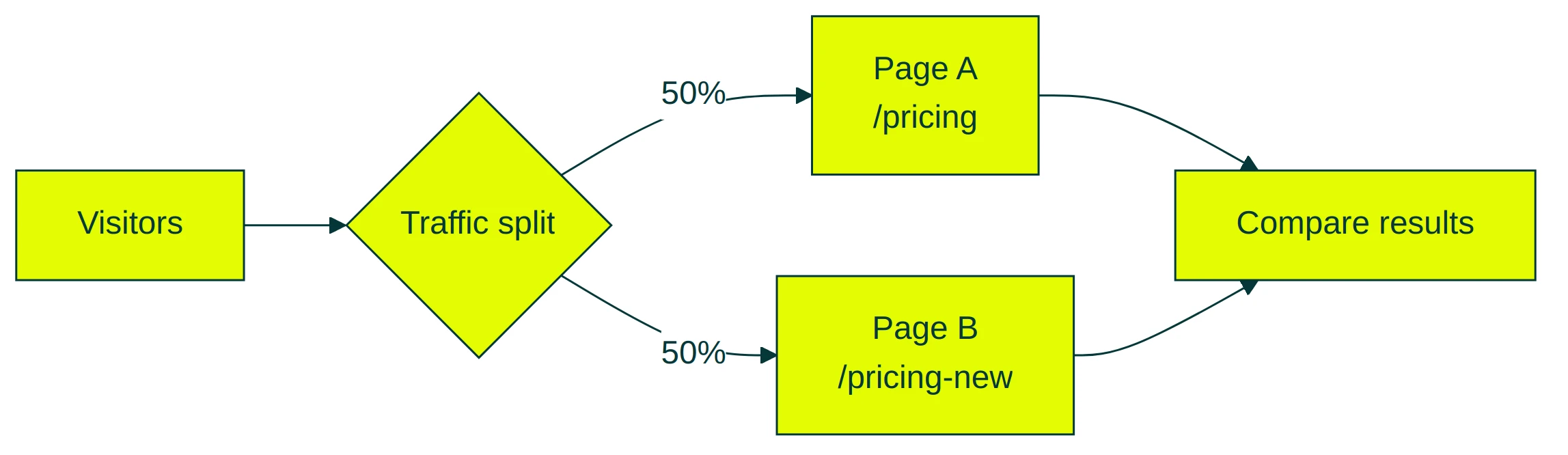
The practical difference? A/B testing is faster to set up. You don’t need to build a new page. Just open a visual editor, make your changes, and go. Tools like Kirro handle the code automatically.
Split testing takes more work. You need a second page, proper redirects, and some extra care to avoid SEO issues. But for a major redesign, there’s no substitute.
Why the terminology gets confusing (platform by platform)
Here’s where the split testing in digital marketing conversation gets messy. The same phrase means different things depending on which tool you’re in.
Meta (Facebook) Ads calls their A/B testing feature “Split Test” inside Ads Manager. But their help docs call it “A/B Testing.” Same feature, two names. It tests audiences, ad creatives, and placements. Nothing to do with web pages.
Google Ads doesn’t use either term. They call it “Experiments.” Always. You won’t find the words “split testing” or “A/B testing” anywhere in Google’s official docs.
Mailchimp uses both interchangeably. Their split test compares subject lines, sender names, or email content. Up to three versions.
HubSpot says “A/B test.” That’s their term. Period.
Web CRO tools (VWO, Optimizely, Convert) are the only ones that make a consistent distinction. To them, A/B testing is same-page changes. Split testing is redirect tests with different URLs.
See the problem? A PPC manager saying “we split tested the ads” means something completely different from a CRO consultant saying “we ran a split test.” They’re both using the same words for different things. Neither is wrong. They’re just speaking different dialects.
Some perspective from BuiltWith’s data: only 0.2% of all websites use any A/B testing tool. Among the top 10,000 sites, that jumps to 32%. Testing is still a big-site thing. Most small businesses haven’t started yet.
Which means most people searching “split testing vs A/B testing” are still deciding whether to test at all. If that’s you? Don’t get stuck on terminology. Just start a test and see what happens.
When to use A/B testing vs split testing
This is the decision that actually matters. Not what you call it, but which approach to use.
Use A/B testing when you’re:
- Testing a new headline, button text, or image
- Trying different copy on a landing page
- Changing colors, layout tweaks, or form fields
- Working with a page that’s mostly fine but could be better
Use split testing (redirect tests) when you’re:
- Comparing a completely redesigned page against the original
- Testing different checkout flows or signup processes
- Trying a fundamentally different page structure
- Validating a rebuild before replacing the original
The data backs this up. According to Convert’s analysis of their customer experiments, A/B tests make up 67.6% of all tests run. Split URL tests? Just 16.9%. Most teams run A/B tests because most changes are small tweaks, not full redesigns.
Set your expectations: only 20% of experiments produce a confident result. That’s from 28,304 tests. The other 80% were inconclusive, stopped too early, or didn’t have enough traffic.
Peep Laja (CXL founder) put it well: “People throw ‘just A/B test it’ around like it’s as simple as writing a headline.” Most businesses don’t have the traffic to run a valid test every month. Let alone choose between types.
Our take: If you’re debating A/B testing vs split testing, you probably need A/B testing. Split tests are for teams that already know their way around testing tools and have a specific redesign to validate.
When you’re ready to try your first test, pick one page and change one thing. A headline is a great starting point. One travel company changed three words on their CTA button (“Sign up for free” to “Trial for free”) and saw a 104% increase in premium signups. That’s an A/B test. No new page required.
You can set up a test like that in a few minutes with any decent tool.
The SEO factor most guides ignore
Nobody talks about this part. But if you care about search traffic, it matters.
When you run an A/B test (same URL), Google sees one page. Your server sends the same HTML to everyone, including Google’s crawler. The visual changes happen in the browser after the page loads, so Google never notices them. Your rankings stay safe.
When you run a split test (different URLs), Google sees two pages. Both are live. Both might have similar content. And Google gets confused about which one to show in search results.
That’s a problem called duplicate content. Here’s how to avoid it:
- Use temporary redirects (302), not permanent ones (301). A 302 tells Google “this is just for now.” A 301 tells Google “this page has permanently moved,” which can mess up your rankings.
- Tell Google which page is the real one by adding a canonical tag on the test page that points back to the original.
- Keep tests short. Four to six weeks max. Google tolerates short-term testing, but leaving two similar pages live for months sends mixed signals.
- On large sites, watch how many pages Google has to process. Every test page is another URL for Google to crawl, and there’s a limit.
Craig Sullivan, a veteran CRO consultant, warns about another hidden problem with split tests: redirect bugs. “A single undetected bug can tank your results, making a winning version look like a loser.” Redirect lag, analytics counting visits twice, bot traffic hitting one URL harder than the other. These are real issues that don’t exist with same-page A/B tests.
Client-side tools like Kirro are SEO-safe by default. The server sends identical HTML to everyone, including Google’s crawlers. No redirect headaches. No duplicate content worries.
For a deeper look at testing and search engine rankings, check out our guide on SEO A/B testing.
Real numbers: how often each test type actually wins
Every comparison guide skips this: real data about how often tests actually work.
Optimizely analyzed 127,000 experiments run on their platform between 2018 and 2023. The result? Only 12% produced a clear improvement. The other 88% either showed no difference or made things worse.
That might sound discouraging. It shouldn’t be. Other large studies found similar numbers:
- Kohavi & Thomke (Harvard Business Review): At Google and Bing, only 10-20% of experiments generate positive results
- Convert (28,304 experiments): Only 20% reached enough confidence to declare a winner
- Econsultancy (450+ companies): Two-thirds of companies see clear winners in less than 30% of their tests
The pattern is consistent. Most tests don’t produce dramatic winners.
For the A/B testing vs split testing debate, this is the real answer: the type of test matters less than the quality of your idea. A well-chosen A/B test on a high-impact element beats a poorly planned split test every time.
A Harvard study tracking 35,262 startups backs this up. Companies that adopted A/B testing saw 30-100% improvement in page views. But they also failed faster when ideas didn’t work. Testing doesn’t guarantee wins. It guarantees faster learning.
The practical takeaway? Don’t stress about which testing method is “better.” Focus on designing a good test. Start with A/B testing because it’s faster and cheaper. Graduate to split tests when you have a specific redesign worth validating.
How to get started (with either method)
If you’ve read this far, you have a choice to make. Here’s the simplest path for each approach.
Starting an A/B test:
- Pick a page that gets decent traffic (your homepage or top landing page)
- Change one thing (headline, button text, hero image)
- Set a goal (clicks, signups, purchases)
- Let it run until the numbers are meaningful
Most A/B testing tools make this pretty painless. Install a small script on your site, open the visual editor, make your changes, and hit start. No code. No developer. No new pages.
Kirro’s visual editor lets you do this in about three minutes. Change a headline, pick a conversion goal, launch. It uses math that works with less traffic (Bayesian statistics), so you get clear answers faster.
Starting a split test:
- Build your new page (this is the hard part)
- Set up a redirect that sends some traffic to the new URL
- Add proper SEO tags (302 redirect, canonical tag on the test page)
- Set a goal and let it run
Split tests need more setup and more traffic. If you’re comparing entirely different pages, you’ll need more visitors to get a reliable answer.
Most split testing tools handle both methods. But if you’re just getting started, A/B testing is the move. Simpler, faster, and you’ll learn whether testing works for your business before investing in full page rebuilds.
If you’re looking for A/B testing software that makes the simple stuff genuinely simple, give Kirro a try. Three minutes to set up. No PhD required.
FAQ
Is split testing the same as A/B testing?
Usually, yes. Most people use the terms interchangeably. Ronny Kohavi’s research treats them as synonyms. But in web CRO, “split testing” often means redirect tests where visitors see entirely different pages at different URLs. A/B testing usually means changing elements on the same page. The practical distinction matters for setup, tools, and SEO.
What does split testing mean in digital marketing?
It depends on the platform. In email marketing (Mailchimp, HubSpot), split testing means comparing subject lines or email designs. In paid ads (Meta, Google), it means testing different ad creatives or audiences. In web CRO, it means comparing different page versions. The term originally came from direct mail in the 1920s, where marketers literally split their mailing lists to test different letters. For a full breakdown, see our split testing meaning guide.
Does Netflix use A/B testing?
Yes. Netflix runs hundreds of A/B tests at the same time. Thumbnails, UI layouts, recommendation algorithms. Companies at that scale (Amazon, Google, Booking.com) run thousands of concurrent tests with dedicated teams. For smaller businesses, the approach is the same. Just at a different scale.
What are the 4 types of tests?
A/B tests (comparing two versions of a page element), split/redirect tests (comparing entirely different pages), multivariate tests (testing multiple elements at once), and multi-page or funnel tests (testing changes across a sequence of pages, like a checkout flow). Most businesses should start with A/B testing. Move to the others when you have enough traffic and testing experience.
Which is better, A/B testing or split testing?
Neither is universally better. A/B testing is faster, cheaper, and works for most situations. You can test a headline change in minutes. Split testing is better when you’re comparing fundamentally different approaches, like a complete redesign or a new landing page layout. 67.6% of all experiments are standard A/B tests. Split URL tests? Just 16.9%. Start simple.

Randy Wattilete
CRO expert and founder with nearly a decade running conversion experiments for companies from early-stage startups to global brands. Built programs for Nestlé, felyx, and Storytel. Founder of Kirro (A/B testing).
View all author posts